
Wokwi: run Arduino code in your browser
Wokwi is an online electronics simulator. You write code for a virtual board in the browser, press start, and watch virtual parts and the serial monitor react, with no hardware and no install. Wokwi lets you run the code against a simulated board and inspect serial output, rather than only read generated code. We tested one small case on 27 October 2026: an Arduino Uno blink sketch with serial output, opened without signing in. It ran, and the serial monitor printed the lines we expected. No payment or card was requested in our test. Wokwi states it is free for personal use, and its pricing page lists a €0 Community plan with unlimited simulations and unlimited public projects.
Quick facts
- Wokwi's docs describe it as "an online Electronics simulator" for Arduino, ESP32, STM32 and other boards, parts and sensors. The home page lists Arduino (Uno, Mega, Nano), ESP32, STM32 and Raspberry Pi Pico. We tested only the Arduino Uno.
- The docs say "Wokwi is free for personal use" and point commercial users to paid plans. The pricing page lists a €0 Community plan with unlimited simulations and unlimited public projects, plus paid plans with extras such as unlisted projects, fast build minutes and custom library upload. Plan names and descriptions differ between these two pages, so check the pricing page before relying on either.
- Per the pricing page, free-plan projects are public and visible to everyone, and unlisted projects need a paid plan. We did not save or share any project, so we did not test this.
- In our test we were not asked for a card or any payment, and we did not sign in. We did not verify any limits, so we do not state any.
- The docs list WiFi simulation, a virtual logic analyzer, GDB debugging and SD card simulation among its features. We did not test any of these, or ESP32, STM32 or MicroPython projects.
What makes it useful
Rather than only read code, you can run it. Wokwi runs the sketch on a simulated board and shows the result, so a student can check logic, serial output and wiring ideas before touching hardware, and share a project by link. It does not replace a real board for timing, power or sensor noise, which a simulator may not reproduce.
Our test
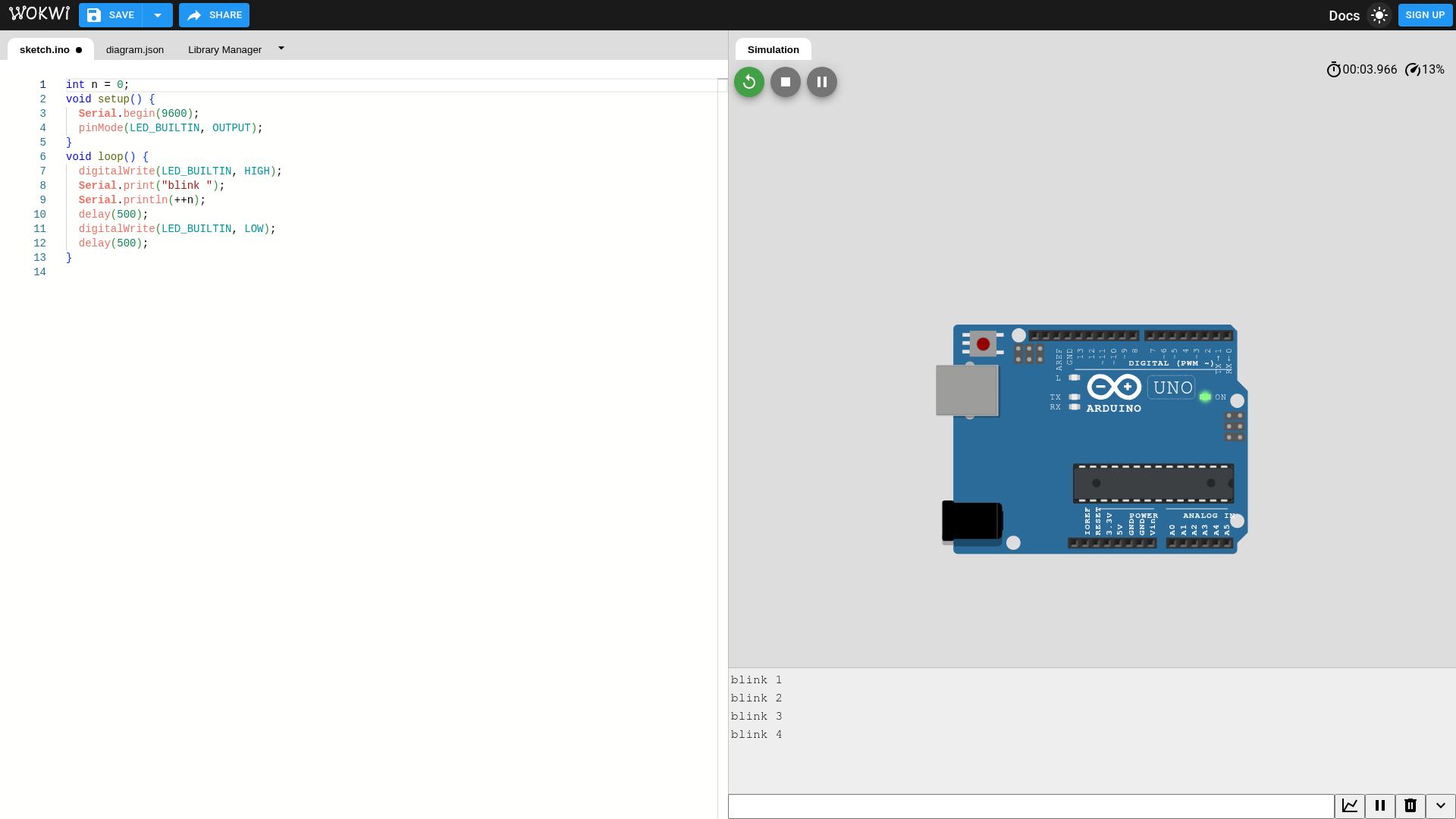
On 27 October 2026 we opened wokwi.com/projects/new/arduino-uno in a desktop browser. We did not sign in or sign up. We replaced the empty starter sketch with our own short one: it sets up serial at 9600 baud, switches the built-in LED on pin 13 on and off every half second, and prints "blink 1", "blink 2" and so on. We pressed Start.
- Result: the sketch compiled and ran. The serial monitor printed "blink 1" to "blink 4" in order, and the on-board LED showed lit at the moment of the screenshot. We saw one start-to-run cycle only.
- Speed: the simulation ran slower than real time in our test. The speed indicator showed 3% to 13%, and four blink lines took well over four seconds to appear. We did not find out why, and we do not know how it behaves on other devices.
- Not tested: saving, sharing, signing in, the Library Manager, parts and wiring (we used the Uno alone), ESP32, STM32, Pico, MicroPython, WiFi and the paid plans. We saved and published nothing.
How to try it
- Go to wokwi.com and choose a board, for example Arduino (Uno, Mega, Nano).
- Edit sketch.ino in the left pane. The right pane shows the virtual board.
- Press the green Start button and read the serial monitor under the board.
- Use the Add a new part button to add parts such as LEDs and buttons, then edit the connections in diagram.json. We did not test this step.
- Before you save or share anything, read the pricing page: free projects are public.
Availability: we found no country statement on the Wokwi pages we read, and we did not check this from India. Our test does not show how the tool behaves from your location.
Sources checked 27 October 2026: