
WinSCP: free FTP and SFTP client for Windows
WinSCP calls itself a "popular SFTP client and FTP client for Microsoft Windows" and its licence page says it is free software under the GPL. The classic download is free; the Microsoft Store version costs $19.99. Here is what its pages say.
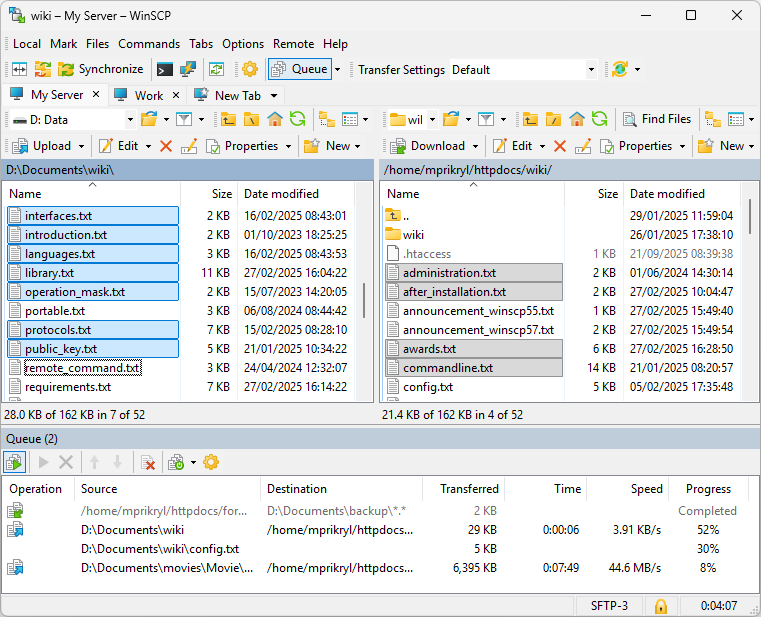
Official app preview
Quick facts
- What it does: copies files between your Windows PC and a remote server or storage (website hosting, NAS, cloud) over FTP, FTPS, SFTP, SCP, WebDAV and Amazon S3.
- Price: free from winscp.net under the GNU GPL. The optional Microsoft Store version costs $19.99 (about ₹1,900), which supports development.
- Platforms: Windows only.
- Best for: anyone who runs a website, a home server or a NAS and needs to upload, download or sync files with it.
What it is
WinSCP is a file manager for moving files between your computer and remote servers, with a graphical interface and an integrated text editor. Its site counts over 274 million downloads. It is written by Martin Prikryl and has been around since 2000.
Is it free?
Yes, from its own site. The licence page says: "WinSCP is free software: you can use it, redistribute it and/or modify it under the terms of the GNU General Public License (GPL)". One exception, clearly documented on the site: WinSCP from the Microsoft Store costs $19.99 (about ₹1,900) and includes automatic updates and easy reinstalls; the docs page "Why isn't it free?" explains the store fee supports the project. The same program is free as a classic download from winscp.net.
What the pages list
- FTP, FTPS, SFTP, SCP, WebDAV and S3 support.
- Graphical interface (Explorer or Commander style), integrated text editor, all common file operations.
- Scripting and task automation, plus a portable mode.
- Translated into many languages.
- Current version 6.7, with features like synchronisation of two local directories, ssh-agent support and an experimental 64-bit build, per its download page.
Good to know, per WinSCP
- Its privacy policy says installing may collect anonymous installation counts by region and language, and that "No private information is collected".
- The same policy says the installer "might offer you to install a third party application" alongside WinSCP. Watch the install screens and decline anything you do not want.
- Using the app may collect anonymous usage statistics; you can opt out, and you can turn off automatic update checks, per the policy.
Our advice
- Get it from winscp.net as a classic download to avoid the store fee. This is our advice, not the developer's.
- Read each installer screen, since third-party offers may appear (per WinSCP's own privacy policy).
- Ask your hosting provider for the SFTP details (host, username, port) before you start.
Privacy and data
- WinSCP publishes a readable privacy policy: anonymous install and usage statistics, with opt-outs; donation details processed when you donate; ads on the site (not the app) use cookies. No private information is collected during install, per the policy.
India
- No region limit appears on the pages we read. We did not test it from India. The store price is in US dollars; the rupee figure is our approximate conversion at about 95 INR per US dollar, checked 21 October 2026.
Frequently asked questions
Is WinSCP free?
Yes from winscp.net, under the GPL. The optional Microsoft Store version costs $19.99 (about ₹1,900) to support development.
What does it connect to?
Servers and storage over FTP, FTPS, SFTP, SCP, WebDAV and Amazon S3, per its home page.
Does it work on Mac or Linux?
No. Its site presents it as a Windows application.
Sources: winscp.net, Download, License, Microsoft Store, Privacy. Checked 21 October 2026.
Official screenshots, version 6.7 download page, privacy policy and Store documentation rechecked 22 October 2026. Remaining details keep their original source-check date. Original publication date is unchanged.