WinDirStat: a free tool to see what is filling your Windows drive
WinDirStat scans your drives and draws a map of what is using the space. The project says it is free and open source under the GPL.
Official publisher artwork hosted by its publisher. Official source. Independent guide, not affiliated or sponsored. Artwork and trademarks belong to their owners.
What it is
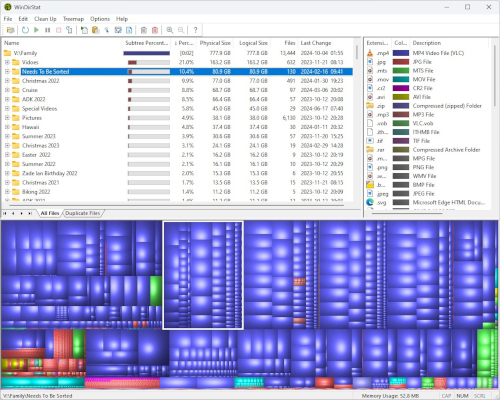
WinDirStat shows what is filling your Windows drives. The project describes it as "a free, open-source disk usage analyzer and cleanup assistant for Microsoft Windows". You pick a drive or folder, it scans it, and it draws a treemap: each rectangle is a file, the area shows the size, the colour shows the file type, and the nesting shows the folders. It is not an AI tool.
Is it free?
Yes. The WinDirStat website says it is "free, open-source", and its README says the application is distributed under the GPL v3 or later. The GitHub repository lists the GNU General Public License v3.0. We saw no price, ads or account on the download page.
What it does (per the project)
- Scan one or more drives or folders, network shares or connected MTP devices.
- Views of the largest files, file types, treemaps, sunbursts and flame graphs.
- Search by name, size, type or owner, and a duplicate-file finder that compares content hashes. The project says the optional quick (sparse) hashing only labels matches as "Probable duplicates".
- Save scans as CSV or JSON, and watch file-system changes.
- Open, move or delete files, and run Windows cleanup tools.
- Try to recover deleted files from local NTFS, exFAT and FAT drives with administrator access. The README says recovery depends on surviving metadata and file data, so it is not a guarantee.
- Dark mode, a portable settings mode and translations.
How to get it
- The README recommends a package manager or the Microsoft Store. Commands it lists:
winget install -e --id WinDirStat.WinDirStat,choco install windirstat, orscoop install extras/windirstat(needs the extras bucket). - Or open the Downloads page for installers: x64, x86 and ARM64 .msi files, and portable .zip and .7z archives. If unsure, the README says to pick the 64-bit MSI installer.
- The latest release we saw on GitHub was v2.9.3, published 11 October 2026.
- The README says version 2.x was developed for and tested on Windows 7, 8, 8.1, 10 and 11, and several Windows Server versions. Other systems are not supported. It is Windows only. We saw no Mac, Linux or Android version.
Basic use, from the README
- Choose drives, or Individual Folders, in Select Drives.
- Leave "Scan for duplicate files" off unless you need it, because hashing reads more files. For faster full-drive NTFS scans, use File, then Run Elevated.
- Open Largest Files, select an item to find it in the treemap, and press Ctrl+F to search.
- Review items in Explorer before cleanup, then refresh the results.
What to watch out for
- Imitation sites. The README warns that unofficial sites copy the name, branding or downloads and may offer modified files or malware. It says to install only through the Microsoft Store link, listed package managers, official GitHub releases, or links from windirstat.net.
- Deleting is on you. The program can delete files. Check what a file is before you remove it, especially in Windows or Program Files folders. That is our advice, not a project statement. The README says to review items in Explorer before cleanup.
- Elevated mode needs administrator rights, and so does file recovery.
Privacy and data
- We found no privacy statement and no mention of data collection, tracking or update checks on the pages and README we read, so we cannot say what the app sends, if anything.
- The project lists scans of local drives and folders. Exports to CSV or JSON are files you save yourself.
India
- We saw no region limit and no price. We did not test downloads from India.
Frequently asked questions
Is WinDirStat free?
Yes. It is open source under the GPL, per the project.
Does it work on Mac?
No. It is for Windows only, per its pages.
Can it delete files for me?
It can delete files and run Windows cleanup tools when you choose to. Review first.
Is the logo free to use?
The README says the logo and its derivatives are under the Creative Commons CC BY 3.0 licence.
Sources: Home, Downloads, Background, GitHub README. Checked 18 October 2026.
Independent guide, not affiliated.