WebAIM Contrast Checker: test the text, not your guess
Pale text can look elegant on your screen and still miss a contrast requirement. WebAIM's Contrast Checker compares a foreground and background colour and shows a ratio with text-specific pass/fail results. We tested two greys on white: the first failed normal-text AA, while a darker replacement passed. A passing pair is useful evidence, not a certificate that an entire design is accessible.
Quick facts
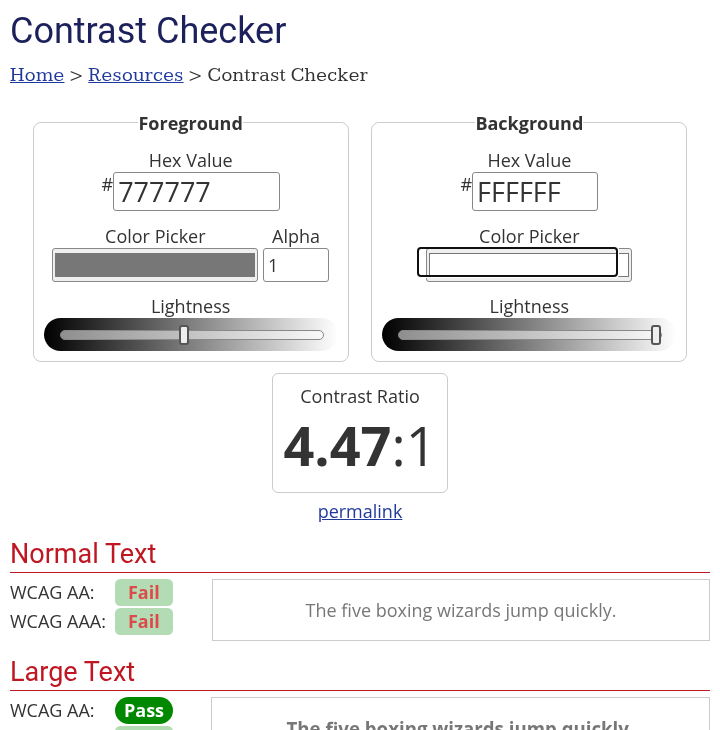
- Tested: opaque foreground #777777, then #595959, both against #FFFFFF with foreground alpha 1.
- First result: #777777 on white displayed 4.47:1, with normal-text AA Fail and large-text AA Pass.
- Darker result: #595959 on white displayed 7:1, with normal-text AA and AAA Pass in the tool.
- Cost/account: no sign-in, card or payment requested in these two public checks. Access limits and paid-service pricing were not established.
- Use: compare actual text/background pairs in websites, slides, documents or graphics. Apply the right threshold to the actual text size.
- Scope: no whole-page audit, mobile test, colour-vision simulation, alpha blending, gradients or photographic backgrounds tested. No India-specific availability guarantee established.
Why use it beside a chatbot?
A chatbot can suggest a palette. This checker tests the exact colour values you intend to use and distinguishes normal text, large text and non-text UI checks. That turns a vague looks-readable judgment into a repeatable check. It does not choose a brand palette for you or prove that every person can comfortably read the result.
Our two-pair check
On 29 October 2026 we entered 777777 as Foreground and FFFFFF as Background, leaving alpha at 1. The live page displayed 4.47:1. Normal Text showed WCAG AA Fail and AAA Fail; Large Text showed AA Pass and AAA Fail.
We then changed the foreground to 595959 without changing the white background. The tool displayed 7:1 and Normal Text showed AA Pass and AAA Pass. Large Text also showed AA and AAA Pass. We inspected the actual UI and recorded its results rather than inferring success from the colours alone.
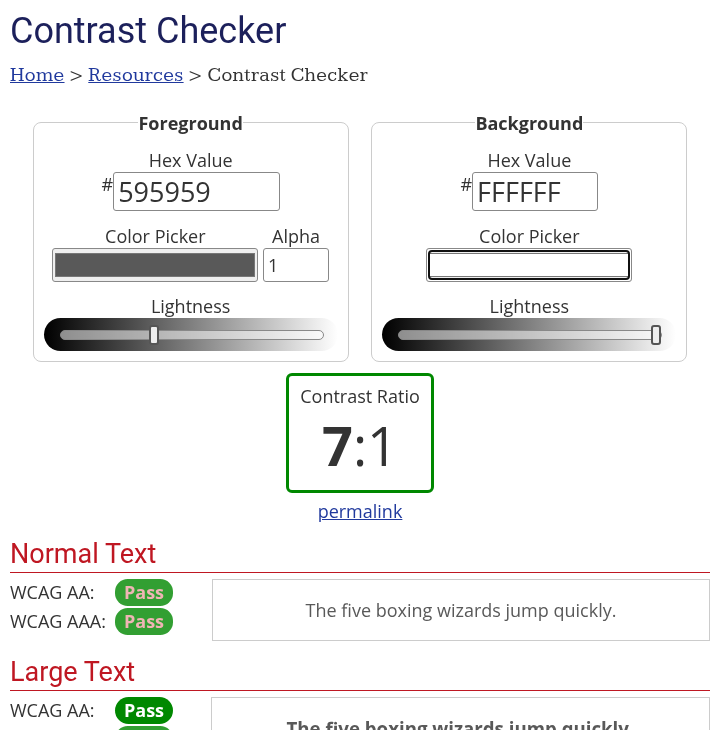
These are the tool's displayed ratios. Do not round a borderline value upward to make it pass. W3C's guidance says the thresholds must be met without rounding: 4.499:1 does not meet 4.5:1.
Know which threshold you are checking
- Normal text, Level AA: at least 4.5:1 under WCAG 2.2 success criterion 1.4.3, subject to its stated exceptions.
- Large text, Level AA: at least 3:1. W3C describes large-scale text as at least 18 point, or 14 point bold, or equivalent sizes. WebAIM gives typical CSS equivalents of 24px and 18.66px bold.
- Enhanced text contrast, Level AAA: at least 7:1 for normal text or 4.5:1 for large text.
A design does not become large text because it feels like a heading. Check its actual displayed size and weight. A large heading and a small caption using the same colours can have different pass/fail outcomes.
The checker also has a 3:1 graphical-object/UI result. WCAG's non-text criterion has its own scope and exceptions; that result does not mean all borders, charts or controls are automatically accessible. We did not test a real interface.
A practical colour check
- Get the actual foreground and background values from your design. Start with solid, opaque colours rather than guessing from a screenshot.
- Open WebAIM Contrast Checker. Enter the foreground and background hex values. Our tests kept alpha at 1.
- Read the Normal Text or Large Text result that matches your content. Do not treat a large-text pass as a small-text pass.
- If needed, choose a darker foreground or lighter background, then test the new pair. We changed the hex value directly; we did not test the lightness sliders or eyedropper.
- Check the pair in the final layout and its different states. Keep a record of the values and result, and test other text/background combinations separately.
What a pair check leaves out
A single pair does not inspect your whole website or poster. Actual text may sit over a gradient, photograph or transparent layer, and the background can change across the letters. This test did not cover those cases. WebAIM's evaluation guide describes why backgrounds that are not solid colours need extra manual attention.
Readability also depends on size, weight, spacing and context. Contrast is one requirement, not a replacement for keyboard, screen-reader, structure, language or usability checks. This is design guidance, not legal compliance advice or a full WCAG conformance assessment.
We submitted only public colour values, not a document, image or URL to scan. We did not audit the site's privacy or data handling, use its API/bookmarklet, or test WAVE. No account or external integration was connected.