
Selling or buying a vehicle: transfer of ownership on Vahan, Form 29 and Form 30
When you sell or buy a vehicle, the buyer's name has to be entered as the registered owner. The Ministry of Road Transport and Highways' Parivahan Sewa site explains the forms, the time limits and the online route on Vahan. Here are those points in plain steps, and what we could not confirm for Kerala.
The rules for a normal sale
From the Parivahan Sewa page on transfer of ownership:
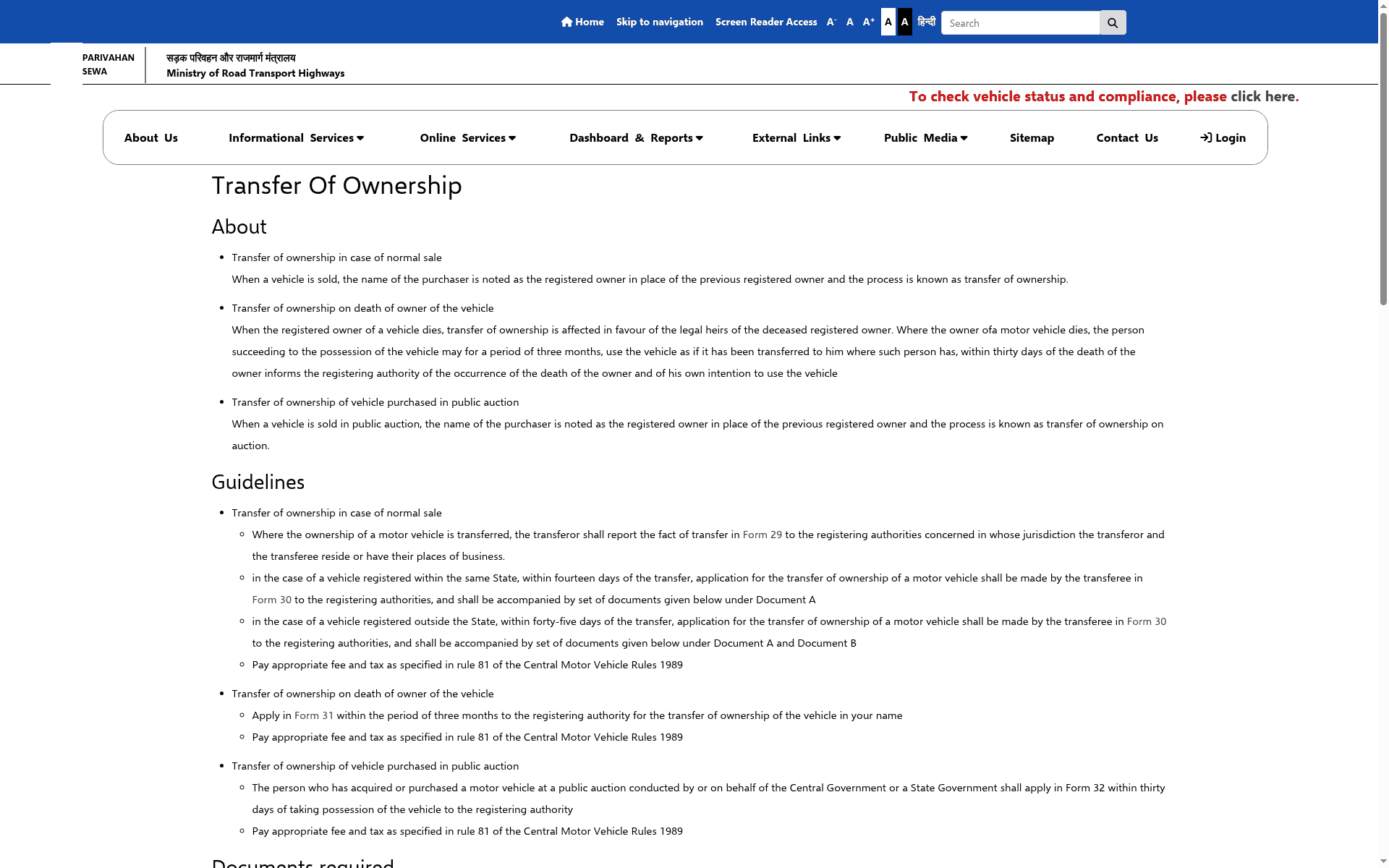
- The seller reports the transfer in Form 29 to the registering authorities where the seller and the buyer live or have their places of business.
- If the vehicle is registered in the same state, the buyer applies in Form 30 within fourteen days of the transfer.
- If it is registered outside the state, the buyer applies in Form 30 within forty-five days of the transfer, with an extra declaration about the no objection certificate (Document B on the page).
- The fee and tax are as specified in rule 81 of the Central Motor Vehicles Rules, 1989. The page does not list amounts.
Documents
The page lists, as Document A: the certificate of registration, certificate of insurance, pollution under control certificate, PAN card of the seller and the buyer (or Form 60), pencil print of the chassis and engine number, the buyer's proof of date of birth and address, the buyer's undertaking, a passport size photograph and a tax clearance certificate. Items marked with an asterisk on the page may be conditional, so read the page for your case.
The online route
The Parivahan Sewa FAQ gives these steps on the Vahan portal:
- Open vahan.parivahan.gov.in and enter the vehicle registration number, then click Proceed.
- Choose "Basic Services" and enter the last 5 digits of the chassis number, then "Validate Regn_no/Chasi_no".
- Generate an OTP, enter it and submit. The step by step guide says the OTP goes to the mobile number provided.
- Select "Transfer of Ownership", enter the service details and update the insurance details.
- Review the fee panel and pay online. The step guide shows a payment gateway screen, and a fee receipt is generated after a successful payment.
The FAQ also says you can edit or delete a submitted application from the same page using the last 5 digits of the chassis number, and dispose of an application you do not want to continue from "Status", then "Dispose Application".
Other cases on the same page
- Owner has died: the successor applies in Form 31 within three months. The page says the person who takes possession may use the vehicle for three months if they inform the registering authority within thirty days of the death.
- Bought at a public auction run by the Central or a State Government: apply in Form 32 within thirty days of taking possession.
What we did not check
We did not log in to Vahan, apply or pay anything. We did not confirm the exact fee, which documents Kerala's RTOs ask for in practice, or whether a visit to the RTO is needed after the online step. The same pages say the process can depend on the state, so check with your RTO.
Frequently asked questions
Who files Form 29 and Form 30?
The seller files Form 29 and the buyer files Form 30, per the Parivahan Sewa page.
How long do I have?
Fourteen days for a same-state vehicle and forty-five days for a vehicle from another state, counted from the transfer, says the page.
Can I fix a mistake after submitting?
The FAQ describes Edit and Delete options on a submitted application, using the last 5 digits of the chassis number.
Sources: Parivahan Sewa: Transfer Of Ownership · Parivahan Sewa: Vahan vehicle registration questions · Step by step guide for miscellaneous services (PDF) · Vahan citizen services. Checked 2 November 2026. Explainer by AiCoN - not a government publication. Details can change; check the portal before you apply.