
TMPlayer: free open-source player for your Telegram videos on TV, phone and PC
TMPlayer plays the videos in your own Telegram chats while they download. The project says it is free, open source (GPL-3.0) and has no server or bot.
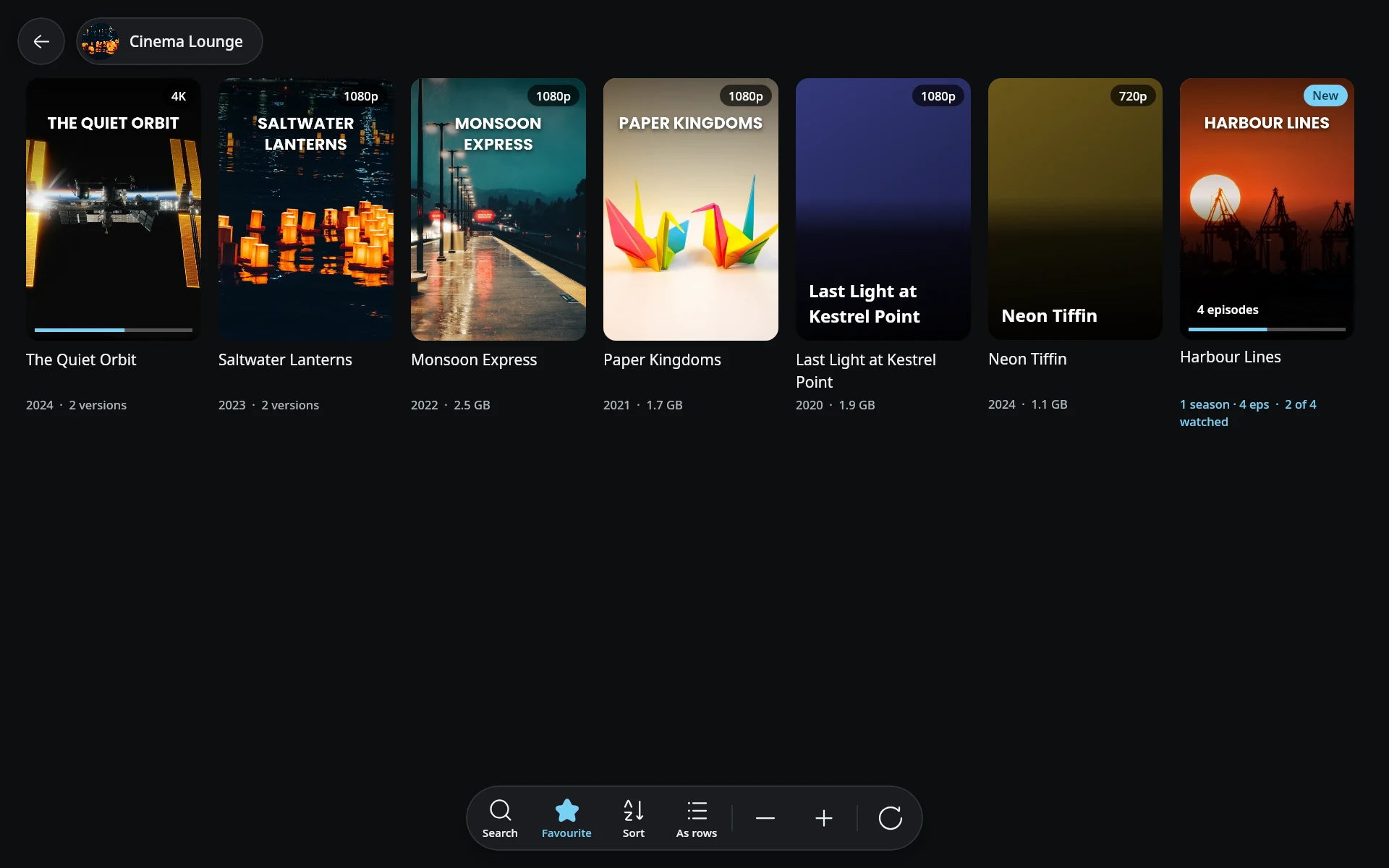
Official app screenshot
What it is
TMPlayer is a free, open-source player for the videos in your own Telegram chats. Its site says it "signs in as you, lists the videos in your Telegram chats and plays them on the big screen", and starts while the file is still downloading. The developer is Nevil (dracu-lah on GitHub). It is an unofficial app. The project says it is not affiliated with Telegram.

Official TMPlayer screenshot from tmplayer.org. The video titles in it are sample content.
Is it free?
Yes, per the vendor. The FAQ says: "it is free, and there is no paid version. Every feature works for everyone, with no TMPlayer account, no subscription and no trial." The code is on GitHub under GPL-3.0. GitHub Sponsors and Buy Me a Coffee are optional and unlock nothing, per the site. It has no ads of its own. Telegram's own sponsored messages still show in public channels, as Telegram requires, per the site.
Where it runs, per the project
- Android 8.0 and above, phone or TV, from one universal APK.
- Android TV, Google TV and Fire TV (Fire OS 7 or newer). Not Samsung Tizen, LG webOS, Roku or Apple TV, because they do not run Android.
- Windows 10 and 11, 64-bit, with an MSI installer or a PowerShell line.
- Linux, 64-bit, as an AppImage.
- Macs with Apple Silicon and macOS 26 or newer, marked a preview. No iPhone or iPad version.
The latest GitHub release we saw was v1.27.0, dated 19 October 2026. The home page still says macOS is "later", while the download page and release list include a Mac DMG, so we follow the download page.
How to install it, per the project
Android phone
- On the phone, open tmplayer.org/download and tap the download button for the universal APK.
- Open the file. Android asks to let your browser install apps. Allow it, then tap Install.
- Open TMPlayer and enter your phone number. To sign in an account on another phone, scan the QR code from that phone instead.
Android TV
- Install the free Downloader app from the Play Store.
- Type tmplayer.org/apk into Downloader and press Go.
- Let Downloader install apps, then press Install.
- Open TMPlayer and scan the QR code with Telegram on your phone: Settings, Devices, Link Desktop Device.
Windows
Use the MSI from the download page. The installer is not code signed yet, so Windows SmartScreen may warn you. The project says to click More info, then Run anyway. It also offers a PowerShell line that checks the file against a published checksum.
How it uses Telegram
- It signs in through TDLib, Telegram's official client library, with your own account. The sign-in shows up in Telegram's list of devices, where you can end it, per the FAQ.
- It shows only videos. You cannot read, reply or send messages in it, per the FAQ.
- The project says it uses Telegram's official API as permitted for third-party clients. If you build it yourself you need your own free Telegram API credentials.
- Sign-in is by QR code or by phone number. If two-step verification is on, your Telegram password comes next.
Privacy and data, per the project's privacy page (effective 19 October 2026)
- It says there is no TMPlayer account and no developer-run backend. Your session, settings and watch cache stay on your device.
- It says there is no analytics or advertising SDK. Crash reports go to Sentry only if you switch them on or agree to send one.
- It contacts tmplayer.org (or GitHub) for a small file naming the newest release, at start and every six hours. That reveals your IP address and app version. A setting can turn it off.
- Poster and overview lookups (TMDB, TVmaze, AniList) and skip-intro lookups are on by default and can be switched off in Settings. They send a cleaned-up video title and episode numbers, not the file.
- Online subtitle search (OpenSubtitles or SubDL) runs only if you use it. It sends the file name and a hash, not the video.
- On Windows, macOS and Linux your signed-in session stays in a folder after uninstalling. The project says to treat the device as a signed-in Telegram device.
What to watch out for
- Not tested by AiCoN. We have not installed or used it.
- It is a one-developer project, started on 7 August 2026 per GitHub, with 46 stars when we checked. That is young and small. The code is open, but we did not audit it.
- It signs into your Telegram account. Our advice: only install files from tmplayer.org or its GitHub releases, and check Telegram's device list afterwards. The FAQ warns that several apps call themselves a Telegram media player, including an unrelated one on Google Play named "TMP - Telegram Media Player".
- The project says it provides and recommends no media and tells you to use it only with content you own or are allowed to access. Our advice: the same.
- Google plans to restrict Android installs from unregistered developers from 2027, per the project's own download page. We did not check that claim.
- The APK is not on the Play Store, per the project's own update FAQ. We found no F-Droid listing on its pages, so we make no claim about it.
India
- No region limit appears on the pages we read. Telegram access depends on your network. No price applies.
Videos
No official YouTube video from the project (English or Malayalam) was found. A YouTube channel named "TMP app Telegram Media Player" turned up, and it belongs to the different app of that name, so we do not link it.
Frequently asked questions
Is TMPlayer free?
Yes, per the project: no paid version and no TMPlayer account.
Is it open source?
Yes, GPL-3.0 on GitHub.
Can it read my chats?
The FAQ says no. It lists videos only.
Do I wait for the download?
The project says it starts within seconds and keeps downloading while you watch.
Sources: tmplayer.org, download, install, FAQ, privacy, GitHub. Checked 19 October 2026.
Independent guide, not affiliated.
Scoped recheck 23 October 2026: the FAQ still says it is free with no paid version, no TMPlayer account, no subscription and no trial; the home page still says no server and no bot; licence still GPL-3.0. Added the project's own desktop-grid screenshot from the GPL-3.0 source repository. No fact changes. Other claims retain their original source-check date. Original publication date unchanged.