
Thonny: a simple Python editor for beginners, with Python included
Thonny is a beginner Python editor with Python built in and a step-by-step debugger. It uses the MIT licence and we saw no price, though the site never says "free".
Official app preview
What it is
Thonny is a program for learning to write Python code. Its website calls it a "Python IDE for beginners": an editor, a place to run your code, and tools that show what your program is doing as it runs. The Windows and macOS installers include Python. The Linux installer uses an existing Python 3 installation. It is not an AI tool. We included it as a free learning tool for beginners.
Is it free?
Thonny's pages do not use the word "free". Its GitHub page lists the licence as the MIT License, which is an open-source licence. We saw no price, account or paid version on thonny.org or GitHub. Check the licence if you plan to share or sell something built with it.
What you can do with it
- Start with one installer. The site says the Windows and macOS installers include Python 3.14, while Linux uses existing Python 3. The first screen has "all features that may distract beginners" removed.
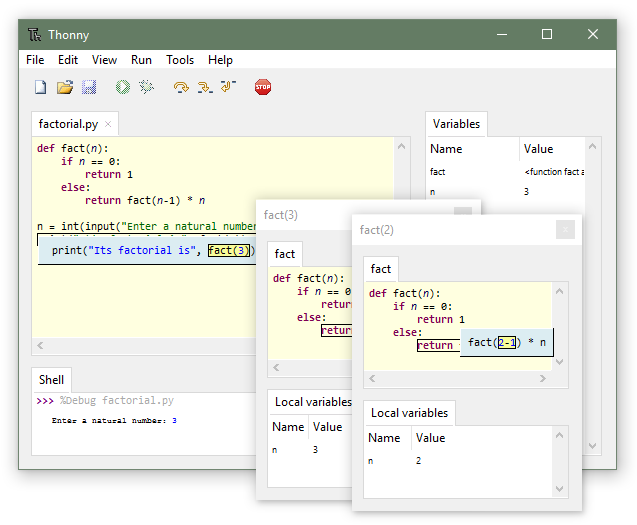
- See your variables. The site says View, then Variables, shows how your code changes each variable.
- Step through your code. Press Ctrl+F5 to run step by step with no breakpoints, and the site says you can also step through how Python works out a single expression.
- Spot common mistakes. The editor highlights unclosed quotes and brackets, and shows which variables are local.
- Install add-on packages from a built-in package manager (Tools, Manage packages).
- Downloads: the site lists installers for Windows 10 and 11 (Intel/AMD and Arm), macOS (Intel and Apple Silicon) and Linux. Current version shown: 5.0.0.
What to watch out for
- It teaches Python only. It is not a general-purpose coding course. You still need lessons or a book to learn what to type.
- Third-party versions may be older. The site says Homebrew, Flatpak, Snap and Linux package-manager versions "may have older version". Use the official downloads.
- It is a small team project. The site says the main author is Aivar Annamaa, with support from Cybernetica AS and earlier help from the Raspberry Pi Foundation. We did not check how fast bugs are fixed.
Privacy and data
- We did not find a privacy policy on thonny.org.
- A page on Thonny's GitHub wiki says user action logging has been off by default since version 3.2.0 and can be turned on in Tools, Options. That page is old, so we could not confirm what version 5.0.0 does. The log is described as something you can export, not as sent anywhere.
- We did not install the app to check whether it contacts any server, for example to look for updates.
India
- The downloads are ordinary installers with no region limit on the pages we read. No rupee price is involved. We did not find anything India-specific.
Frequently asked questions
Is Thonny free?
We saw no price, and it uses the MIT open-source licence. The site does not say "free" in so many words.
Do I need to install Python first?
Not with the Windows or macOS installers, which include Python 3.14. The Linux installer uses existing Python 3.
Does it work on Windows 11?
Yes. The site says the Windows installer requires Windows 10 or 11.
Sources: Thonny, GitHub, User action logs (wiki). Checked 16 October 2026.
Independent guide, not affiliated.
Official media and homepage download details rechecked 22 October 2026: the page still lists Thonny 5.0.0 and Python 3.14 installers for Windows and macOS. The older debugger illustration is not a version 5.0 hands-on test. Original publication date is unchanged.