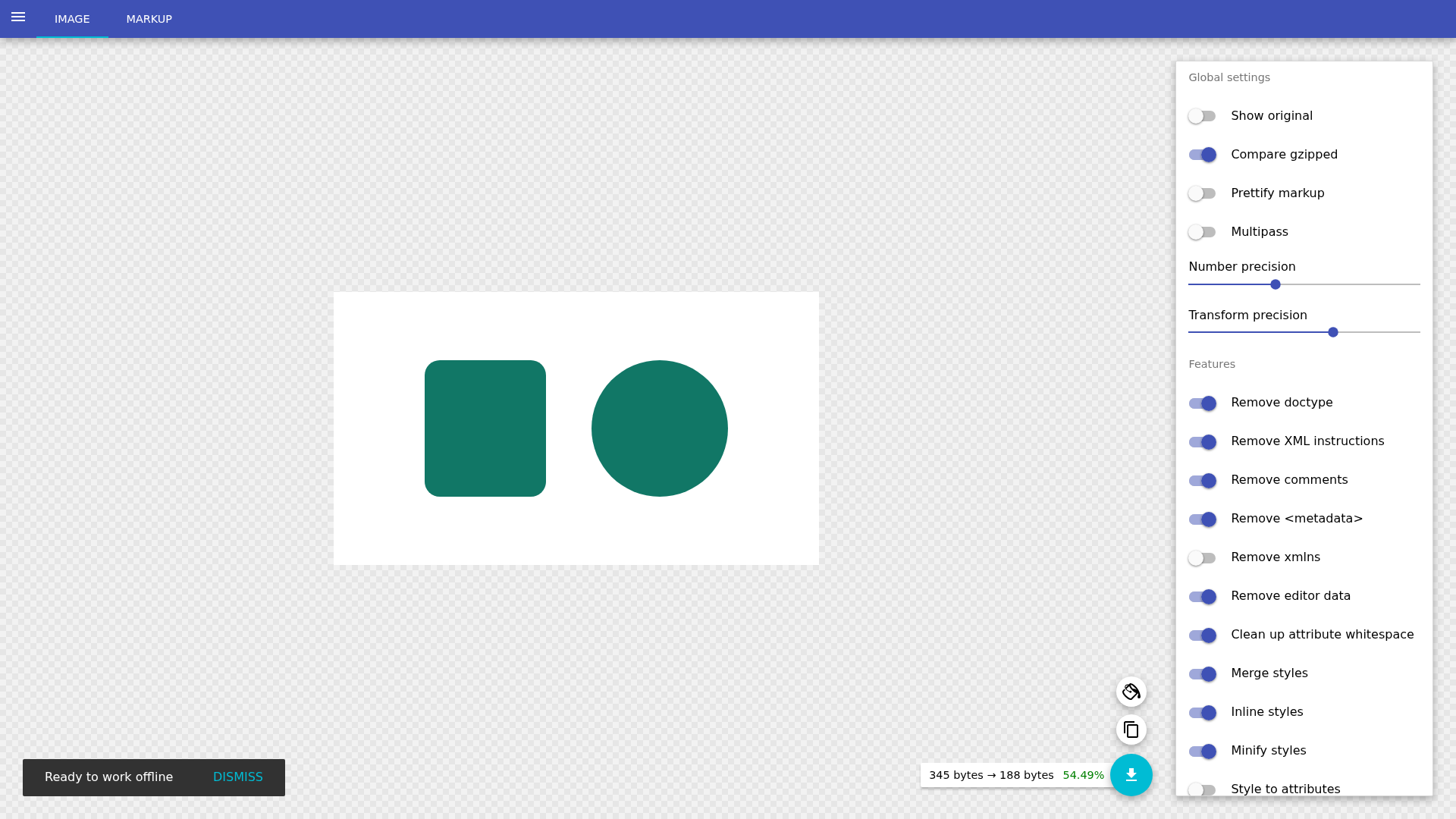
SVGOMG: shrink an SVG, then check what changed
An SVG exported from a design tool can contain comments, metadata and long numbers that add bytes without changing the picture. SVGOMG lets you open the real file, see an optimized preview and download the result. We used the public browser tool, then checked the downloaded file rather than trusting the percentage on screen.
Quick facts
- What it is: a web interface for SVGO. The current tool showed SVGO v4.0.0.
- Cost/account: no sign-in, card or payment was requested for our open, optimize and download test. The official source repository is MIT-licensed. We did not establish service limits or a paid-plan policy.
- Test: one fictional 640 x 360 SVG with a white background, green rounded rectangle and green circle. We left the tool's optimization settings unchanged.
- Result: original 598 bytes, downloaded SVG 240 bytes. That is 358 bytes, or 59.9%, smaller for this sample only.
- Visual check: both files rendered at 640 x 360 with identical pixels in one renderer. This does not prove every SVG will survive optimization unchanged.
- India: no India-specific availability guarantee established. This was not an India-network or mobile-device test.
Why use it beside a chatbot?
A chatbot can explain SVG markup or suggest edits. SVGOMG applies a set of optimization rules to the actual file, exposes switches and gives you a downloadable artifact with a live preview. That makes it useful when preparing icons, illustrations or other SVG web assets. It is an optimization workflow, not an AI image generator.
What our file check showed
On 29 October 2026 we opened the official public tool without signing in and selected a fictional sample.svg. It contained an XML declaration, a comment, metadata, redundant decimal places and simple shapes. We did not change the default settings before using Download.
The downloaded sample.svg was 240 bytes, compared with the 598-byte source. Its markup no longer contained the comment or metadata, shortened the colours and numbers, and represented the background rectangle as a path. The viewBox and 640 x 360 dimensions remained.
We rendered the source and actual downloaded SVG at their original dimensions, opened the output and compared pixels. Both showed the same white background and two green shapes, and the pixel-difference check found no difference in that renderer. We did not test animation, fonts, gradients, filters, linked assets, embedded scripts or use inside a real website.

Try it without losing the original
- Keep an untouched copy of an SVG you own or have permission to edit. Start with a non-sensitive sample.
- Open the original SVGOMG site and choose Open SVG. Paste markup is another visible entry point, but we tested file selection.
- Inspect the preview. Use Show original to compare before and after when checking your own work; we did not test that toggle.
- Check whether Compare gzipped is enabled before reading the size figures. Our screenshot had it on. Our 598-to-240-byte result comes from actual file sizes, not the smaller gzip estimates shown in the UI.
- Download, open the result and compare it at the sizes where it will be used. Test it in its final page, especially if CSS or JavaScript refers to IDs.
- If something changes, restore the original and adjust one relevant option at a time. A smaller file is not a win if it breaks the asset.
Three options deserve extra care
ViewBox: SVGO's official documentation warns that Remove viewBox can prevent scaling and cause clipping. Do not switch it on just to chase a smaller number. Our output retained viewBox.
Titles: the official Remove title documentation warns about accessibility. A title may be the accessible summary of an SVG. Our fictional sample had no title or description, so this test says nothing about preserving accessibility information.
IDs: Clean up IDs can remove unused IDs and shorten referenced ones. SVGO warns that separately optimized inline SVGs can end up with colliding IDs. Our sample had no external CSS, JavaScript or cross-file references. A visual preview alone cannot check those dependencies.
Privacy and limits
We used only invented artwork. This test did not audit network traffic, storage, retention or security, and we did not establish a current site-specific privacy policy. Do not read the successful browser test as a guarantee that confidential assets stay private. Use approved tooling for sensitive work.
The app displayed Ready to work offline, and an older web.dev case study describes offline support. We did not disconnect the network or test a later offline visit, so offline use is not a tested claim here. This is also not an SVG sanitization or malware-safety test: optimization is not proof that an untrusted SVG is safe to embed.
Compression depends on the source. A hand-written or already optimized SVG may shrink little, and reducing precision can alter complex artwork. Keep the original and inspect both appearance and behavior.