
Super Productivity: a free to-do list and time tracker
Super Productivity is a free, open-source to-do list and time tracker. Its pricing page says 100% free with no premium tiers, and the home page says no account needed.
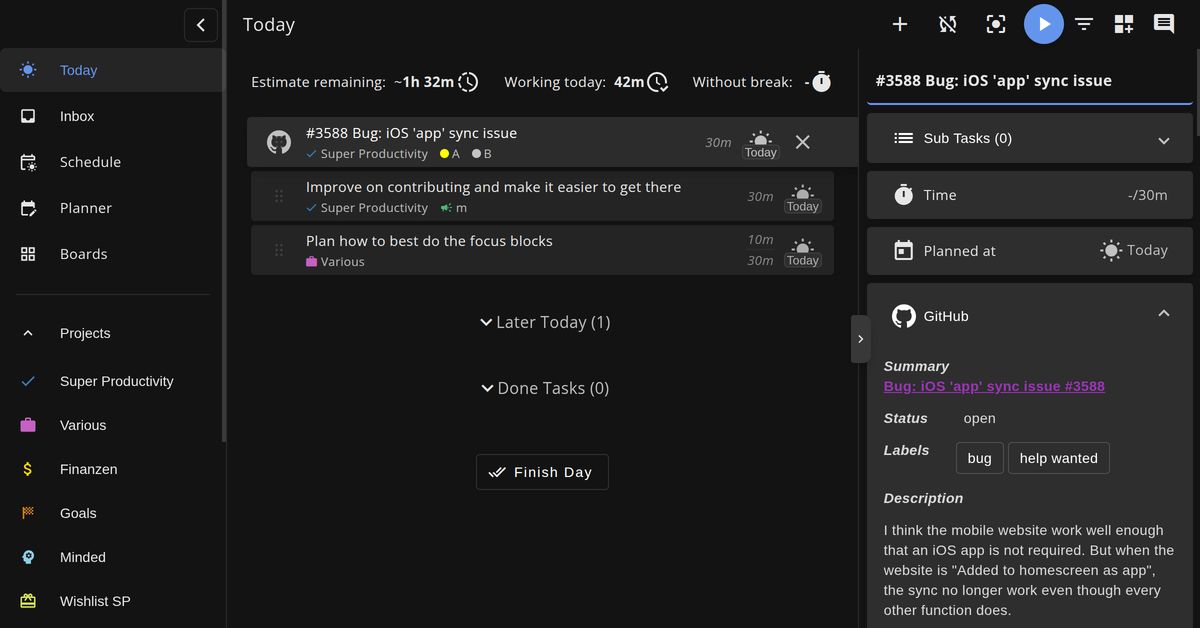
Official publisher artwork hosted by its publisher. Official source. Independent guide, not affiliated or sponsored. Artwork and trademarks belong to their owners.
Official app demo

What it is
Super Productivity is a to-do list and time tracking app. Its home page calls it "all in one free, open-source app": you add tasks with time estimates, schedule the work, and track the time you spend. It lists Windows, macOS, Linux, Android, iOS and web versions. It is not an AI tool. We included it as a free way to plan a day without a spreadsheet.
Is it free?
Yes. Its pricing page says "Super Productivity is 100% free. No trials, no premium tiers, no hidden costs." The GitHub README says "It's free and open source and always will be", and GitHub lists the MIT licence. The pricing page also has a Support Development section for optional donations.
What you can do with it
- Plan. Task lists, Kanban boards or an Eisenhower Matrix, with subtasks, notes, tags, projects and repeating tasks, per the home page.
- Focus. A focus mode and a Pomodoro timer with breaks.
- Track time. Start a task, track your time, and turn it into timesheets and reports.
- Use your calendar. The home page says you can bring in your calendar and timebox your tasks.
- Sync if you want. Optional Super Sync, WebDAV or Dropbox, per the home page. Sync is not required.
What to watch out for
- Built for deep-work planning. It has many features (time estimates, boards, plugins), so a simple list app may be enough for light needs.
- Sync setup. Syncing across devices needs you to pick a sync option. We did not check how hard that is.
- Not tested. We did not install or use it.
Privacy and data
- The home page says "No account needed" and "Works offline". The README says it does not collect any data and no registration is required.
- The privacy policy (last updated 2 July 2026) says all data is stored locally on your device by default, and is transferred to external services only if you turn on sync or an integration.
- It says the only default network request is the desktop app's update check, which sends no user data and can be turned off.
- It says the website uses analytics, and YouTube videos load only if you play them.
- The data controller named is Johannes Millan in Berlin, Germany.
India
- It is free, so no rupee price is involved. The pages mention no country limits. We did not check store listings from India.
Frequently asked questions
Is Super Productivity free?
Yes, per its pricing page: 100% free, no trials, no premium tiers.
Do I need an account?
No, per the home page and README.
Does it work offline?
The home page says yes.
Sources: Home page, Pricing, Privacy Policy, GitHub. Checked 17 October 2026.
Independent guide, not affiliated.
Scoped recheck 23 October 2026: the pricing page still says "100% free. No trials, no premium tiers, no hidden costs."; the home page still says no account needed and works offline; the README still says free and open source and always will be; licence still MIT. Added the project's own demo animation from the MIT source repository. No fact changes. Other claims retain their original source-check date. Original publication date unchanged.