
Subtitle Edit: free open source editor to create and fix video subtitles
Official publisher logo hosted by its publisher. Official source. Independent guide, not affiliated or sponsored. Artwork and trademarks belong to their owners.
Subtitle Edit says it is a free, open-source editor for video subtitles, "completely free with no ads or limitations", under the MIT licence.
Quick facts
- What it does: lets you create, edit, time-sync and convert subtitle files (such as .srt and .vtt) while watching your video.
- Price: free. The FAQ says "Yes. Subtitle Edit is released under the MIT license. It is completely free with no ads or limitations."
- Platforms: Windows 10 (22H2) and later, macOS 12 and later, and Linux.
- Best for: people who already have a subtitle file that is out of sync or has mistakes, or who want to write subtitles for their own video.
What it is
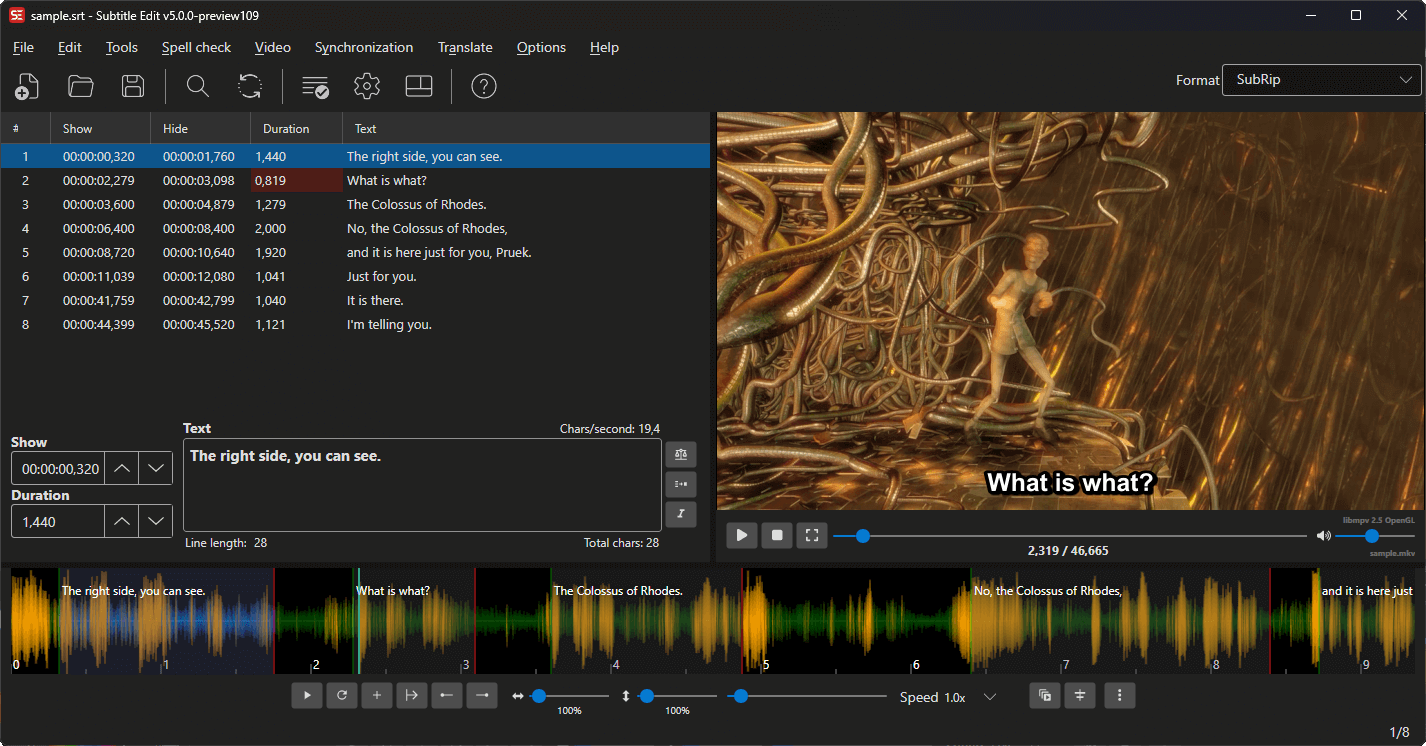
Subtitle Edit is a subtitle editor. Its FAQ says it supports 380+ subtitle formats and provides tools for "creating, editing, synchronizing, translating, and converting subtitles". You open a video, play it with the subtitle list beside it, and change text and timings. This article covers editing and fixing. We did not review the optional translation, speech-to-text or AI features.
Is it free?
Yes, per the project. The documentation home page calls it "a free, open-source editor for video subtitles", and the FAQ says it is MIT-licensed with no ads or limitations. The README lists donations through GitHub Sponsors and PayPal, which are optional. We saw no price, so there is nothing to convert to rupees.
What the pages list
- Open, edit and save subtitles in over 380 formats, including SubRip (.srt), WebVTT (.vtt) and Advanced SubStation Alpha (.ass).
- Batch convert many subtitle files at once, and convert between formats from the Save as menu.
- Fix Common Errors, and tools to adjust durations, bridge gaps and improve time codes against the audio.
- A waveform view, generated automatically if FFmpeg is installed, and a Command Palette (Ctrl+Shift+K) to find any command.
- OCR import for image-based subtitles such as Blu-ray SUP and VobSub.
- Playback through libmpv, libVLC or FFmpeg.
Good to know, per the project
- GitHub lists v5.3.0, published 14 October 2026, as the latest release. The documentation describes Subtitle Edit 5, built on Avalonia, as the cross-platform version.
- The macOS .dmg bundles libmpv and ffmpeg. On Linux a Flatpak bundles its dependencies, while the native .tar.gz builds need mpv and ffmpeg installed.
- The README warns that older Windows 10 builds (2004 to 21H2) are end-of-life and may fail to start with a .NET runtime error.
- Some features are optional, such as AI review with a local model, translation and speech-to-text. These can use outside services, see the privacy section.
Our advice
- Keep a copy of the original subtitle file before you edit and save.
- Use only subtitles you made or have the right to change.
- Download only from the GitHub releases page the README links.
- We did not test the program or any feature.
Privacy and data
- The README says Subtitle Edit "is an offline, open-source application" and does not collect, store, transmit or analyze the content of your subtitle files, media files or related metadata.
- It says that if you choose optional third-party online services (such as translation, speech-to-text, text-to-speech, OCR or dictionary lookups), the minimal data needed for that request goes directly to the provider you select, under that provider's terms.
India
- No region limit appears on the pages we read. We did not test it from India.
Source code
The GitHub project SubtitleEdit/subtitleedit is under the MIT licence and has about 14,600 stars, per its GitHub page.
Frequently asked questions
Is Subtitle Edit free?
Yes. Its FAQ says it is MIT-licensed and completely free with no ads or limitations.
Does it work offline?
Yes for the core features, per the README. Optional online services need the internet.
Can it make subtitles from speech?
The README mentions optional speech-to-text through third-party services. We did not review that feature.
Sources: Documentation, FAQ, GitHub. Checked 21 October 2026.