SQLBolt: write the query, inspect the result
Reading a SQL answer is different from running it. SQLBolt pairs short lessons with a supplied practice table and an editor that updates the result as you change the query. We completed all five tasks in its first SELECT lesson, then checked what happens when a query returns the wrong column or names a column that does not exist.
Quick facts
- Best fit: a beginner who wants to practise SQL concepts against a ready-made table without first setting up a database.
- Actual test: Lesson 1, SELECT queries; five completed tasks and a visible Continue control.
- Checked result:
SELECT title FROM movies;returned the Title column and checked the first task. - Failure distinction: selecting Year returns data but does not answer the title task; selecting a missing column produced a query error.
- Access and cost: no account, card or payment was requested during this lesson. The page has a separate donation link. We did not verify a site-wide pricing guarantee.
- Scope: supplied practice data only. No private database, Google account, download or production connection was used.
What it adds beside a chatbot
A chatbot can explain SELECT, suggest a query or help unpack an error. SQLBolt lets you execute a query against the table shown on the page and compare its result with a concrete task. The value is the practice loop: predict the columns, type the query, inspect the result, then explain what changed.
The task checkmark is feedback on a small exercise, not proof that you can safely query any database. A correct result for one sample does not establish performance, permissions, production safety or understanding of every SQL dialect.
Our first query and result
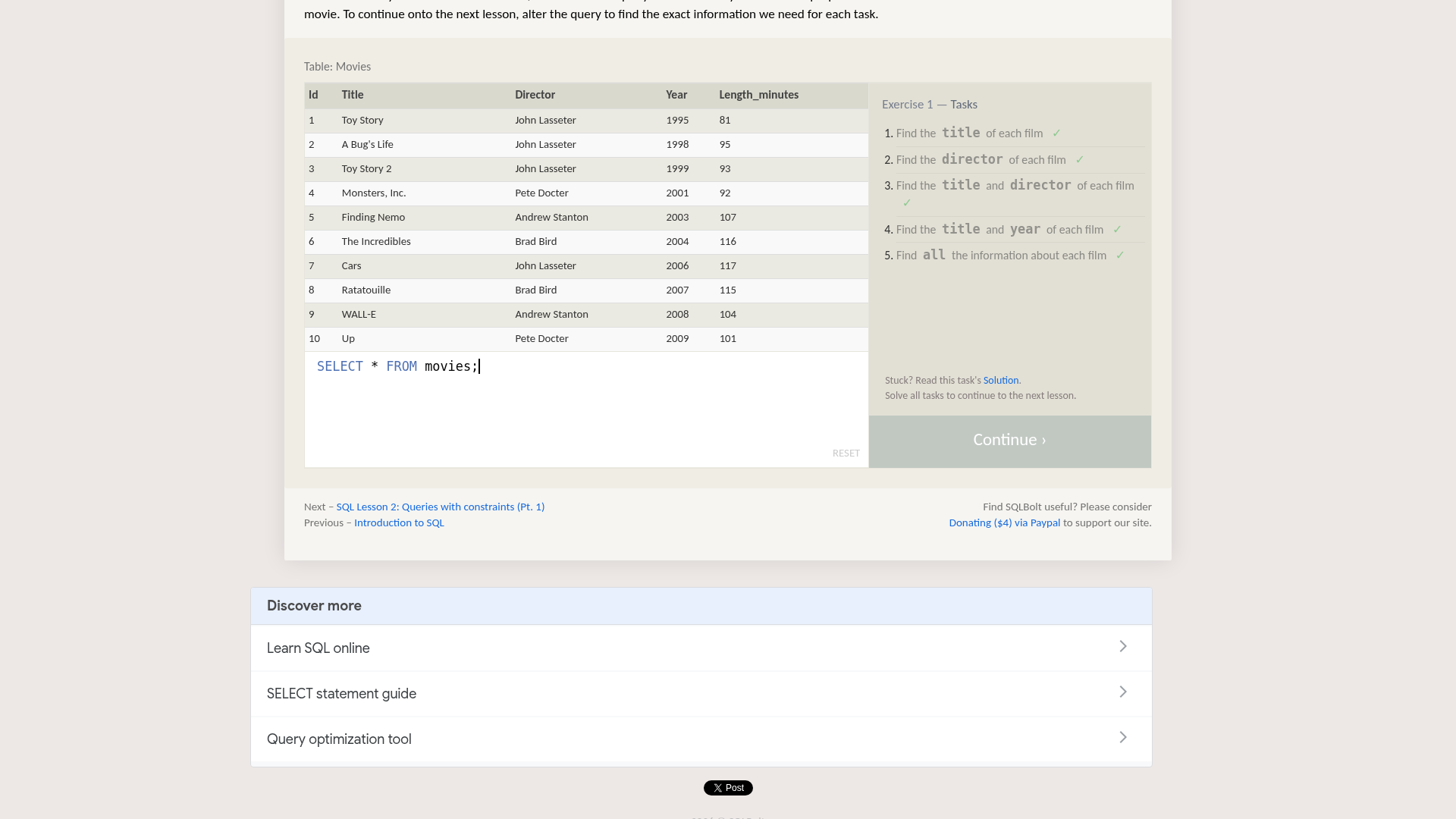
On 29 October 2026 we opened Lesson 1: SELECT queries 101. It provides a Movies table with Id, Title, Director, Year and Length_minutes columns. We used only the data supplied by the lesson.
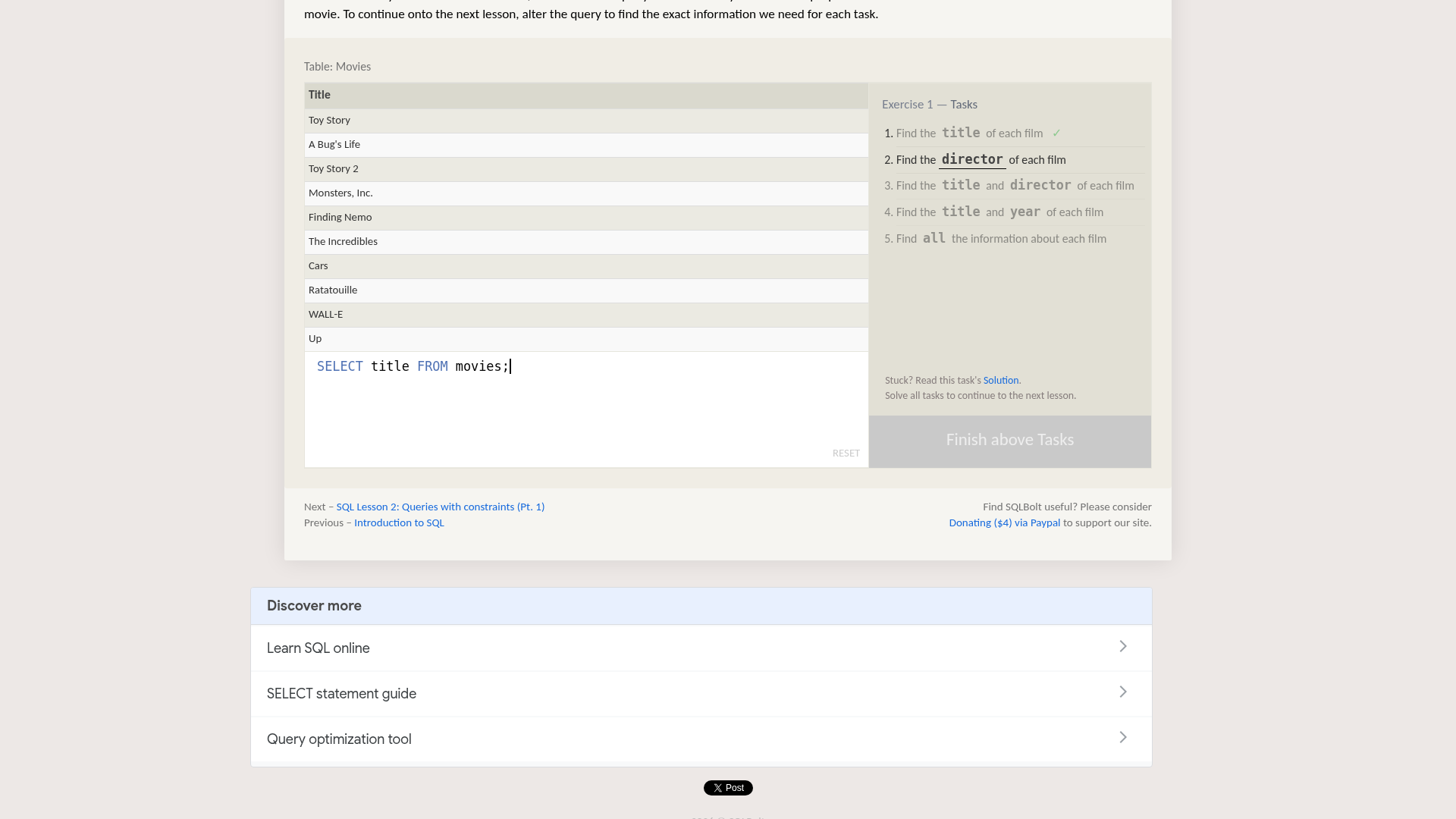
The first task asks for the title of each film. We replaced the starting query with:
SELECT title FROM movies;
After the result updated, the table had one column headed Title, with values such as Toy Story and A Bug's Life. The first task gained a checkmark. We checked the result header and task state rather than assuming that text appearing in the editor meant the query had finished.
We then worked through the remaining column-selection tasks:
SELECT director FROM movies;
SELECT title, director FROM movies;
SELECT title, year FROM movies;
SELECT * FROM movies;
These are separate queries, entered one at a time. The first two choose named columns; the asterisk query requests all columns. In our test all five tasks gained checkmarks and Finish above Tasks changed to Continue.
A valid query can answer the wrong question
Before completing the title task we tried SELECT year FROM movies;. It returned a Year column, but the title task did not gain a checkmark. That query can run while still being the wrong answer to the question.
Compare the requested fields and rows, not only whether data appears. For a real report, also check filters, joins, duplicate rows and the date range. Those broader topics were not verified by our first-lesson test.
A query error can leave an old table visible
We also entered SELECT missing_column FROM movies;. The page displayed No such column: missing_column. The previous Director result remained visible behind the error message. That old table was not the successful output of the invalid query.
Wait for the current query to finish and look for an error before trusting the displayed table. Confirm the result header matches your current request. Checkmarks earned earlier can remain visible while a later query is wrong, so they are not a current-query validity badge either.
This was a missing-column error, not a claim that we tested every syntax error or failure mode. We returned to valid queries afterward and verified the final five-task completion state.
A useful learning routine
- Open the official introduction and read what a table, row and column represent.
- In Lesson 1, predict what changing
*totitlewill remove from the result. - Type one query at a time. Wait for the result header and task state to update.
- Try a valid but different column. Explain why it runs but does not answer the original task.
- Read errors carefully. An old result can remain visible after a failed query.
- After each task, explain the query in your own words. Use the solution link when stuck, then try again without copying.
Foundation, not a production database course
The official introduction says lessons begin with query parts and later cover changing tables and creating tables. It also notes that SQLite, MySQL, Postgres, Oracle and Microsoft SQL Server differ in additional features and storage types despite sharing SQL concepts.
We tested only the first SELECT lesson. We did not test joins, aggregate queries, destructive statements, saved progress across devices, certificates, mobile editing or the intermediate topics. Nothing here establishes job readiness or a credential.
Use the exercise's supplied table. Do not paste private database exports or credentials into a public lesson editor. Before applying SQL at work, check your actual database's dialect, permissions and approved test environment. This post does not recommend running modification queries against production data.
Access and limits
Our public browser session reached the lesson and completed its tasks without sign-in, payment or a Google connection. A donation link was visible; we did not open or use it. We found no need to install a database for this route.
We did not verify a formal pricing policy, privacy audit, offline support or India-specific availability. Do not turn a successful browser test into an unlimited-access, no-tracking or regional guarantee. Use sqlbolt.com, the domain of the lesson tested here, rather than assuming similarly named sites are the same service.