
ShareX: a free screenshot and screen recording tool for Windows
ShareX says it is a completely free, open source screenshot and screen recording tool for Windows, with no ads and no account needed.

Official publisher artwork hosted by its publisher. Official source. Independent guide, not affiliated or sponsored. Artwork and trademarks belong to their owners.
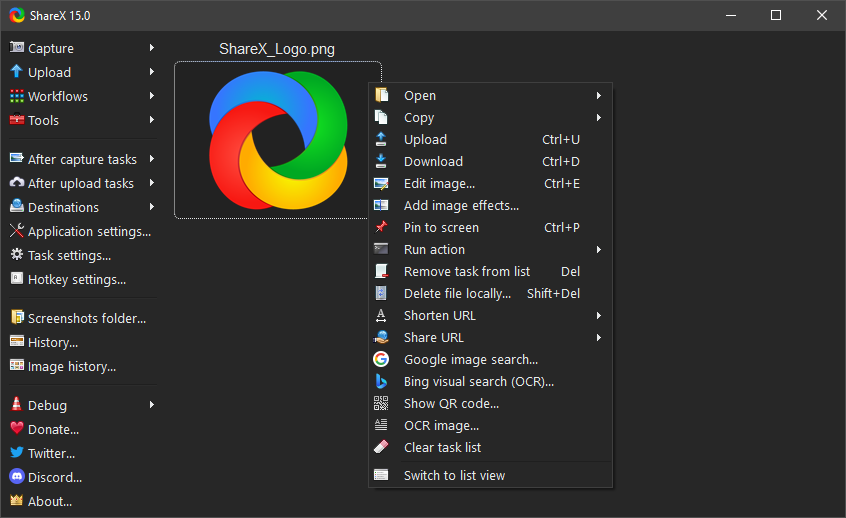
Official interface preview
What it is
ShareX is a free screenshot and screen recording tool for Windows. Its site describes it as a "free and open source screenshot tool for Windows with screen capture, screen recording, file sharing and productivity features built into one lightweight application". You press a key, capture the full screen, a window, a region or a scrolling page, mark it up, and save, copy or upload it. It is not an AI tool. We included it as a free, official, no-ads utility for anyone who often shares screenshots.
Is it free?
Yes. The ShareX site lists "Completely free", "Open source" and "No advertisements". The project's GitHub page says it is "completely free, open source, lightweight, privacy focused and has no advertisements" and that no account is required. ShareX is also listed on the Microsoft Store and Steam; the project says to use its official links.
What it does
- Capture: full screen, active window, region, scrolling capture, and GIF or video screen recording, per the site.
- Mark up: arrows, boxes, text, step numbers, blur and pixelate to hide private details before you share.
- After-capture tasks: the project lists copy to clipboard, save, open in the editor, upload, scan a QR code, or recognise text with OCR.
- Upload: to destinations you choose and set up yourself, then copy the link.
- Extras: colour picker, image converter and more small tools.
How to get it
- Download: https://getsharex.com/downloads, GitHub releases, the Microsoft Store or Steam. A portable version exists, per the project.
- Version: GitHub shows v21.0.0, released 3 July 2026.
- Windows only. The project's changelog says newer versions need Windows 10 64-bit or higher, and that Windows 7 is no longer supported. It also says the setup is now around 100 MB.
What to watch out for
- It is built for power users, with a lot of settings. Start with the capture hotkeys and ignore the rest.
- Uploads go to whichever service you pick. Do not upload screenshots with private details to a public link host.
- An unofficial project issue on GitHub reports that the app contacts GitHub even with update checks off. We did not test this.
Privacy and data
- ShareX's privacy policy says the app "does not collect data of any kind, including personally identifiable information".
- It says files are sent only to third-party services that you choose and configure.
- It says ShareX checks GitHub for updates at startup and downloads updates only if you allow it.
- It says the website uses Google Analytics to measure page views.
India
- ShareX's pages do not restrict by country. We did not test the download from India. The site lists Hindi among its app languages.
Frequently asked questions
Is ShareX free?
Yes. Its site and GitHub page say completely free, open source and no ads.
Does it work on Mac?
No. The project describes it for Windows only.
Does it collect my data?
ShareX's privacy policy says the app collects no data. Uploads go only where you send them.
Sources: ShareX website, Privacy policy, GitHub page, Changelog. Checked 15 October 2026.
Independent guide, not affiliated.
Official interface media and linked project sources rechecked 22 October 2026. Original publication and other source-check dates are unchanged.