
scrcpy: free tool to show and control your Android screen on a PC
scrcpy shows your Android screen on your PC and lets you control it. Its README says it is free, open source and needs no account or root.
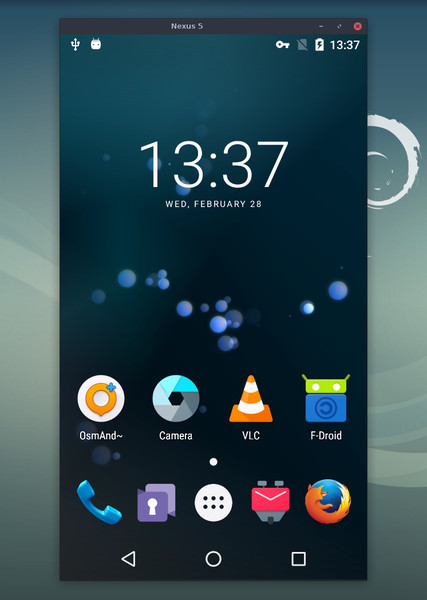
What it is
scrcpy (said "screen copy") shows your Android phone's screen on your computer and lets you control it with the computer's keyboard and mouse. The README says it "mirrors Android devices (video and audio) connected via USB or TCP/IP" and that it "does not require root access or an app installed on the device". It works on Linux, Windows and macOS. It is not an AI tool and it is not a phone app: it runs on the computer.
Is it free?
Yes, per the project. The README lists "no account, no ads, no internet required" and "free and open source software". The licence section shows the Apache License 2.0, and GitHub lists Apache-2.0. We saw no price.
What it can do, per the README
- Show the phone screen (30 to 120 fps depending on the device) and control it with keyboard and mouse. Right-click is Back and middle-click is Home.
- Forward audio on Android 11 and newer.
- Record the screen to a file, and copy and paste in both directions.
- Mirror with the phone screen turned off.
- Use the phone camera, and on Linux as a webcam. Camera mirroring needs Android 12 or newer.
What you need, per the README
- An Android device with at least Android 5.0 (API 21).
- USB debugging turned on in the phone's developer options. The README says this is not needed for its OTG mode.
- Some phones, "especially Xiaomi", need an extra option called "USB debugging (Security Settings)" to allow control with keyboard and mouse.
How to install on Windows, per the project
- Download the zip for your PC from the official GitHub release (64-bit, 32-bit or ARM 64-bit are listed) and extract it. The latest release we saw was v5.0.1, dated 8 October 2026.
- Or use a package manager. The Windows page lists WinGet:
winget install --exact Genymobile.scrcpy. - Plug the phone in by USB with USB debugging on.
- Double-click
open_a_terminal_here.batin the scrcpy folder, typescrcpyand press Enter.
Note the project says scrcpy is a command-line program. There is no window with buttons for settings. That is the biggest hurdle for non-technical users. The release also lists SHA256 checksums.
Download safely
The README opens with a warning: the GitHub repo is "the only official source for the project", and you should not download releases "from random websites, even if their name contains scrcpy".
Privacy and data
- The README says it needs no account and no internet. It says "nothing is left installed on the Android device".
- We did not read a separate privacy policy, and none is listed in the README. We make no wider claim.
- Our advice: USB debugging gives the connected computer more control of your phone. Turn it off when you are not using scrcpy, and only plug into your own computer.
India
- No region limit appears. No price applies.
Frequently asked questions
Is scrcpy free?
Yes: free and open source, Apache 2.0, with no account and no ads per the README.
Do I need to root my phone?
No, per the README.
Does it work wirelessly?
The README says USB or TCP/IP. We did not check the steps for wireless.
Sources: scrcpy README, Windows page, releases. Checked 19 October 2026.
Independent guide, not affiliated.
Scoped recheck 23 October 2026: project README and GitHub releases. v5.0.1 (8 October 2026) remains the latest release and README claims are unchanged. Added the project's own README screenshot, and replaced the under-chip logo (previously a GitHub organisation avatar) with scrcpy's official SVG icon from the repository. No fact changes. Other claims retain their original source-check date. Original publication date unchanged.