regex101: test the pattern before you trust it
An AI-generated regex can look right and still accept the wrong input. regex101 runs the pattern against examples and shows exactly which text matched. We tested a simple invoice-ID rule with two intended matches and four deliberately wrong cases, rather than trusting the pattern's appearance.
Quick facts
- Cost/account: official docs include pattern matching and unit tests in Free. Our basic matching test used no account, card or payment. Pro adds features and higher limits; this is not an all-features-free claim.
- Tested engine: PCRE2 (PHP), with global and multiline flags, shown as gm. Six lines of fictional IDs produced exactly two matches.
- Purpose: check generated patterns, spot partial matches and inspect case sensitivity before using a regex elsewhere.
- Privacy: docs say matching runs in your browser. Saving or publishing sends workspace fields to the service; draft links put editor content in a URL. We did not save, publish or share a workspace.
- India: no India-specific availability guarantee established. This was not an India-network check.
Why use it beside a chatbot?
A chatbot can suggest a regex and explain its intent. A regex tester executes it in a selected engine and highlights actual matches. That gives you a concrete way to challenge the suggestion with wrong-length values, prefixes, lowercase text and other edge cases. It is a verification step, not proof that a rule is complete or safe in production.
Our six-case check
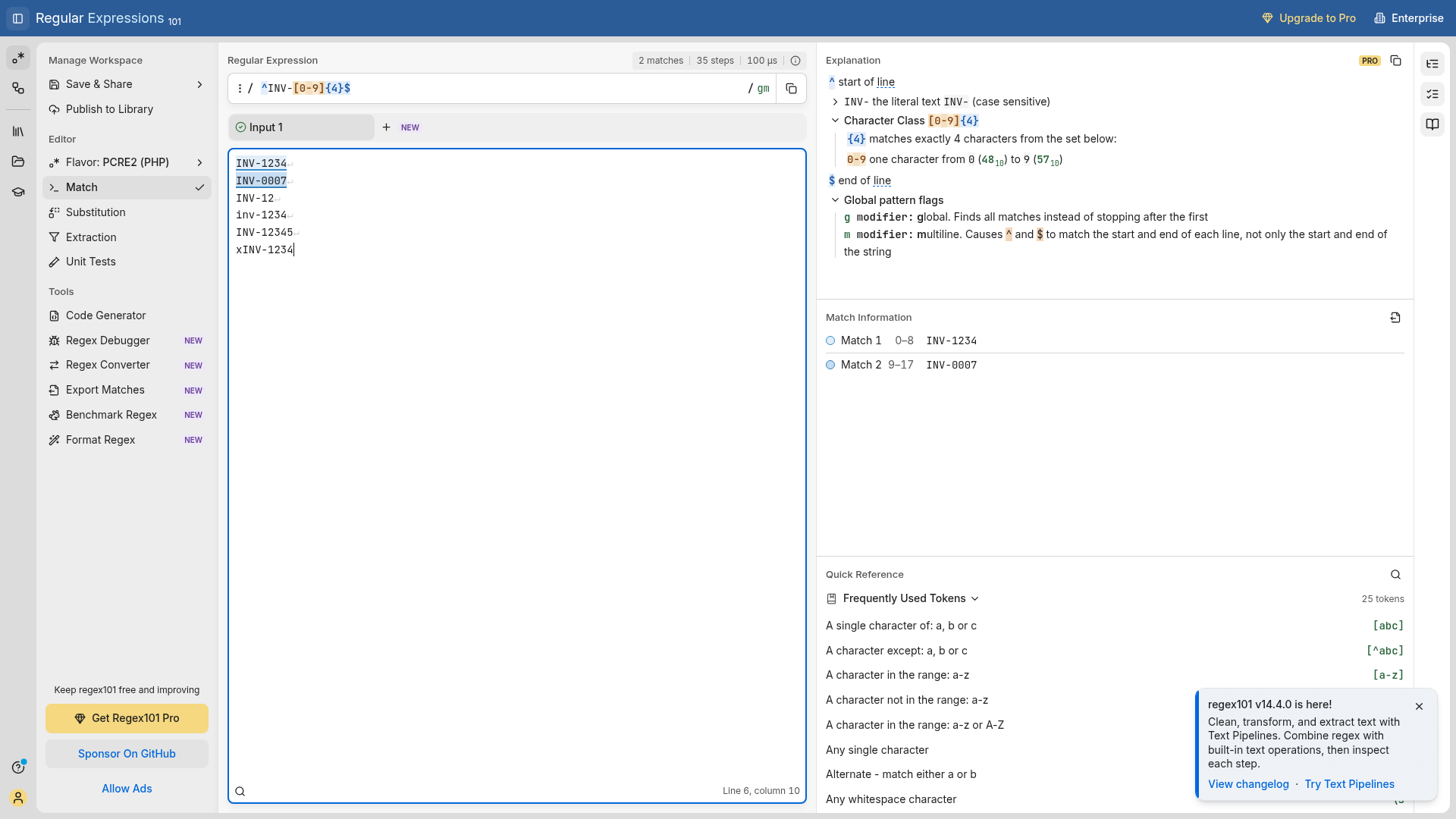
On 29 October 2026 we entered this pattern in the real public editor using PCRE2 (PHP) and gm flags:
^INV-[0-9]{4}$We wanted uppercase INV-, followed by exactly four ASCII digits, across one test string containing these six lines:
INV-1234
INV-0007
INV-12
inv-1234
INV-12345
xINV-1234
The editor returned two matches: INV-1234 and INV-0007. The shorter ID, lowercase prefix, extra digit and extra leading character were not matched. Match Information showed offsets 0-8 and 9-17 for the two accepted values. Those results matched our expectations for this sample.
This is a fictional format check, not an invoice verifier. It says nothing about whether an invoice exists, whether a customer owes money or whether a number is unique.
Repeat the useful part
- Open regex101 and choose the engine your real application uses. Our check kept PCRE2 (PHP).
- Paste the pattern into Regular Expression and fictional examples into Test String. Include both cases that should match and cases that should fail.
- Inspect flags. In our check g finds all matches and m makes ^ and $ apply to each line. We did not enable case-insensitive matching.
- Compare the actual match list with your expected list. Do not judge a pattern only by whether the first happy-path example matches.
- Run equivalent tests in your actual application before shipping. For a single-value field, use your engine's full-match or appropriate anchoring approach rather than copying this multiline harness blindly.
Small choices change the result
The same visible pattern can behave differently across engines, flags and newline conventions. Here, m is intentional because the test input has one ID per line. It is not a universal setting for form validation. We used [0-9] to express ASCII digits explicitly. This six-line check did not cover trailing spaces, Unicode, every newline type, long inputs or performance risks.
The official comparison says Free includes two editable test strings and unit tests. We used one multiline test string, not six separate tabs, and did not run the unit-test interface. Advanced benchmarking and other Pro tools were not part of this check.
Keep private data out of sharing links
The privacy guide separates browser processing from saving and sharing. It says matching and editor operations run on your device, but saving or publishing a workspace sends its pattern, test strings and other saved fields to regex101. Copy draft link places editor content in the URL, readable by whoever receives it. Use invented examples for public links and do not paste passwords, tokens or customer records into a demonstration.
We did not audit network traffic, test offline operation, create an account or test hosted workspace permissions.