
PhotoRec: free tool to recover deleted photos and files
PhotoRec tries to recover deleted photos and files from drives and memory cards. Its page says it is free and open source under GPL v2 or later.
Official publisher artwork hosted by its publisher. Official source. Independent guide, not affiliated or sponsored. Artwork and trademarks belong to their owners.
Official PhotoRec media
What it is
PhotoRec is a program that tries to get back files you lost: deleted photos, documents, videos, or files from a memory card or a reformatted drive. Its page says it is "file data recovery software designed to recover lost files including video, documents and archives from hard disks... and lost pictures... from digital camera memory". It comes in the same download as TestDisk, which repairs lost partitions. It is not an AI tool.
Is it free?
Yes. The PhotoRec page says: "PhotoRec is free - this open source multi-platform application is distributed under GNU General Public License (GPLV v2+)". The TestDisk page says the same for TestDisk, under GPL v2+. We saw no price or account. The download page also mentions a commercial "partner" product with a graphical interface. That is a separate paid-looking tool, and we did not check it.
What it does, per the site
- It "ignores the file system and goes after the underlying data", so the page says it can still work when the file system is badly damaged or the drive was reformatted.
- It lists hard disks, memory cards (SD, CompactFlash and others), USB drives, CD-ROMs and disk images. The page says it recognises more than 480 file extensions, including ZIP, Office, PDF, HTML and JPEG.
- The page says it uses read-only access to the drive or card you recover from.
- The page also lists TestDisk features: fixing a partition table, recovering a deleted partition, and undeleting files from FAT, exFAT, NTFS and ext2 file systems.
How to get it
- Go to the official TestDisk and PhotoRec download page.
- Pick your system. The page lists Windows (64-bit and 32-bit), macOS, Linux and others. It says the programs are portable: extract the files and use them, with no installer.
- The page showed version 7.2 (22 February 2024) as the stable release, and a 7.3 work-in-progress beta. We suggest the stable one. That is our suggestion.
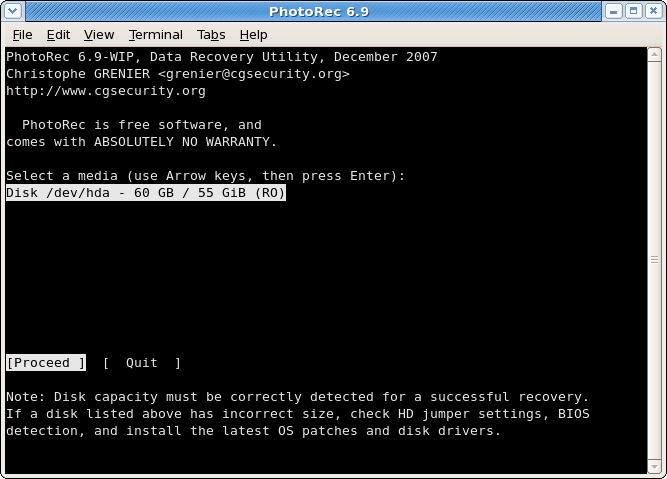
- Follow the official step-by-step guide. It says Windows users start the program from an administrator account and right-click, Run as administrator. Its screens use the arrow keys and Enter, per the guide.
What to watch out for
- Stop using the drive first. The page says: as soon as a file is deleted, "do NOT save any more pictures or files to that memory device or hard disk drive", or you may overwrite your lost data. Do not save recovered files to the same partition either.
- It is not a point-and-click tool. We did not test it, but the guide shows keyboard-driven screens and options like "expert mode". A careful first-timer may find it hard. A graphical version, QPhotoRec, is listed on the download page. We did not check it.
- No promise of recovery. We saw no claim that every file comes back. The page says a file can only be recovered whole if its data has not been overwritten, and fragmented files may fail. A page-listed online checker lets you upload a sample file to see if a type is supported. Our caution: do not upload private files.
Privacy and data
- We did not find a privacy statement for the program on the pages we read, and we did not test what it sends. It works on files you point it to.
- Recovered files can include old private data, so store them somewhere safe.
India
- We saw no region limit and no price. We did not test downloads from India.
Frequently asked questions
Is PhotoRec free?
Yes. Its page says it is free and open source under GPL v2 or later.
Can it recover from an SD card?
The page lists SD cards and other memory cards.
Do I need to install it?
The download page says no installer is needed.
Sources: PhotoRec, TestDisk, Download, Step by step. Checked 18 October 2026.
Independent guide, not affiliated.