
OpenHands: free, open-source AI coding agents you control
OpenHands is a free, open-source platform for AI software-engineering agents - give it a repo and a task, and an AI agent writes, runs and tests code like a junior developer. The software is free to self-host; for the AI model you connect either a cloud provider API key (billed per use by that provider) or a local model server running on your own hardware.
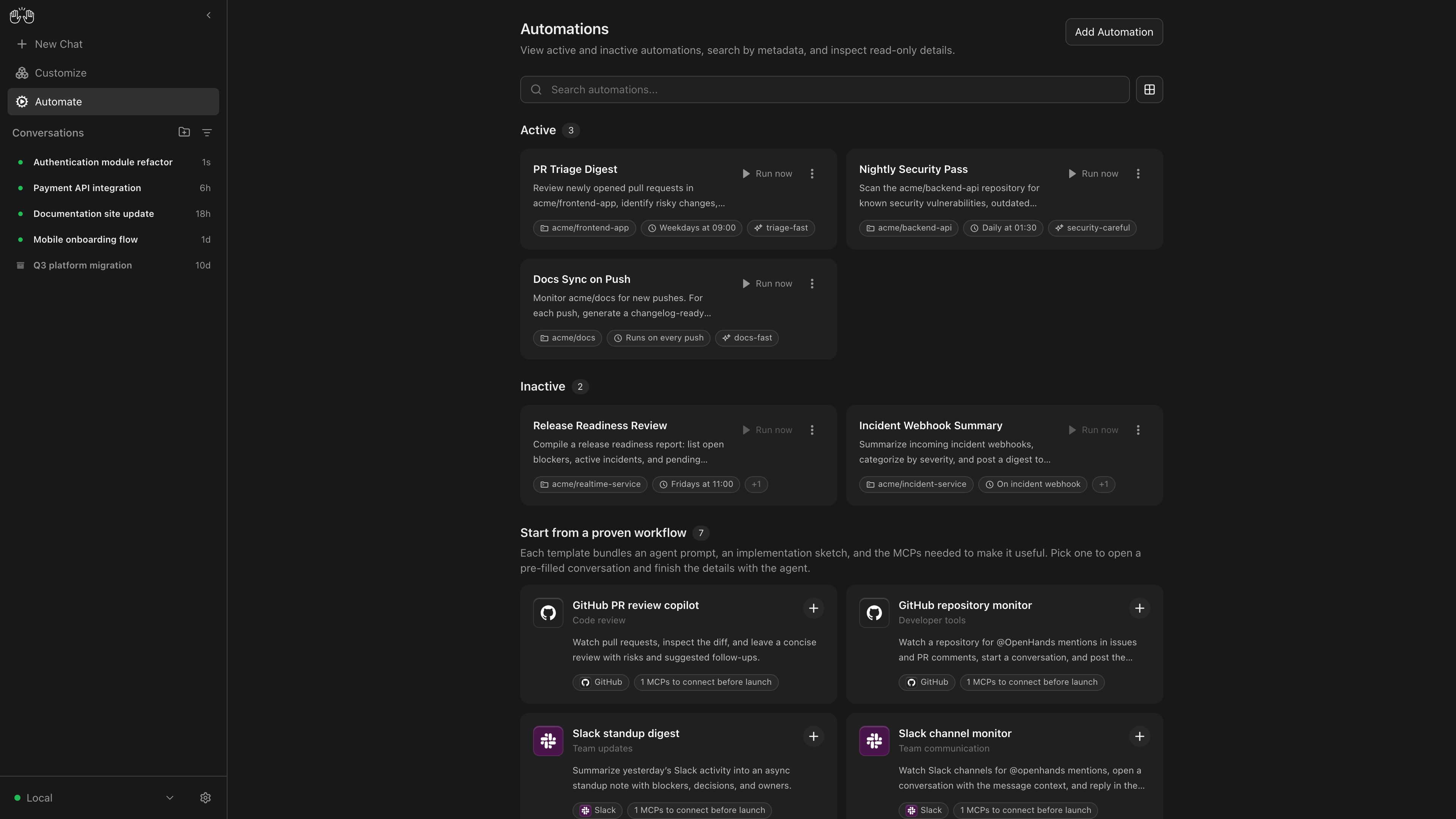
Official publisher artwork hosted by its publisher. Official source. Independent guide, not affiliated or sponsored. Artwork and trademarks belong to their owners.
Image: official OpenHands Agent Canvas screenshot, from the project's assets.
Quick facts
- What it is: an open-source platform (MIT licence, 91,000+ GitHub stars at the time of checking) for running coding agents - with a GUI, a command-line tool, and an SDK. It can also drive other agents like Claude Code, Codex and Gemini CLI through the Agent-Client Protocol.
- Price: the Agent Canvas app is free to self-host. The AI side needs a capable model: connect a cloud provider API key (OpenAI, Anthropic and others, billed per use by that provider) or a local model server such as Ollama, LM Studio, vLLM or SGLang, per the official docs - which also note OpenHands requires a powerful model to work well. So model, provider or compute charges may apply depending on what you connect; local models shift the cost to your own hardware. Paid Teams ($499/month, about ₹47,000, up to 10 users, 30-day trial) and Enterprise plans target companies. A hosted OpenHands Cloud also exists.
- Install: via npm or Docker, on your laptop or a server. The docs' Quick Start walks through both.
- Best for: developers who want an AI agent to handle real tasks - fixing issues, writing tests, small features - inside their own setup instead of a locked-in service.
What it is
OpenHands (from All-Hands AI, originally the OpenDevin project) is one of the most-starred open-source AI agent projects on GitHub. Its Agent Canvas is a control center for coding agents: start a conversation, point the agent at your code, and it can read files, run commands, edit code and test its changes. It runs locally by default and can connect to remote or cloud backends when you want agents working while your laptop is shut. OpenHands itself runs where you choose. One privacy point to understand: when the agent uses a cloud model, your code and context are sent to that model provider - self-hosting the app does not keep prompts local unless you also run a local model server.
Image: official OpenHands architecture diagram, from the project's GitHub README.
Is it free?
The software: yes, MIT-licensed and free to self-host. The AI behind it: OpenHands connects to any LLM supported by LiteLLM - cloud APIs like OpenAI or Anthropic (billed per use by the provider) or a local model server like Ollama, LM Studio, vLLM or SGLang, per the official docs, which caution that OpenHands needs a powerful model to work well. Cloud API costs depend on model and usage, and long agent tasks on premium models can add up quickly, so set usage budgets; local models run on your own hardware. The official pricing page lists the self-hosted Agent Canvas as free, a Teams plan at $499/month (about ₹47,000; up to 10 users, with a 30-day trial) for companies needing multi-user controls, and custom Enterprise pricing. Dollar conversion uses the mid-market rate of about ₹94 per US dollar (rateswale.com, 22 October 2026) and is approximate. There is also a hosted OpenHands Cloud at app.all-hands.dev where you sign in with GitHub, GitLab or Bitbucket.
India
- Self-hosting runs wherever your machine is; the docs cover laptop and server installs.
- Students can start with free or low-cost model tiers, or experiment with a local model through Ollama on a capable machine, before spending seriously.
- Running agents on a small home server or a cheap VPS is a practical way to keep long tasks going - a genuinely useful homelab project.
Good to know
- An agent that can run commands is powerful and risky: run it inside Docker (the default sandbox), use it on throwaway branches, and review its changes before merging.
- API costs can grow on big tasks - set usage budgets with your model provider.
- Agent Canvas can manage several agents and automate recurring chores like reports or issue triage.
Frequently asked questions
Is OpenHands free to use?
The platform is free and open source. You pay your chosen AI model provider for API usage, which can be near zero with free or cheap models and much higher on premium models.
Can it use Claude Code or Codex instead?
Yes - Agent Canvas works with any ACP-compatible agent, including Claude Code, Codex, Gemini CLI and OpenCode.
Is it safe to let an AI run commands?
OpenHands sandboxes agents in Docker by default. Still run it on non-critical code, use version control, and review everything it does.
Sources: OpenHands, OpenHands pricing, OpenHands docs, GitHub, USD-INR rate. Checked 22 October 2026.