
OBS Studio: free screen recording and live streaming
OBS Studio is free, open-source software for recording your screen and live streaming. Its site lists Windows, Mac and Linux. Expect a learning curve.
Official app preview
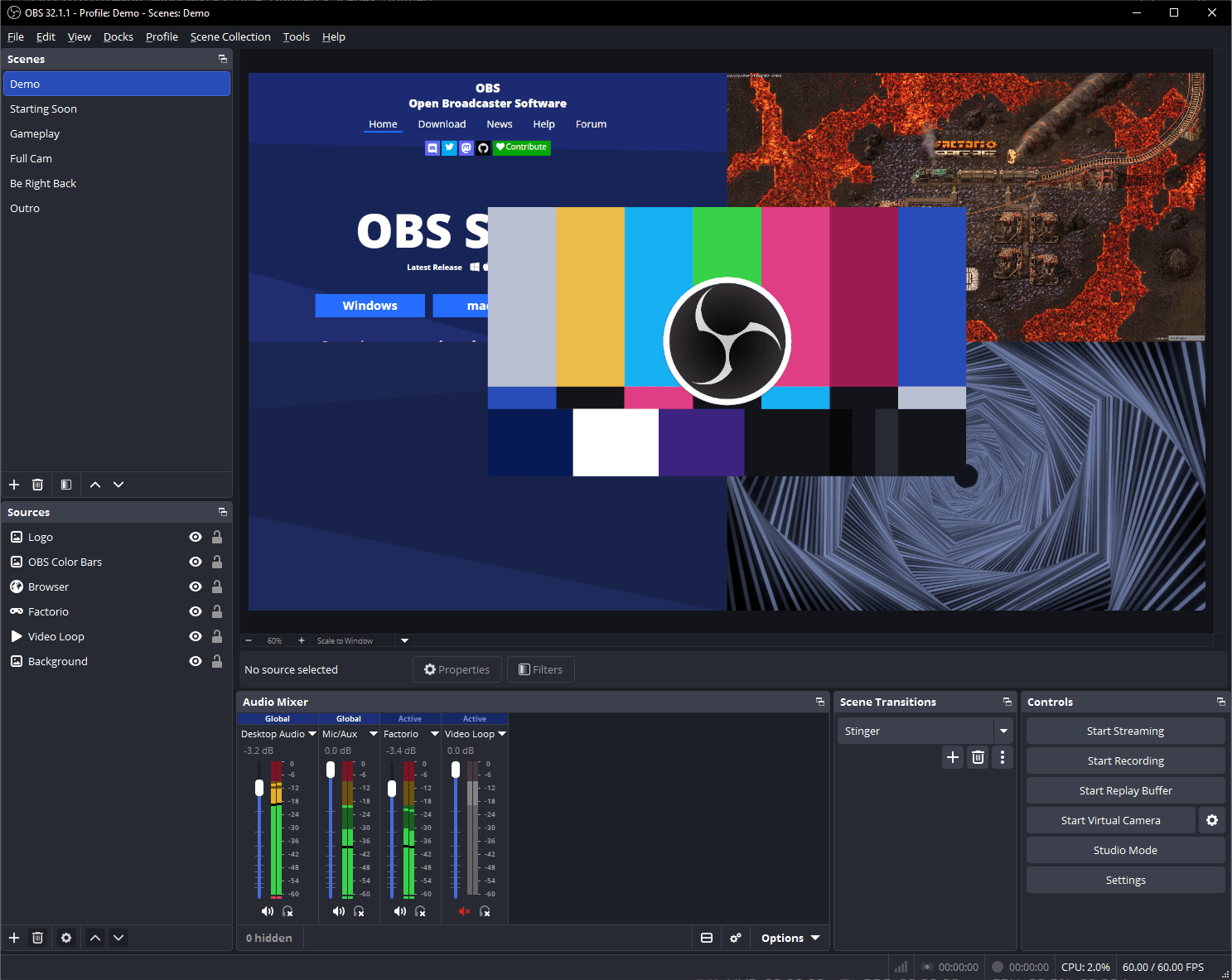
What it is
OBS Studio is a free, open-source app for recording your screen and live streaming. Its website describes it as "Free and open source software for video recording and live streaming" for Windows, Mac and Linux. You build scenes from sources such as window captures, images, text, browser windows and webcams, and switch between them. It is not an AI tool. We included it as a free option for recording lessons, demos or streams.
Is it free?
Yes, per the site: "Free and open source software". The project's GitHub page lists the GNU General Public License v2. The OBS privacy policy says you are not required to make any contribution or donation. The project is supported by sponsors and donations, per its site. We saw no price or paid plan for the app.
What you can do with it
- Record and mix. Real-time video and audio capture and mixing, with an unlimited number of scenes, per the site.
- Audio. A mixer with per-source filters such as noise gate, noise suppression and gain, per the site.
- Switch scenes. Transitions, hotkeys, Studio Mode to preview before going live, and a Multiview of up to 8 scenes.
- Extend. Plugins and scripts in Lua or Python, per the site.
What to watch out for
- Not a simple one-click recorder. The site lists a lot of options (scenes, sources, docks, hotkeys). Expect a learning curve.
- Computer needed. The site lists Windows 10 and 11, macOS 13.0 or newer, and Linux. It is not a phone app.
- Not tested. We did not install it or record anything.
Privacy and data
- The privacy policy (last updated 6 August 2025) covers the OBS websites and its software. It names Wizards of OBS LLC as the company.
- It says the services use cookies, web beacons and similar tools, and that Google Analytics is used on the services, with an opt-out plug-in linked.
- It says the services may collect information such as IP address, interactions, crashes and approximate location for analytics.
- It says the services are not intended for children under 13 (16 in some places).
- The policy does not spell out what the desktop app itself sends. We did not verify that.
India
- It is free, so no rupee price is involved. The site does not mention country limits. We did not check India availability beyond that.
Frequently asked questions
Is OBS Studio free?
Yes, per its site: free and open source, under the GNU General Public License v2 on GitHub.
Which systems does it run on?
Windows 10 and 11, macOS 13.0 or newer, and Linux, per the site.
Can it stream live?
Yes, the site says it supports live streaming to your favourite streaming platforms.
Sources: OBS home page, Privacy Policy, GitHub. Checked 17 October 2026.
Independent guide, not affiliated.
Official homepage and download page rechecked 22 October 2026. They list 32.2.2, Windows 10/11 and macOS 13.0 or newer. Linux distribution is via Flatpak or the official Ubuntu 24.04+ PPA. Other statements keep their original source-check date. Original publication date is unchanged.