
Netron: inspect AI model files in your browser
Netron is a free, open-source viewer for neural network model files. You open a model such as a TensorFlow Lite or ONNX file and see its layers, shapes and settings as a graph, so you can check what a model really contains before you put it on a device. We tested one small case on 27 October 2026: a tiny TensorFlow Lite example model, opened through a netron.app link of the kind the README lists for its samples, showed a readable layer graph with no sign-in. No payment was requested in our test.
Quick facts
- The Netron README describes it as "a viewer for neural network, deep learning and machine learning models". It lists ONNX, TensorFlow Lite, PyTorch, torch.export, ExecuTorch, TorchScript, TensorFlow, Core ML, OpenVINO, Keras, Caffe, Darknet, Safetensors and NumPy as supported, and calls MLIR, JAX, GGUF, RKNN, ncnn, MNN, PaddlePaddle and scikit-learn "experimental". We tested only TensorFlow Lite.
- The project's GitHub repository shows an MIT licence. The README offers the browser version at netron.app, plus macOS, Linux and Windows installers and a pip package. We tested only the browser version.
- In our test we did not sign in and were not asked for any payment. We did not verify any limits, such as maximum model size.
- The README does not say what the browser version does with a model file you open, and we did not audit network traffic or check how it handles files. Do not open private or sensitive models in the web app unless you have confirmed how they are handled. The README also lists desktop installers and a pip package; we did not test them.
- Netron shows structure, not quality. It does not tell you how accurate a model is.
Why use it instead of a chatbot
A chatbot can explain what a dense layer is. Netron's value is different: it draws the layers, tensor shapes, weight sizes and settings of the model file itself as a graph you can click through. For an embedded student, that is a quick visual check of a model's input shape and layer types before trying to run it on a microcontroller. We only tested one tiny model, so we cannot say how it copes with large ones.
Our test
On 27 October 2026 we opened netron.app in a desktop browser. We did not sign in. We used the "hello world" TensorFlow Lite example model from the public TensorFlow Lite Micro GitHub repository (hello_world_float.tflite, 3,164 bytes). We do not republish the file.
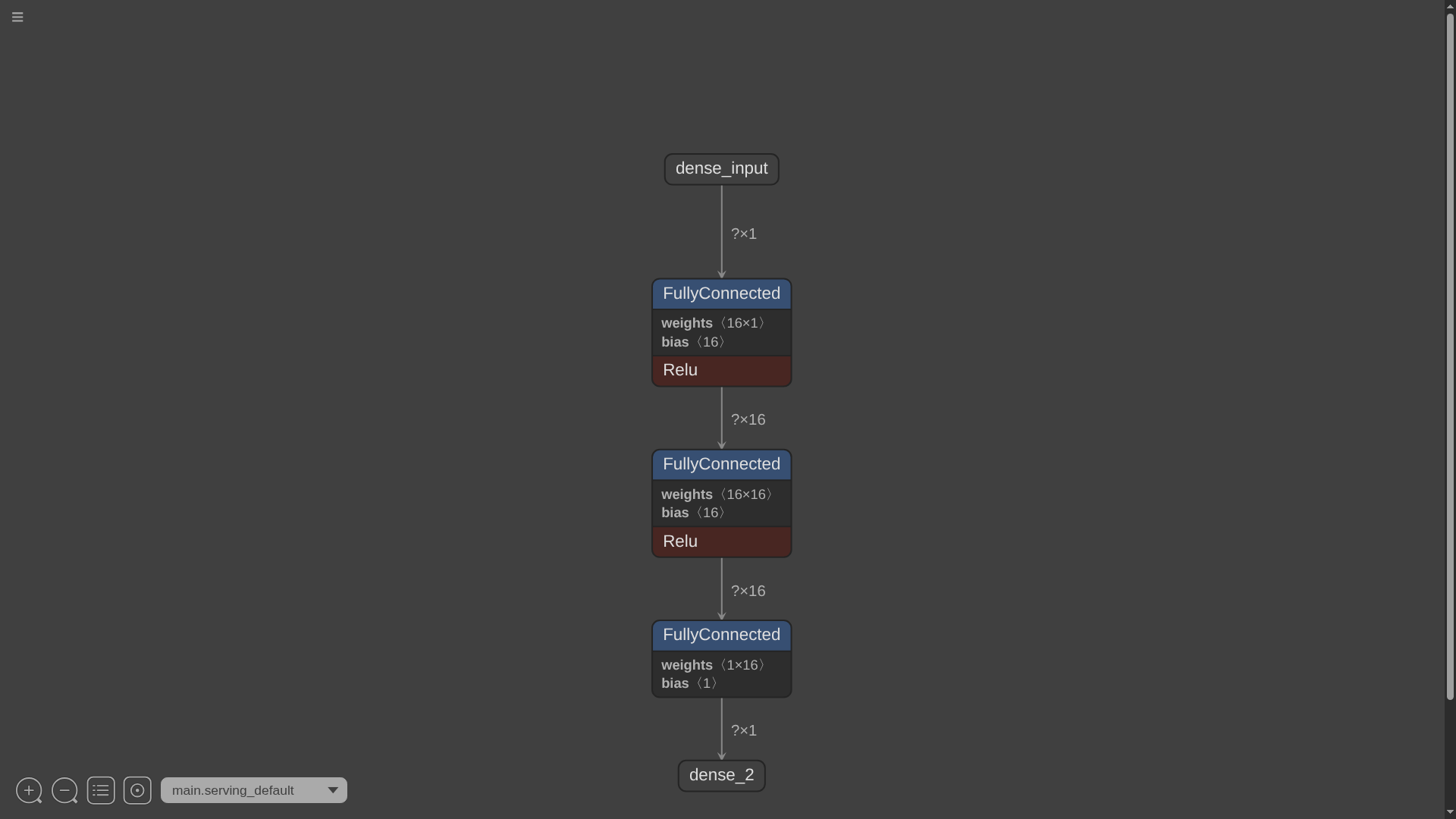
- Result: Netron drew a graph from the file: dense_input, then three FullyConnected layers (weights 16x1, 16x16 and 1x16, with biases 16, 16 and 1), two of them followed by Relu, then the output dense_2. Tensor shapes appeared on the connecting lines.
- Details: clicking a layer opened a Node Properties panel with its type, attributes (for example fused activation RELU and weights format DEFAULT) and the names of its input, weights, bias and output tensors. This panel is not shown in the screenshot.
- How we opened it: through a link in the pattern the README uses for its sample models, netron.app/?url= followed by the address of the raw model file on GitHub. We did not verify opening a file from local disk through the Open Model button, or drag and drop.
- Not tested: the Open Model button, ONNX, PyTorch and other formats, large or quantised models, searching inside a big graph, exporting the graph as an image, the desktop apps and the pip package. We saved nothing.
How to try it
- Go to netron.app. The README's sample list shows the link pattern netron.app/?url= plus the address of a public model file; that is the route we tested. The Open Model button is the other way in, which we did not verify.
- Read the graph from top (input) to bottom (output). Tensor shapes sit on the lines between layers.
- Click a layer to see its properties and tensor names.
- Do not open private or sensitive models in the web app unless you have confirmed how they are handled. The README lists desktop and pip versions, which we did not test.
Availability: netron.app is a public web page and we found no country statement in the README. We did not check this from India, and our test does not show how the tool behaves from your location.
Sources checked 27 October 2026: