NAPS2: free open source software to scan documents to PDF on Windows, Mac and Linux
NAPS2 says it is free and open source scanning software for Windows, Mac and Linux, and completely free for individuals and businesses.
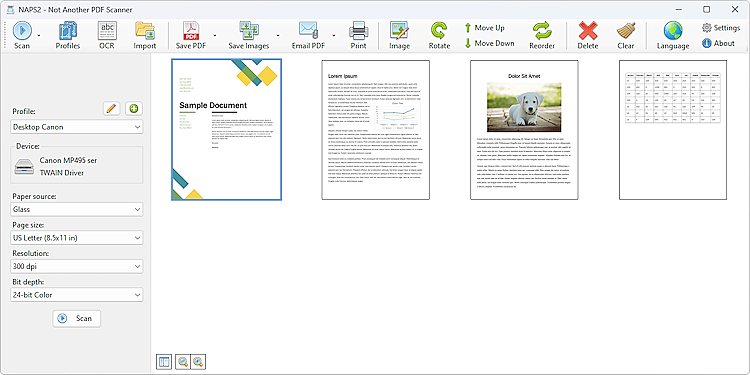
Official interface reference
The official NAPS2 homepage shows desktop scanning, crop and OCR examples. Use that page to inspect the publisher previews. They are not embedded here because website-image reuse rights have not been verified. No AiCoN scanner test is implied.
Quick facts
- What it does: scans paper documents from a flatbed or document feeder scanner and saves them as PDF, TIFF, JPEG or PNG.
- Price: free. The site says "completely free to use for both individuals and businesses, and includes no ads or unwanted software". Donations are optional.
- Platforms: Windows, Mac and Linux.
- Best for: people with a home or office scanner who want simple scans and searchable PDFs without paid software.
What it is
NAPS2 stands for "Not Another PDF Scanner". Its site says you can scan with devices from Canon, Brother, HP, Epson, Fujitsu and more, then save to PDF, TIFF, JPEG or PNG with one click. It supports flatbed scanners and automatic document feeders, including duplex.
Is it free?
Yes, per the vendor. The home page says "Free and open source" and "NAPS2 is completely free to use for both individuals and businesses". Every page footer says "provided completely free of charge, with no ads or restrictions". We saw no price anywhere, so there is nothing to convert to rupees. The official GitHub README and LICENSE state GNU GPL 2.0 or later for NAPS2. Some developer libraries have additional licence options.
What the site lists
- Choice of WIA and TWAIN drivers on Windows. The README also lists SANE and ESCL scanners.
- Settings such as DPI, page size and bit depth.
- Rotate, crop and rearrange pages, auto deskew, and brightness and contrast tools.
- OCR to make scanned PDFs searchable, in over 100 languages. The OCR help page says you download a language the first time you click the OCR button.
- Sharing a scanner across your local network, and a command-line interface for automation.
- Over 40 interface languages.
Good to know, per NAPS2
- The download page lists version 8.5.1, updated 12 October 2026. GitHub shows the same release.
- Windows: installer (x64 and ARM64), MSI and a portable ZIP. The site also links the Microsoft Store.
- Mac: installers for Universal, Intel and Apple Silicon. Linux: deb, rpm and Flatpak for x64 and ARM64.
- The README gives broad requirements of Windows 7+, macOS 10.15+ and Linux with GTK 3.20+. However, the download page places Windows 7/8, macOS 10.15/11 and Ubuntu 18.04 in separate legacy 7.5.3 sections. The macOS installation guide explicitly requires macOS 12+ for the latest version and names 7.5.3 as the last for macOS 10.15/11. Use the vendor package guidance for your OS.
- The OCR help page says NAPS2 cannot save OCR results to a text file. Save a PDF, then copy the text from your PDF viewer.
Our advice
- Check that your scanner has a driver for your computer before you start. NAPS2 works with scanner drivers, so it cannot make an unsupported scanner work. We did not test any scanner.
- Scans of IDs, bank papers or medical papers are private. Keep the PDFs in a safe folder, not a shared or synced one.
- Download only from naps2.com or the GitHub releases it links.
Privacy and data
- The privacy policy says that if you set up Gmail or Outlook email sending, NAPS2 stores your email address and a secure token only on your computer, sends them only to that provider, and that the developer cannot access them.
- It says no data is shared with any third party beyond that. The policy does not describe the scanning or OCR features, so we make no further claim.
India
- No region limit appears on the pages we read. We did not test it from India.
Source code
The GitHub project cyanfish/naps2 has about 4,700 stars, per its GitHub page. Its README and LICENSE state GNU GPL 2.0 or later; a generic repository label is not the licence text.
Frequently asked questions
Is NAPS2 free?
Yes. Its site says it is completely free for individuals and businesses, with no ads.
Does it scan with a phone?
The pages we read describe scanner use on a computer. It lists no phone app.
Can it make searchable PDFs?
Yes, with OCR, per its site. You pick and download an OCR language first.
Sources: naps2.com, Download, OCR help, Privacy Policy, GitHub. Checked 20 October 2026.
Official homepage, download page, GitHub README and LICENSE rechecked 23 October 2026. GPL 2.0 or later is now verified. The vendor download page separates legacy Windows 7/8 and macOS 10.15/11 packages from latest 8.5.1; the README still gives broader minimum requirements. This is not a scanner, installation or OCR test. Other claims retain their original source-check date. Original publication date is unchanged.