
MolView: sketch molecules and see them in 3D, free in your browser
Sketch or search any small molecule and watch its 3D model appear - free, in your browser, no account. Here is what our scripted test showed and where the free tier ends.
Quick facts
- What: MolView, a browser-based chemistry sketcher and 3D viewer for small molecules, made by Bergwerf Labs in the Netherlands.
- Free tier: search, sketch and view molecules with no sign-up. Saving diagrams, reaction mechanisms and advanced export (high-resolution, SVG, SDF, XYZ) need a paid plan.
- Paid plans: Student $9/year, Academic $49/year, commercial plans from $99/user/year, per the official subscriptions page.
- Runs in: any modern browser, touch-friendly; nothing to install.
- Data source: structures resolve through PubChem; sketches can come from its own builder (Mol* Viewer, per the app's About dialog).
- Best for: students learning organic chemistry, teachers demonstrating molecular geometry, and anyone who wants to see a molecule in 3D in seconds.
What it is
Type a name like aspirin or caffeine - or sketch atoms and bonds yourself - and MolView shows the structural formula on one side and a live 3D model on the other. You can rotate the model, switch between ball-and-stick, licorice and spacefill styles, and search by common name, IUPAC name, SMILES, InChI or molecular formula. It runs entirely in the browser, works on touch screens, and needs no account for its core features.
See how it looks
These are MolView's official illustrations from molview.com, hotlinked with attribution - not our screenshots.

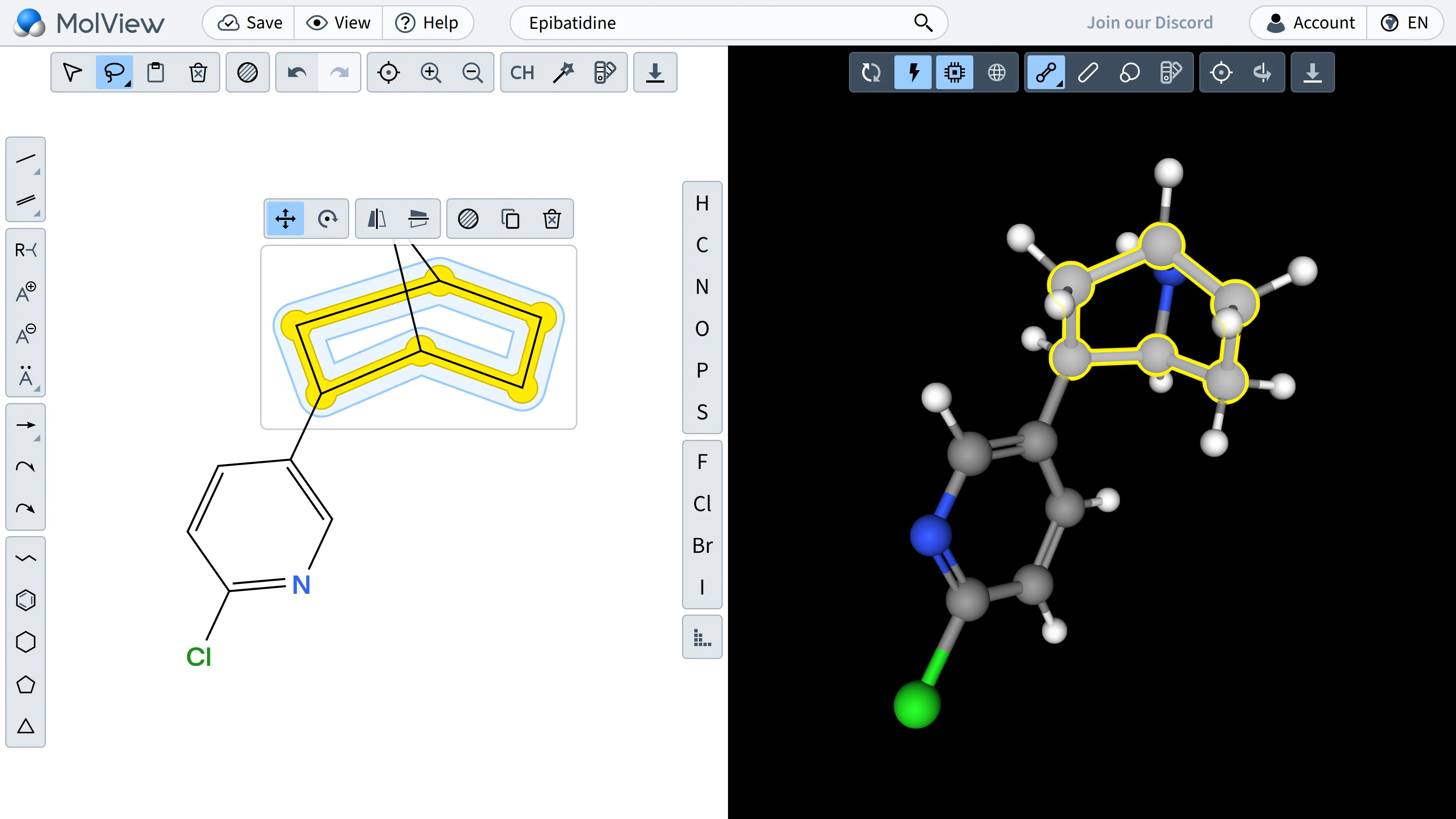
Source for both images: molview.com (Bergwerf Labs).
What we tested
On 22 October 2026 we ran a scripted desktop browser test on app.molview.com, no account. We clicked through the one-time Terms and Conditions prompt, typed "aspirin" into the Search box, confirmed live autocomplete suggestions appeared (Aspirin, Aspirin DL-lysine, NO-aspirin and more), and selected "Aspirin". The app loaded the page title "Aspirin", drew the 2D skeletal structure in the sketcher and rendered the 3D ball-and-stick model in the viewer - all in seconds, with no sign-in. The default molecule on first load is caffeine. We did not test drawing bonds manually, saving files, image export or paid features.
Is it free?
The core is free: search, sketch and view, no sign-up, per the official subscriptions page. The limit that matters: free diagrams cannot be saved, and advanced export (high-resolution images, SVG, SDF, XYZ) is paid. Paid plans listed on the same page: Student $9/year (about ₹850 at roughly ₹94.5 per US dollar, rate as of 21 Oct 2026), Academic $49/year (about ₹4,600), Standard commercial $99/user/year, Publisher $250/user/year. Prices include sales tax where stated; payments are handled by Paddle as merchant of record, with a 30-day refund window per the Terms.
Privacy and data
The points below summarize MolView's published privacy policy, updated 14 November 2025; we did not audit its systems.
- Free use needs no account, so you can sketch and view without handing over personal information.
- If you create an account, the policy says your information is stored in its database, used for email communication and user-demographics analysis, and that MolView may reach out to you personally based on your role or institution.
- It collects anonymized usage data through Google Analytics 4, per the policy.
- Servers are located in the United States; the database runs on a ScalaHosting VPS, and Paddle receives your name and email if you buy a subscription.
- You can view, update or erase your information in account settings, or request full account removal by email, per the policy.
India
- Nothing on the official pages indicates region restrictions; the app loaded and ran fully in our browser test. We did not test from India itself.
- Pricing is published in USD, EUR and JPY only; a student subscription is roughly ₹850/year at recent rates.
- Useful for Class 11-12 and college organic chemistry - seeing a molecule's geometry beats memorising flat structures.
Good to know
- Diagrams you create are your own intellectual property, per the Terms; structures retrieved from PubChem are believed to be public domain.
- Commercial use rules are specific: academic and non-commercial use is broadly allowed, but using MolView images in products that are sold (like textbooks or courseware) requires the Publisher subscription.
- The free tier cannot save your work - a session is lost when you close the tab, so screenshot anything you want to keep.
- The Terms note some features depend on external web services and availability is not guaranteed.
Frequently asked questions
Is MolView really free?
The core is: search, sketch and view small molecules with no sign-up. Saving diagrams and advanced export need a paid plan, from $9/year for students.
Do I need to install anything?
No - it runs in the browser, including on touch devices.
Can I use MolView images in a project or book?
Academic and non-commercial use is broadly fine per the Terms, but content sold commercially (like paid courseware) requires the Publisher plan. Read the use categories in the Terms before publishing.
Does it work offline?
No - structure resolution depends on online lookups, so you need a connection.
Sources: MolView, Features, Subscriptions, Terms and Conditions, Privacy Policy, App. Checked 22 October 2026.