
MediaInfo: free tool to see what is inside a video or audio file
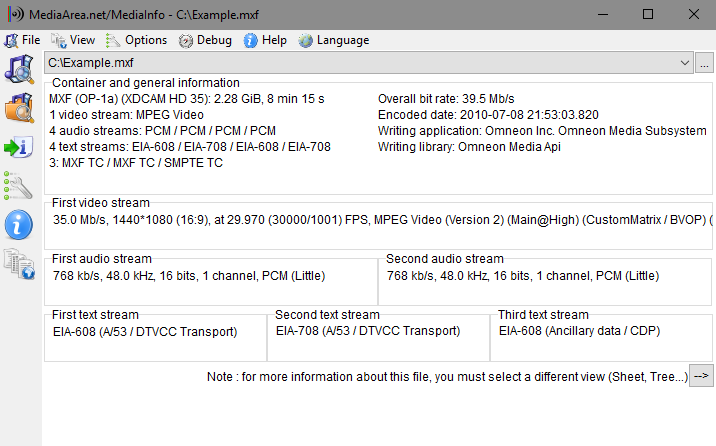
MediaInfo calls itself open-source software with a BSD-style licence. It shows you the codec, bit rate, resolution and tags inside a media file, which helps when a video will not play or you want to know what you downloaded. Here is what its pages say.
Official app preview
Quick facts
- What it does: shows the technical and tag data inside video and audio files: container, codecs, resolution, frame rate, bit rate, channels, subtitles and chapters.
- Price: free on desktop. Windows, Mac and Linux downloads from mediaarea.net cost nothing; the licence is BSD-style open source and the site asks for donations. Store apps differ: the iPhone app and the official Android app are free to download with optional in-app purchases for extra features (US store: $2.99 a year or $7.99 lifetime, about ₹285 or ₹760), and the Mac App Store version is a paid listing ($0.99, about ₹95).
- Platforms: Windows, macOS, Android, iOS and many Linux distributions (also Flatpak and Snap), per its download list. A browser version, MediaInfoOnline, works without installing.
- Best for: anyone who wants to know why a video will not play, what quality a file really is, or which codec it uses.
What it is
MediaInfo is a project of MediaArea. Its site describes it as "a convenient unified display of the most relevant technical and tag data for video and audio files". You open a file with it and it lists the details: the container format, the video and audio codecs, bit rates, subtitle tracks and chapter marks.
Is it free?
On desktop, yes, per the project. The licence line on its page says: "It is Open-Source software which means that end users and developers have freedom to study, to improve and to redistribute the program (BSD-style license)." The downloads page charges nothing and the site asks for donations to support development.
On phones and in app stores it is not fully free. The iPhone app and the official Android app (from MediaArea.net on Google Play) are free to download with optional in-app purchases that unlock more features; the US App Store lists these at $2.99 a year or $7.99 lifetime (about ₹285 or ₹760). The Mac App Store version is a paid listing at $0.99 (about ₹95) with the same optional extras; the free choice on a Mac is the download from mediaarea.net. The browser version, MediaInfoOnline, is free to use.
What the pages list
- Container details: format, duration, overall bit rate, writing application, title, author, album, date and more.
- Video details: codec, aspect ratio, frame rate, bit rate, color space and bit depth.
- Audio details: codec, sample rate, channels, bit depth, language and bit rate.
- Subtitle and chapter information.
- Reads many formats, including MP4, Matroska (MKV), AVI, MPEG-TS, MP3, FLAC, AAC, H.264, H.265 (HEVC) and more.
- Current version is 26.10, per its download section. MediaInfoOnline lets you test it in the browser without installing.
Our advice
- Use it before you convert or delete a file: one look tells you the codec and quality. This is our advice, not the project's.
- If a video has no sound on your TV, check the audio codec with MediaInfo first. It often explains why.
- Download from mediaarea.net only.
Privacy and data
- We could not read a privacy statement on the pages we checked (the privacy link redirected) and make no claim about data. The desktop program reads files on your own computer.
India
- No region limit appears on the pages we read. We did not test it from India.
Frequently asked questions
Is MediaInfo free?
The desktop version from mediaarea.net is free and open source under a BSD-style licence. The iPhone and Android apps are free with optional paid extras, and the Mac App Store listing costs $0.99 (about ₹95).
What is it for?
It shows what is inside a media file: codecs, resolution, bit rate, audio channels, subtitles and tags, per its feature list.
Do I have to install it?
No. Its site offers MediaInfoOnline, which tests files in the browser without installing anything.
Sources: MediaInfo, Download, App Store (iPhone), Mac App Store, Google Play. Checked 21 October 2026.
Official screenshot gallery, product page and platform download list rechecked 22 October 2026. The product page still lists version 26.10. Store prices and other statements retain their original source-check date. Original publication date is unchanged.