Machine Learning for Kids: train a real AI model in your browser, free
Children can collect examples, train a real machine learning model and test it in the browser, then build a Scratch game that uses it. No account, no payment. Here is what the official pages confirm and what our hands-on test found.
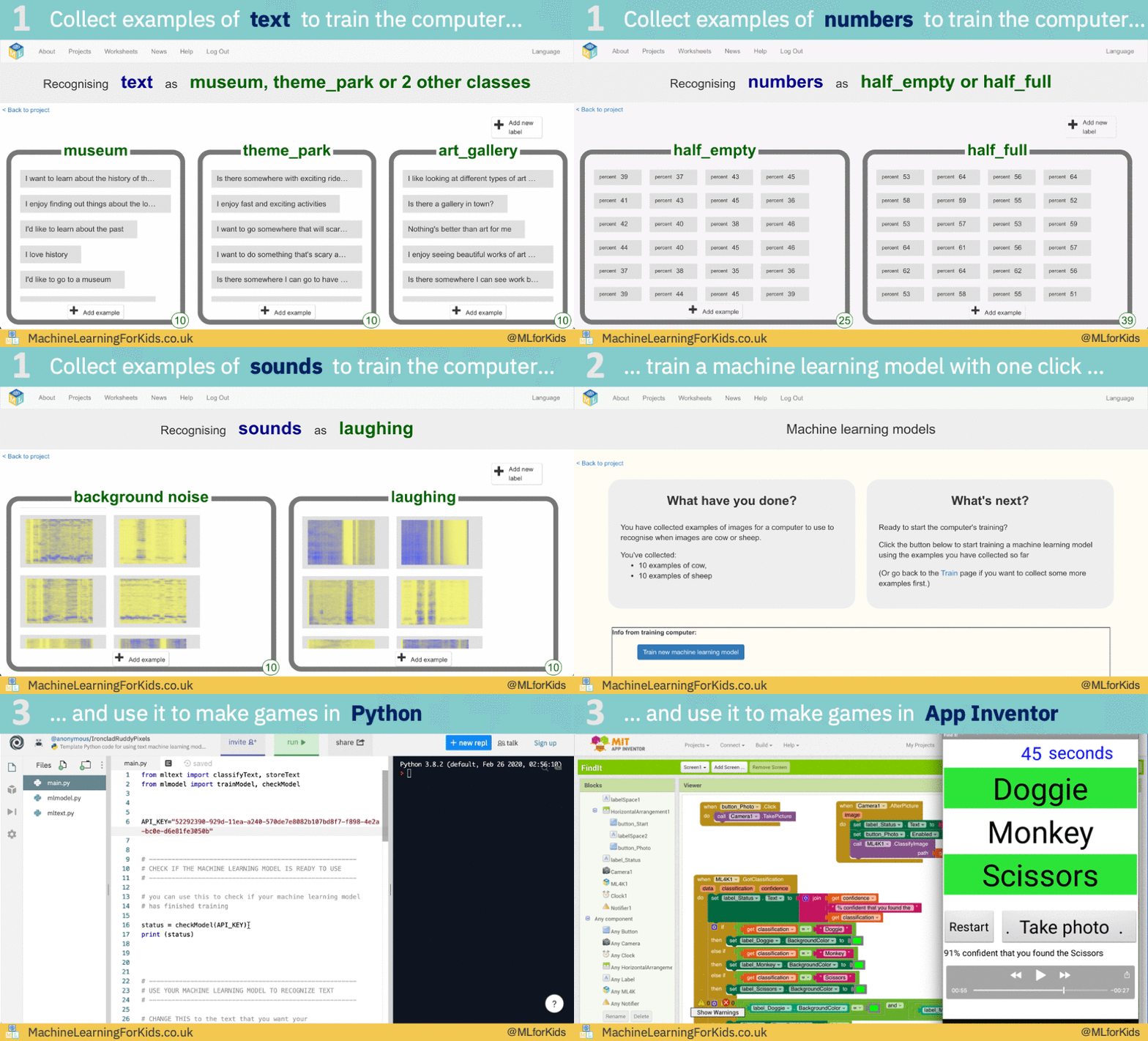
Official demo animation
Quick facts
- What: Machine Learning for Kids, a free website where children train real machine learning models and use them in Scratch, Python or EduBlocks projects
- Cost: completely free; the "Try it now" mode needs no signup and unlocks all features (projects are deleted after at least four hours)
- What you can build: models that recognise text, images, sounds or numbers, predict numbers, or generate text
- Made by: Dale Lane, a UK developer, using IBM Watson APIs; open source (github.com/IBM/taxinomitis); running since 2017
- Accounts: optional class accounts let teachers manage students; student accounts store a username only
- Privacy: no tracking or advertising cookies; project data can be stored on your own computer instead of the cloud
- Works in India: yes, global site; English needed (26 interface languages, Hindi not among them)
What it is
Machine Learning for Kids is a free educational website that turns machine learning into something a child can do hands-on: collect examples, train a model, test it, then build a game or app that uses it. According to its About page, the tool first launched in 2017 and is now used by thousands of schools, code clubs and families. It works entirely in the browser with nothing to install, and it connects with Scratch so trained models become blocks children can code with. Ready-made "pretrained" models (speech to text, face detection and more) are also available as Scratch extensions for projects that would be too complex to train from scratch.
The site includes a library of downloadable worksheets: step-by-step lesson guides with colour screenshots, each designed as a single-lesson activity, plus project templates with training data already collected, such as Titanic survival prediction, UK newspaper headline recognition, and phishing detection.
What we tested
On 22 October 2026 we used the site in a desktop browser with no account. This is exactly what we did and saw:
- On the login page we chose "Try without registering". The site confirms this mode allows "all features of the website without needing to register or log in", with projects deleted after at least four hours.
- We imported the "UK Newspaper Headlines" template, which came with 278 real headlines across four classes: Daily Mail, Daily Telegraph, Independent and The Guardian.
- We clicked "Train new machine learning model". The text model trained in the cloud in about a minute and showed status "Available".
- We tested it with two headlines we wrote: "Royal family attends charity gala in London" was recognised as Daily Mail with 54% confidence, and "Pound falls as markets react to tech stocks selloff" was recognised as The Guardian with 93% confidence. The full loop of collect, train and test worked without paying or signing up.
- We also imported the "Cats and Dogs" image template. Some of its training photos failed to load because the third-party image host refused the request, so image projects may need patience or your own uploaded photos.
Is it free?
Yes. There is no paid tier on the site: no pricing page, no subscription, no feature locked behind payment. The anonymous "Try it now" mode includes all features. Teachers can optionally create free class accounts to manage students. The project is maintained by one developer and supported through IBM, which hosts the open-source code.
What you can use it for
- A first real AI lesson: children see for themselves that more and better examples make a model smarter, which is the core idea behind every AI system they meet
- School and coding clubs: free lesson worksheets and class accounts built for teachers
- Weekend projects at home: train a model to recognise your drawings, sounds or hand gestures, then build a Scratch game with it
- Trying pre-trained AI: speech-to-text and face detection models can be added to Scratch projects as ready-made blocks
Privacy and data
The site's Help section says it is created and operated by a single individual in the United Kingdom, and gives an unusually detailed privacy breakdown. Teacher accounts store a username and email; student accounts store a username only, with no email addresses, real names or contact details, and students cannot create accounts by themselves. When creating a project, you choose where its data lives: in the cloud (a database on IBM Cloud in Dallas, not published, sold or shared) or on your own computer (browser storage, so no project data touches the site's servers at all). Cookies are used only for logging in; "Try it now" needs none, and the site says it uses no tracking or advertising cookies. Text models are trained in the cloud, while image, sound and number models are trained on your own computer. We did not audit the service's servers or data handling; this section only summarises the site's published Help pages.
India
The site is global and we hit no region restrictions. Children will need working English: the interface is available in 26 languages, but Hindi is not one of them, and the worksheet text is in English. Everything runs in the browser, so no app store access is needed, which makes it usable on school computers and shared family PCs alike.
Good to know
- "Try it now" projects are deleted after at least four hours. Create a free class account if you want work to persist.
- Some image templates load photos from outside image hosts; one failed to load in our test, so be ready to upload your own photos instead.
- The model results are only as good as the examples collected. That is the point: testing wrong answers is part of the lesson.
- The site's newspaper template data is from 2017, so its "news" is dated, though the technique is timeless.
Frequently asked questions
Do we need to sign up or pay anything?
No. "Try it now" gives full access with no account and no payment. Registration is only needed for teachers who want to manage a class.
What ages is it for?
It is designed for school-age children with an adult or teacher supervising, and it assumes no prior coding knowledge; the projects build on Scratch.
Does it work on a phone?
It is a browser tool, but it is designed for desktop use with Scratch. A laptop or desktop computer is the practical choice.
Who is behind it?
UK developer Dale Lane, who has run it since 2017. It uses IBM Watson services, and the source code is public under IBM's GitHub organisation.
Scoped recheck 23 October 2026: official site reachable and source repository (Apache-2.0, actively maintained) rechecked; the free "Try it now" mode and Scratch integration claims are unchanged. The added animation is the project's own About-page demo file from the repository. Other claims retain their original source-check date. Original publication date unchanged.