
LibreCAD: free open source 2D CAD software for technical drawings
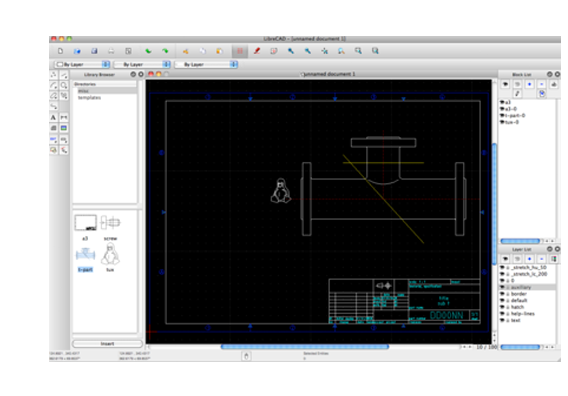
Official publisher historical homepage screenshot, not our current-version or import/export test. Hosted by publisher. https://librecad.org/. Independent guide, not affiliated or sponsored.
Scoped recheck: 24 October 2026. Official pages, terms and documentation reviewed; no account, generation, upload, installation, appliance, calendar, payment or deletion test. Original publication date retained.
LibreCAD remains a free GPLv2 2D desktop CAD tool for Windows, macOS and Linux, not an AI app or 3D modeller. The stable release is 2.2.1.6, published 17 October 2026. Rolling stable-branch candidates and master builds are testing channels, not newer proven stable releases.
What it is
LibreCAD is a 2D CAD program, used to make flat technical drawings such as plans and part outlines. Its website calls it "a feature-packed and mature 2D-CAD application" and "a free Open Source CAD application for Windows, Apple and Linux". It is a desktop program, not an AI tool and not a phone app. It is 2D only, so it is a different job from a 3D modeller.
Is it free?
Yes, per LibreCAD. The site says "Completely and Utterly Free" and "No worries about trials, subscriptions, license costs or annual fees". It adds that support and documentation are free from its community. It says the code is open source under "GPLv2". We saw no price and no sign-in step on the pages we read.
Good to know, per LibreCAD
- It is "available in over 30 languages".
- Downloads are on GitHub. For Windows, the site says to find the latest stable EXE installer there. For Linux it suggests your package manager or an AppImage, and for macOS the stable DMG packages.
- The site says "Help is needed for macOS deployment", so the Mac build may get less attention. We did not check.
- GitHub lists v2.2.1.6, published 17 October 2026, as the latest release when we checked.
- The site notes that the 2.2.0 series needs Qt5. That matters only if you build it from source.
Our advice
- Good for school or hobby drawings, such as a room plan or a workshop sketch, if you want a free CAD tool.
- Download it only through the links on librecad.org, and use the stable release, not the prerelease installers meant for testers.
Privacy and data
- We read no privacy statement for the program and make no claim on what data it collects. Drawings are files on your computer, but we did not check anything beyond that.
India
- No region limit appears on the pages we read. We did not test it from India. There is no price to convert.
Licence note
The repository LICENSE and official manual both expressly state GPLv2, including a no-warranty disclaimer. The licence file separately lists bundled resources, including CC0 SVG icons, MIT muParser and other component/font licences. That source evidence is stronger than an automatic repository badge showing mixed/no single licence. If redistributing a modified application, inspect its actual licence obligations; this guide is not legal advice. The program’s licence statement alone is not a certification of engineering fitness.
DXF is the safe interchange format to verify first. The development README describes DXF/DWG converters and says DWG input/output needs a build with DWGSUPPORT enabled; do not promise every stable package exports DWG or matches AutoCAD perfectly. Keep the original file, save a DXF copy and inspect units, fonts, dimensions, blocks and geometry after reopening or exchanging it. PDF is for review/printing, not proof the editable drawing round-trips without loss. No import/export or sample drawing was run.
Release 2.2.1.6 documents fixes for Undo/Redo, nested blocks/clipboard, hatches, snapping, text, printing and unsafe DXF/DWG reads, plus bounded hyperbolas, RTL MText and small-display improvements. Those are maintainer claims, not our regression tests. Its published SHA256SUMS covers attached release files, not GitHub’s automatically generated source archives. The development README’s universal macOS/signing and new converters describe its branch, not proof that the separate stable DMGs have identical packaging. Do not disable OS security controls just to follow a generic installation tip.
Source-build requirements are branch-specific: current README says Qt6.4+ for 2.2.2/master-era development and Qt5.15+ for 2.2.1, whereas the homepage’s Qt5 sentence is historical 2.2.0 context. The manual warns it is work in progress; its old OS X10.9 installation wording is not a current supported-OS guarantee. No installer, signature, checksum download or operating-system compatibility was tested here.
Frequently asked questions
Is LibreCAD free?
Yes. Its site says it is completely free, with no trials, subscriptions, license costs or annual fees.
Can it do 3D?
No. Its site describes it as 2D CAD.
Which systems does it run on?
Windows, Apple (macOS) and Linux, per the site.
Sources: librecad.org, GitHub. Checked 20 October 2026.
Independent guide, not affiliated.
Scoped recheck: free 2D scope and official screenshot · stable release, packages and checksum scope · branch-specific build and converter caveats · direct GPLv2 and bundled licences · units, layers and output scale · dimension length factor and preferences. Checked 24 October 2026. Published source review only; no account, installation, generation, upload or hardware test.