
Kerala birth, death and marriage certificates: how to download online
Kerala's Local Self Government Department (LSGD) runs K-SMART, a citizen portal with a public quick-certificate search for civil registration records. It lists seven certificate types: birth, death, common marriage, Hindu marriage, building, residence and welfare pension. The search works without any login. For a birth certificate you enter the district, local body, sex, date of birth and the first three letters of the mother's name. We tested the search on 28 October 2026 and it returned matching records within seconds.
Quick facts
- Which portal: per LSGD's civil registration page, birth and death certificates for corporations and municipalities are searched on the K-SMART citizen portal. If the event was registered in a grama panchayat, the department directs you to the ILGMS citizen portal instead.
- What you can search: the K-SMART quick certificates page lists seven types - Birth Certificate, Death Certificate, Common Marriage Certificate, Hindu Marriage Certificate, Building Certificate, Residence Certificate and Welfare Pension Certificate.
- Search inputs: for a birth certificate, pick District, Local Body Type and Local Body, then enter Sex, Date of Birth (DD-MM-YYYY) and the first three letters of the mother's name. For a death certificate, LSGD says to search with the date of death and the deceased's name.
- No login: the quick certificate search is a public page. The Register and Login buttons on K-SMART are for its other services, not for this search.
- Fee: none of the pages we checked state a fee for searching or downloading these certificates. The only fee LSGD's civil registration pages mention is a ₹5 late fee for adding a child's name to a birth record, which is a different service.
- Our test: on 28 October 2026 the birth search returned matching records. We did not view or save any certificate - the certificate view did not load in our test browser, so treat the final download step as described by the department, not verified by us.
- Privacy: the results display personal details to anyone who enters matching search inputs. That is how this public-records search is designed. Be careful when searching other people's records and never share screenshots that show their details.
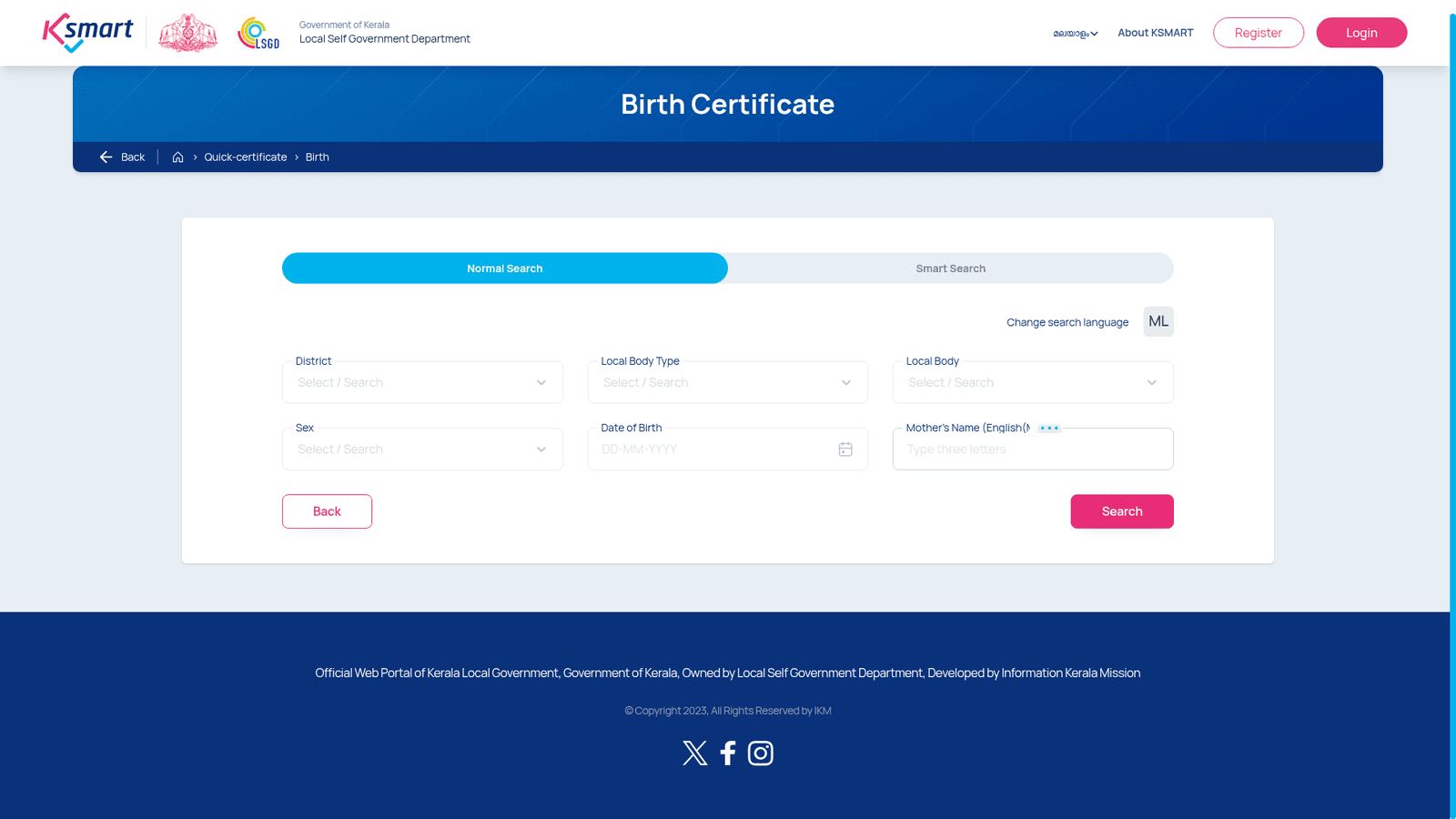
How to download a birth certificate
- Open the K-SMART quick certificates page (link below) and choose Birth Certificate.
- Select District, Local Body Type and Local Body.
- Enter Sex, Date of Birth in DD-MM-YYYY format and the first three letters of the mother's name.
- Press Search and choose the matching record from the results.
- LSGD describes viewing and downloading the certificate from there. We saw no payment step up to that point, but the final certificate view did not load in our test browser, so we could not verify the last step ourselves.
For death certificates, LSGD says the search uses the date of death and the deceased's name. For marriages, the quick certificates page lists both Common Marriage Certificate and Hindu Marriage Certificate searches.
If the birth, death or marriage was registered in a grama panchayat, use the ILGMS citizen portal instead - LSGD's civil registration page routes panchayat records there.
Sources checked 28 October 2026: