
KSRTC bus tickets online: ordinary and SWIFT services on the official portal
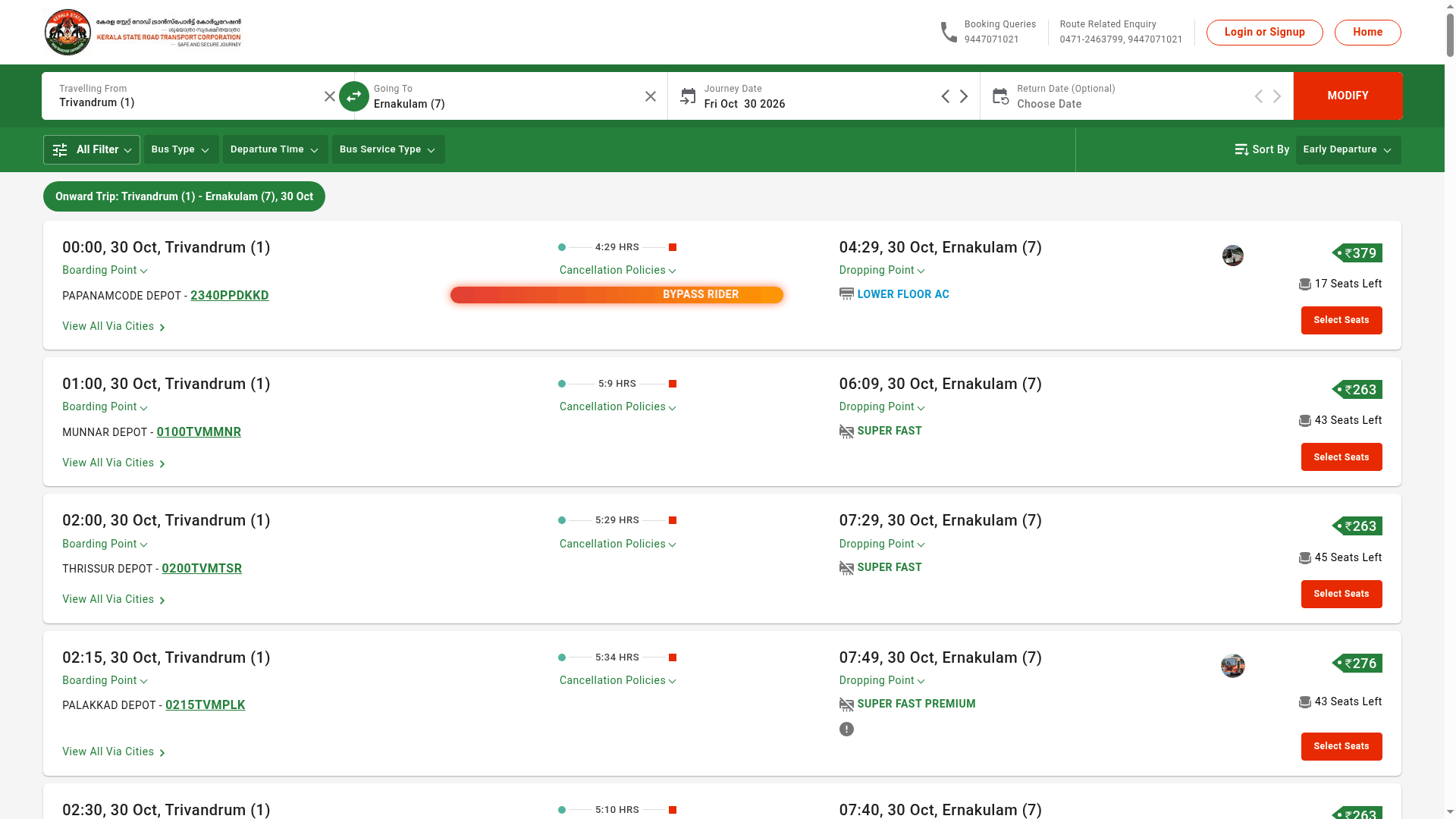
You no longer need a counter queue for a KSRTC seat. The Kerala State Road Transport Corporation runs an official online reservation portal, branded ENTE KSRTC Neo-oprs, where you can check live seat availability, pick your seat and pay for both ordinary services like Super Fast and SWIFT premium buses. We tested a Trivandrum to Ernakulam search on 29 October 2026 and found fares from ₹263 with live seat counts.
Quick facts
- What it is: KSRTC's official online reservation portal, onlineksrtcswift.com, branded ENTE KSRTC Neo-oprs. The site footer identifies it as a Kerala State Road Transport Corporation service, and the Kerala government site for KSRTC SWIFT (ksrtcswift.kerala.gov.in) links to it as the booking portal.
- What you can book: both SWIFT premium buses (like AC sleepers and Bypass Rider services) and ordinary KSRTC services like Super Fast - in our test search, one screen listed Super Fast departures from ₹263 alongside a Lower Floor AC Bypass Rider at ₹379, each with a live seat count.
- Live availability: every listed service shows how many seats are left before you click Select Seats, so you can see at a glance whether a bus is filling up.
- Fares: displayed next to each service before booking. The portal notes that dynamic pricing applies on some buses, so the same route can cost different amounts at different times.
- After booking: the same site has Manage Booking, Cancellation and Status Check sections, so changes and cancellations happen online too.
- On mobile: the same system runs as the Ente KSRTC Neo-oprs app on Google Play and the iPhone App Store.
- Bonus: KSRTC Budget Tourism tour packages are also bookable through the same portal.
How to book a seat
- Open onlineksrtcswift.com on your phone or computer (or install the Ente KSRTC Neo-oprs app).
- Choose Travelling From, Going To and the Journey Date, then tap Search Buses. Round trips are supported - set a return date if needed.
- Compare the listed services by departure time, bus type and fare, then tap Select Seats on the one you want.
- Log in or sign up, fill in passenger details and pay online to confirm the seat.
- To change or cancel later, use the Manage Booking or Cancellation section on the same site with your ticket details.
For route-related questions, KSRTC lists 0471-2463799 and 9447071021; the portal also shows a toll-free number, 18005994011.
Sources checked 29 October 2026:
- ENTE KSRTC Neo-oprs - KSRTC online reservation portal (tested)
- KSRTC SWIFT official site (Kerala government, links to the booking portal)
- Ente KSRTC Neo-oprs on Google Play
- Ente KSRTC Neo OPRS on the App Store
Explainer by AiCoN - not a government publication. Fares and services can change; check onlineksrtcswift.com.