GParted: free partition editor to resize and manage disk partitions
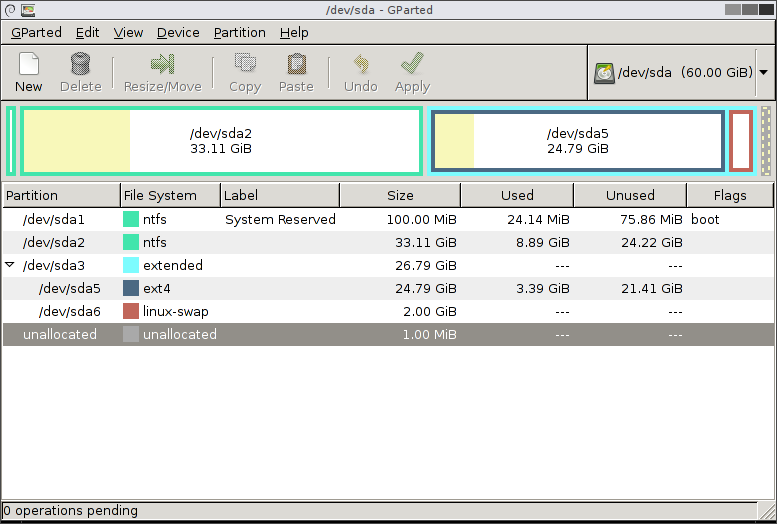
GParted says it is free software and "You do not have to pay money to use GParted". It resizes, copies and moves disk partitions, and its own page warns that editing partitions can cause data loss.
Quick facts
- What it does: creates, deletes, resizes, moves, copies, checks and labels disk partitions, with a graphical window.
- Price: free. The home page says "You do not have to pay money to use GParted". Donations are optional.
- Platforms: runs on x86-64 computers running Linux, Windows or Mac OS X by booting from GParted Live media (CD or USB). It needs at least 1 GB of RAM for all features.
- Best for: careful users who need to grow or shrink a drive's partition, for example to make room for a second operating system. A mistake can lose data.
What it is
GParted is the GNOME Partition Editor. Its home page calls it "a free partition editor for graphically managing your disk partitions" and says you can resize, copy and move partitions without data loss. Its examples: grow or shrink your C: drive, free up space for new operating systems, and create partitions to share data between operating systems.
Is it free?
Yes, per the project. Its Free Software section says you can run, copy, distribute, study, change and improve it, and that it is under the GNU General Public License version 2 or later. No price appears on the pages we read, so there is nothing to convert to rupees.
What the pages list
- Create partition tables (msdos or gpt), and create, move, copy, resize, check, label and delete partitions.
- Work with file systems including ext4, NTFS, FAT32, exFAT, btrfs and xfs. Which actions work depends on the file system, per its feature table.
- Hard disks, SSDs, USB sticks, NVMe drives and RAID devices.
- An attempt to rescue data from lost partitions.
Good to know, per GParted
- The best way to get all features is GParted Live, a small bootable GNU/Linux system. You download an .iso, write it to a USB drive or burn it to a CD, then restart your computer from it.
- The download page lists GParted Live 1.8.1-6 (64-bit only), and the news page dates that stable release 31 August 2026. The 64-bit image works with UEFI Secure Boot, per the download page.
- Checksums are provided, with steps to verify them.
- The download page warns in capitals: "Editing partitions has the potential to cause LOSS of DATA. You are advised to BACKUP your DATA before using gparted."
- The Live CD page recommends a whole-disk or partition image backup first, and names free tools such as Clonezilla and Partclone.
Our advice
- Back up everything important before you touch a partition. This is the project's own advice, and we agree with it.
- Do not run it on a laptop with a low battery, and do not switch off the computer while it applies changes. This is our general caution, not from the project.
- If you are not sure which drive is which, stop and ask someone who knows. We did not test GParted.
- Download only from gparted.org.
Privacy and data
- We found no privacy statement for GParted on the pages we read and make no claim on what data it collects. It runs from a bootable USB, so it works on your drives directly.
India
- No region limit appears on the pages we read. We did not test it from India.
Frequently asked questions
Is GParted free?
Yes. Its home page says you do not have to pay money to use it, and it is under the GPL.
Can I use it on Windows?
Yes, by booting from GParted Live media, per its requirements. It does not install like a normal Windows program.
Can it lose my data?
Yes. Its download page warns that editing partitions can cause data loss and advises a backup first.
Sources: gparted.org, Features, Live CD/USB, Download, News. Checked 21 October 2026.
Official artwork and screenshot pages checked 22 October 2026. The failing logo was removed. Available alternate artwork is not used as a substitute for the current app icon, and small screenshots are not enlarged. Original publication and other source-check dates are unchanged.