Google Stitch: AI that designs app screens from a prompt
Stitch is a Google Labs tool where you describe an app or website in plain words and it draws the screens, with colours, fonts and layout chosen for you. We tested it on 27 October 2026 with one sample prompt. It produced a colour and font set and one parent-dashboard screen in under two minutes, but some icons showed as plain text in our screenshot. We did not test export, prototypes, voice or the Web mode.
Quick facts
- Stitch is a Google Labs product, still marked "BETA" in the app. Google's 18 March 2026 post describes it as an "AI-native software design canvas" where you turn natural language into UI designs.
- Google's post lists an infinite canvas, a design agent, a DESIGN.md file for design rules, interactive prototypes with a Play button, voice input, and exports to developer tools such as AI Studio. We tested only the prompt-to-design step.
- Cost: in our session we were not asked for a card or any payment. We could not find a verified limit or pricing terms on Google's pages, so we do not state any.
- Signing in needs a Google account. The first use asks you to accept additional Stitch terms and has two email and research-invite boxes ticked by default. We unticked both.
- Output is a draft. Stitch's own terms dialog says its outputs are not always accurate and that you must review the work yourself.
Why use it instead of a chatbot
A chatbot can describe a screen or write code for it. Stitch gives you the picture first: a canvas with a colour set, a font pairing and a laid-out screen you can look at, then change with follow-up prompts. That helps if you are a student, a small shop owner or a founder who needs to show an app idea to someone before paying a designer or developer.
Our test
On 27 October 2026 we opened stitch.withgoogle.com in a desktop browser, signed in with a Google account, and chose App mode with the Balanced model. Our prompt was: "A simple mobile app for a neighbourhood tuition class: shows today's timetable, homework due, and a fee reminder card for parents". We used no real names or data.
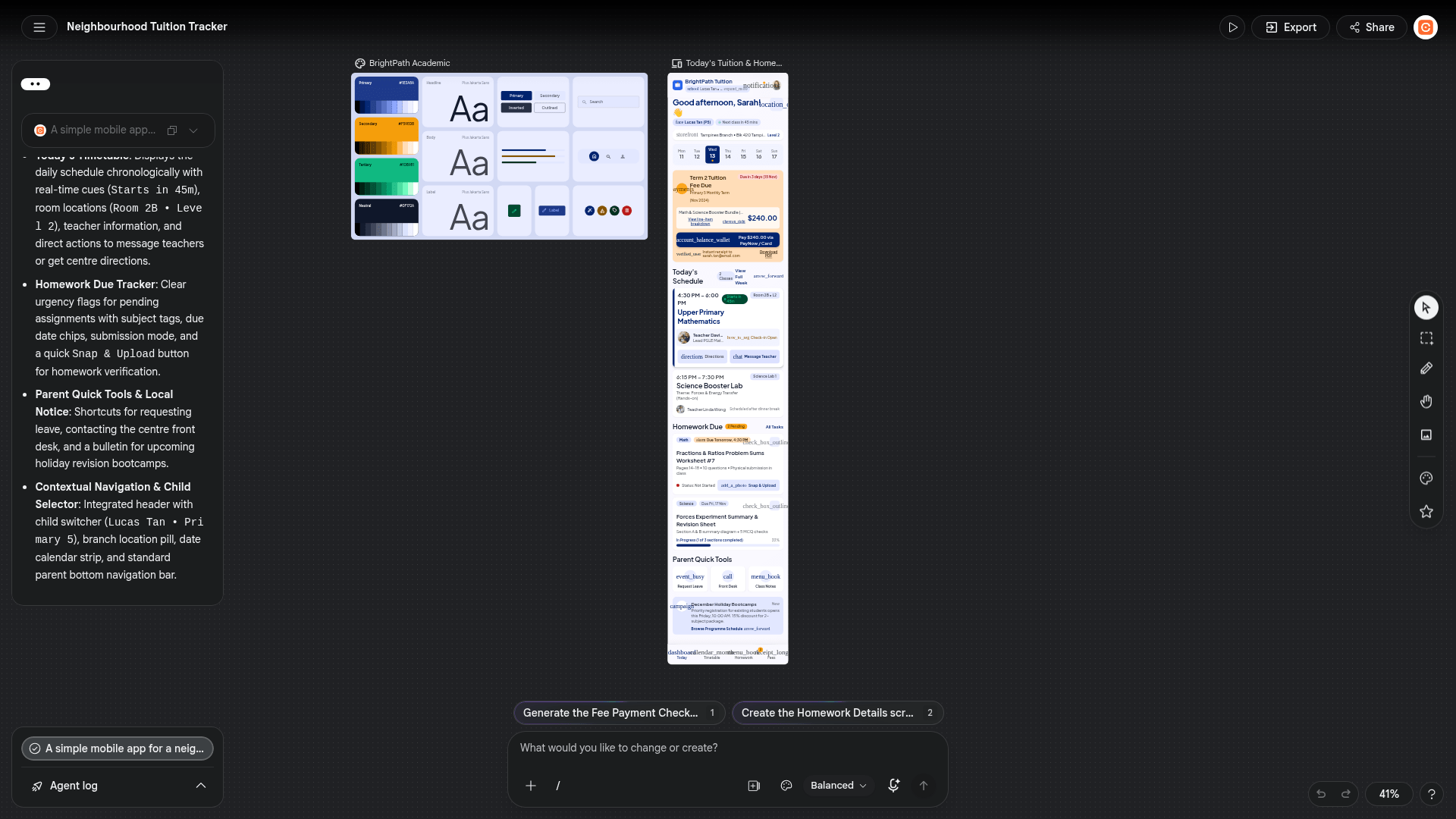
- Result: in under two minutes Stitch created a named design system ("BrightPath Academic") with four colours and the Plus Jakarta Sans font, and one mobile screen with a greeting, a week strip, a fee-due card, today's classes, homework due and parent shortcuts. The agent also suggested follow-up screens, such as a fee payment screen and a homework details screen. We did not generate them.
- What was wrong: in our screenshot several icons appeared as plain words, for example "account_balance_wallet" and "event_busy", and some text sat on top of other text. The fee amount was shown in dollars ($240) although our prompt did not name a currency, and the names, class names and amounts are invented by the tool. You would need to correct these.
- Not tested: exporting to Figma or code (the Export panel opened but needs a screen selected), the Play prototype, voice, Web mode, uploading a sketch, and how many designs the account allows.
How to try it
- Go to stitch.withgoogle.com and sign in with a Google account.
- Pick App or Web, then type who the app is for and which screens you need. Name the currency and language if they matter.
- Read the result, then ask for changes in the box at the bottom, one change at a time.
- Do not put private or client data in the prompt. We did not check how Stitch uses prompts, so read the Stitch privacy notice shown at sign-in first.
Availability in India: we could not find a country list on Google's Stitch pages, and we have not confirmed rollout for India. Our test ran in a remote browser, so being able to open and use Stitch there does not show what works from your location. Try it with your own Google account.
Sources checked 27 October 2026: