
Google Fact Check Explorer: check a viral claim against fact-checkers
Fake videos and doctored clips now spread faster than most of us can check them. Google Fact Check Explorer, part of Google's Fact Check Tools, lets you search a claim or topic and see which fact-checking publishers have reviewed it and what rating each gave. It is a search over published fact-check articles, not an AI chatbot, so it points you to the publisher's own write-up. We tested it on 27 October 2026 with two topic searches and a publisher filter. We found no payment page, and no payment was requested in our test.
Quick facts
- Google's FAQ says you can search by keywords, from specific topics to full quotes, and see matching claims with their fact checks. Results can be limited by language and by publisher.
- Per the FAQ, a fact check appears only if the publisher marked it up in the ClaimReview format and it meets Google's guidelines for Search or YouTube. A claim with no result may simply not be covered; it does not mean the claim is true.
- Google says it does not endorse or create the fact checks. Disagreements go to the website that published the check.
- The FAQ says you can also search by image, using an image URL or an upload, while a separate image context tab is currently limited to beta testers who apply. We did not test image search.
- The FAQ names a Google account only for the Markup Tool (for publishers) and the image beta. It does not say whether text search needs one. Our test browser was already signed in to a Google account, so we did not verify signed-out use.
- We found no payment page. For data handling, Google points to its general privacy policy at policies.google.com/privacy; we did not review it for this post.
What makes it useful
Explorer lists the reviews that publishers have filed, each with the publisher's name, a rating, a date and a link to the article, so you can read the evidence yourself and see who made the call. That is its value. It checks only claims that fact-checkers have already reviewed.
Our test
On 27 October 2026 we opened toolbox.google.com/factcheck/explorer in a desktop browser.
- Topic search: we searched "deepfake video india". The first results were claims reviewed by BOOM Fact Check and Thai PBS, rated "False" and "Disinformation", plus an AFP Fact Check item and a Full Fact item, each with a link to the original article and a date.
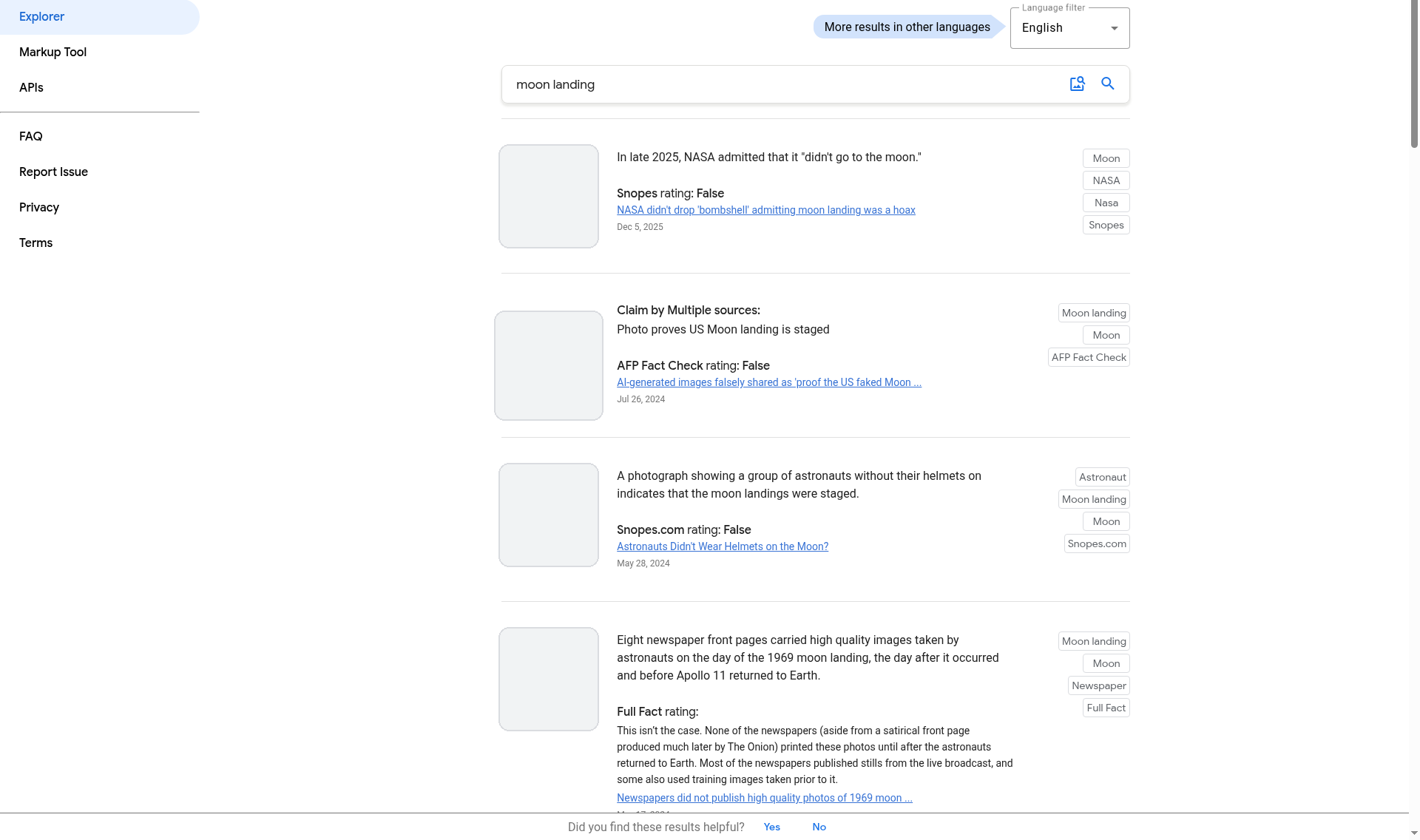
- Second topic search: we searched "moon landing". The top results were claims rated "False" by Snopes and AFP Fact Check and a Full Fact write-up with its explanation, each dated and linked to the publisher's article. The screenshot below shows this search.
- Publisher filter: we searched "site:boomlive.in deepfake", the format the FAQ describes. The first four results we read all came from BOOM Fact Check. The newest was a claim about an Indian Army officer, marked "False" and dated "23 hours ago" at the time.
- Not tested: image search by URL or upload, the language filter beyond English, the Markup Tool, the API, signed-out use, mobile use, or how complete the coverage is. Three searches show the tool working; they do not show it finds a review for every claim.
How to try it
- Open toolbox.google.com/factcheck/explorer.
- Type a claim, a name or a topic into the search box. Use the quoted claim if you have one.
- Read the rating and the date on each result, then open the link to read the publisher's reasoning.
- To see one publisher only, add site: and its domain, for example site:boomlive.in. Use the language filter if you want other languages.
- No result means no matching published review was found. Try different words, or check the claim with other sources.
Availability: Google's FAQ gives no country restriction and we found no India-specific statement. We did not check this from India, and our test does not show how it behaves from your location.
Sources checked 27 October 2026: