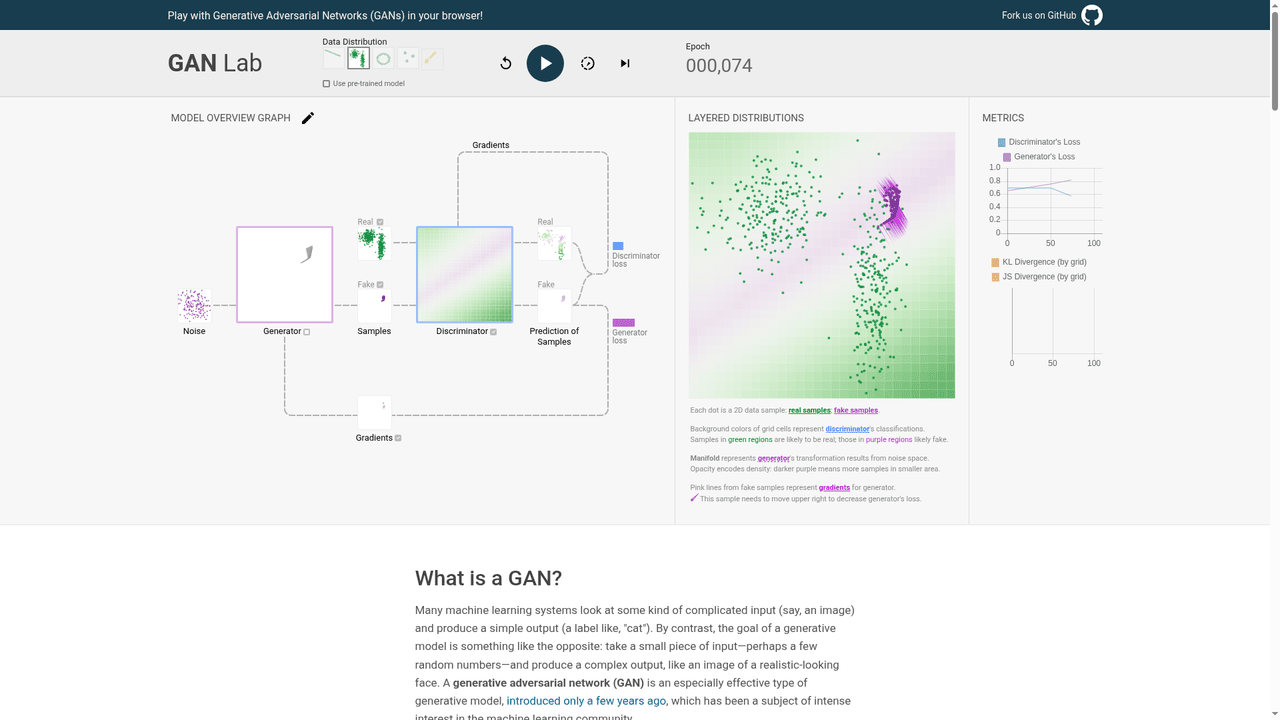
GAN Lab: watch two networks train in your browser
A chatbot can explain a generator and discriminator. GAN Lab lets you watch their interaction while a small model trains, then pause it or advance one step. That makes it useful for students and teachers who want a visual experiment beside a written explanation. We tested reset, play, pause and a manual step in the live demo. It works with points in two dimensions, not photorealistic images or a modern chat model.
Quick facts
- Purpose: an interactive lesson on generative adversarial networks (GANs), using two-dimensional data distributions.
- How it runs: the official page says training and visualization use JavaScript and TensorFlow.js in a browser. The repository suggests Chrome.
- Access and cost: no sign-in, API key, payment or card was requested in our tested demo route. We did not verify service limits or a separate paid offering.
- Source code: the official repository lists Apache License 2.0. This is not a legal opinion about reuse.
- Privacy scope: no private files or user data were submitted. We did not inspect network traffic or prove offline operation.
- India: India-specific availability was not established. Loading the demo is not a test of access from an India-based connection.
Why use it beside a chatbot?
Instead of asking for another diagram, you can start a training run and compare the generated purple samples with the green training samples. The model overview links the generator, discriminator and gradients to the layered view. Pause when a result is confusing, read the explanation below the demo, then step once to inspect the next state. The value is a controllable experiment, not a claim that chatbots cannot teach the topic.
What we actually tested
On 28 October 2026, we unchecked "Use pre-trained model" and reset the selected two-cluster distribution to epoch 000,000. We started training and paused at 000,074. Purple generated samples, a coloured discriminator surface and loss traces had appeared. The generated points were not a clean match for both green clusters at that point. We did not assess convergence or model quality.
We then opened the manual-step control and chose "Both". The epoch counter advanced from 000,074 to 000,075. This confirms that the control advanced the tested run; it is not an accuracy benchmark.
Try this short lesson
- Open the official GAN Lab demo on a roomy browser window. Wait for the interface to finish loading.
- For a fresh run, clear "Use pre-trained model" and press the replay/reset control. Check the epoch is zero.
- Press play. Watch the purple generated samples and the background surface. Pause to compare them with the green training samples.
- Open the step control and choose "Both" to advance the generator/discriminator pair. Observe the counter and compare the visual state.
- Read "What's happening in the visualization?" below the demo. The site's explanation identifies the colours and views.
What we did not test
The official page also describes drawing your own distribution, editing hyperparameters and slow-motion playback. We did not test those controls in this run. We did not test phones, every browser, long training sessions or image generation. This is an established educational project, not a newly launched model or an image-creation service. A failed or unstable run can itself need explanation; more epochs do not prove a better model.