
FxSound: free sound booster and equalizer for Windows
FxSound calls itself "free open-source software to boost sound quality, volume, and bass" for Windows. It was paid software until the team made it free in 2022 and open-source in 2023. Here is what its pages say.
Quick facts
- What it does: boosts the volume, bass and clarity of everything your PC plays, with an equalizer, effects and presets.
- Price: free. Its site says it was made free in 2022 and open-source in 2023 (AGPL 3.0 licence). Donations are invited, not required.
- Platforms: Windows only, per its FAQ.
- Best for: anyone stuck with quiet laptop speakers or cheap headphones who wants louder, clearer sound without new hardware.
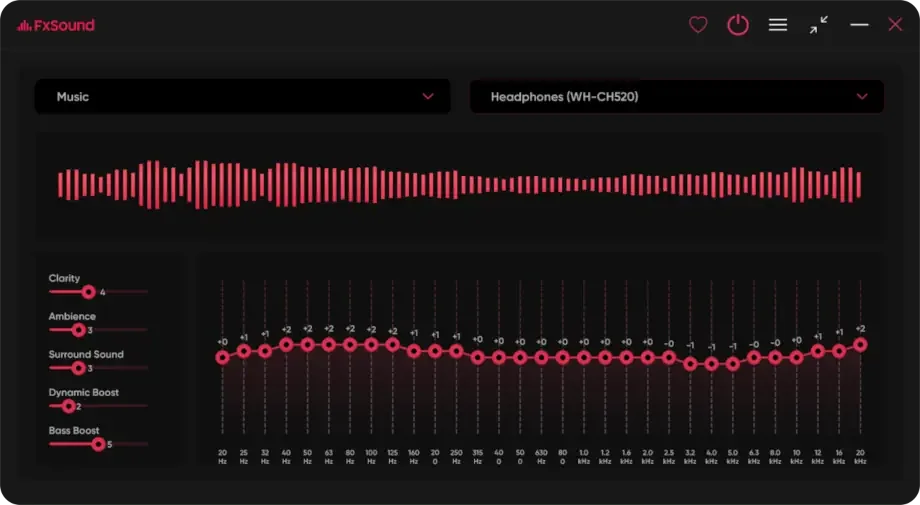
Official interface preview
What it is
FxSound is an audio program that processes all the sound on your Windows PC through a high-fidelity engine, like a digital soundcard, per its GitHub page. Its site says PCs and speakers are built to a budget, and FxSound compensates by processing timbre, volume, spatial balance and dynamics. It runs quietly in the background once installed.
Is it free?
Yes, per the team. The site says: "in 2022 we made FxSound free and in 2023 we made FxSound open-source", because their mission is to make quality audio accessible to all. The source code is on GitHub under the GNU AGPL 3.0 licence. The site accepts donations to support the work. No price appears anywhere, so there is nothing to convert to rupees.
What the pages list
- Volume, bass and sound-quality boosting for all PC audio.
- Equalizer, effects and presets for customized sound.
- Made for quiet laptop speakers and low-quality audio hardware; users include music lovers, gamers and film watchers, per its FAQ.
- Lightweight background program, per its site.
- Windows only. The latest stable release on GitHub was published 17 September 2026, with a beta from 12 October 2026.
Our advice
- Start with a preset, then adjust the equalizer slowly. Big boosts can distort cheap speakers. This is our advice, not the team's.
- If sound stops or double-processes after install, check Windows' own audio enhancements are off. General audio advice, ours.
- Download from fxsound.com or its GitHub page only.
Privacy and data
- We found no privacy statement on the pages we read and make no claim about data. It is a desktop program that processes audio locally on your PC.
India
- No region limit appears on the pages we read. We did not test it from India.
Frequently asked questions
Is FxSound free?
Yes. Its site says it was made free in 2022 and open-source in 2023, with donations invited.
Does it work on Mac or phones?
No. Its FAQ says FxSound is only compatible with Windows.
Will it fix bad speakers?
It cannot change the hardware, but its site says it compensates for low-quality hardware by processing timbre, volume, balance and dynamics.
Sources: fxsound.com, GitHub. Checked 21 October 2026.
Official interface media and linked project source checked 22 October 2026. Original publication and other source-check dates are unchanged.