
FreeFileSync: free folder sync and backup copies for personal use
FreeFileSync compares two folders and copies only the differences. Its FAQ says the standard edition is free for private individuals only.
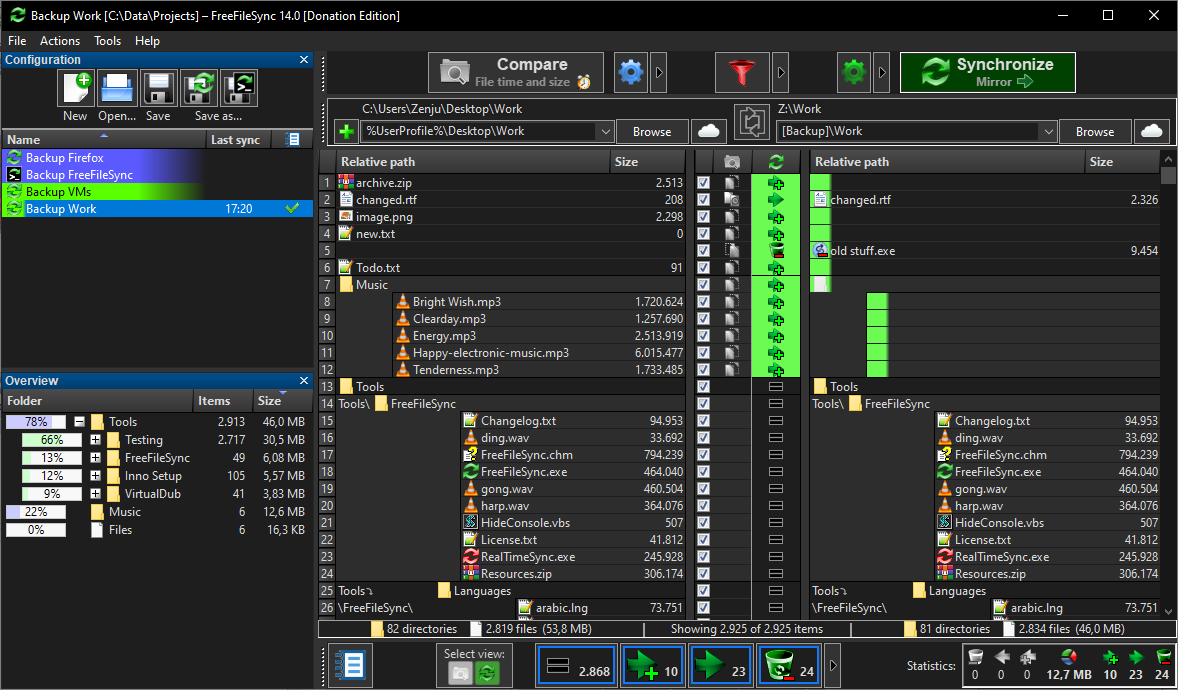
Official publisher artwork hosted by its publisher. Official source. Independent guide, not affiliated or sponsored. Artwork and trademarks belong to their owners.
Official app screenshot
What it is
FreeFileSync compares two folders and copies only what is different, so you can keep a backup copy of your photos and documents on an external drive or another folder. Its site calls it "a folder comparison and synchronization software that creates and manages backup copies of all your important files". It is not an AI tool.
Is it free?
Yes, for personal use. The site's licensing FAQ lists the standard edition at "Free" and says you can "download and use for free... (but you may donate to support)". Important limit: the FAQ says the standard version "is allowed for personal use by private individuals only". Businesses, organizations and government agencies must buy its Business Edition. We quote no price for that edition.
- Donors can download a Donation Edition with a few extras (auto-updater, parallel file copy, email notifications, portable version for Windows). The FAQ says everyone who donates may download it. You do not need it.
- The FAQ says the installer has no advertisement: "FreeFileSync is completely ad-free". It says it had one ad before version 10.
What it does
- The FAQ gives four basic steps: choose the left and right folders, compare them, choose synchronization settings, press Synchronize.
- It says there is no artificial limit on the number of files. The limit is memory: roughly 1 million file pairs per 1 GB of RAM.
- It lists support for Google Drive, FTP and FTPS, and says it runs on Windows, macOS and major Linux distributions. The FAQ lists Windows 7 to Windows 11.
- For details the FAQ points to its online manual and video tutorials.
How to get it
- Go to freefilesync.org and use its download page.
- Pick your system. Do not use a copy from a third-party download site. That is our advice, not the vendor's.
- Start with a small test folder before you sync something important. Also our advice. A sync can delete files in the target folder to make it match, so check the settings before pressing Synchronize.
What to watch out for
- Personal use only for the free edition, as above.
- Sync is not the same as a backup history. Our note: if a mirror-style sync copies a deletion or a mistake, both sides match. We did not read how its versioning options work.
- We did not verify its software license (the site says "Open Source"), the install steps, or the current version number. The site showed different version numbers on different pages.
Privacy and data
- The site's privacy policy covers the website, not the app. It says freefilesync.org keeps log files (IP address, browser type and similar) and that Google serves ads on the site with cookies. It says the forum collects data, and that donation records store a transaction id, email, donor name and amount.
- We found no statement about what the app itself sends. We did not test it.
India
- We saw no region limit. We did not test downloads from India. We quote no INR price.
Frequently asked questions
Is FreeFileSync free?
Yes for private individuals, per its FAQ. Businesses need the Business Edition.
Does the installer show ads?
The FAQ says no.
Does it work on Mac and Linux?
The FAQ says yes.
Sources: Home, FAQ, Donate, Privacy. Checked 18 October 2026.
Independent guide, not affiliated.
Scoped recheck 23 October 2026: the FAQ still says the standard version "is allowed for personal use by private individuals only" with the Business Edition for organisations, still lists the Donation Edition extras, still says the installer is ad-free since version 10, and still gives the roughly-one-million-file-pairs-per-GB-of-RAM limit; the privacy policy still covers only the website. Added the project's own main-window screenshot from its website. No fact changes. Other claims retain their original source-check date. Original publication date unchanged.