EarTrumpet: free volume mixer for Windows
EarTrumpet replaces the plain Windows volume control with a full mixer: one click on the taskbar icon shows a volume slider for every app playing sound. It is free on the Microsoft Store. Here is what its pages say.
Quick facts
- What it does: puts a proper volume mixer in the Windows taskbar, with a separate slider for each app and device.
- Price: free. The Microsoft Store listing shows a price of 0, and there is no paid version on any channel we found.
- Platforms: Windows 10 and 11 (the store listing requires Windows 10 version 14342 or higher).
- Best for: anyone who wants to make one app quieter without muting everything else.
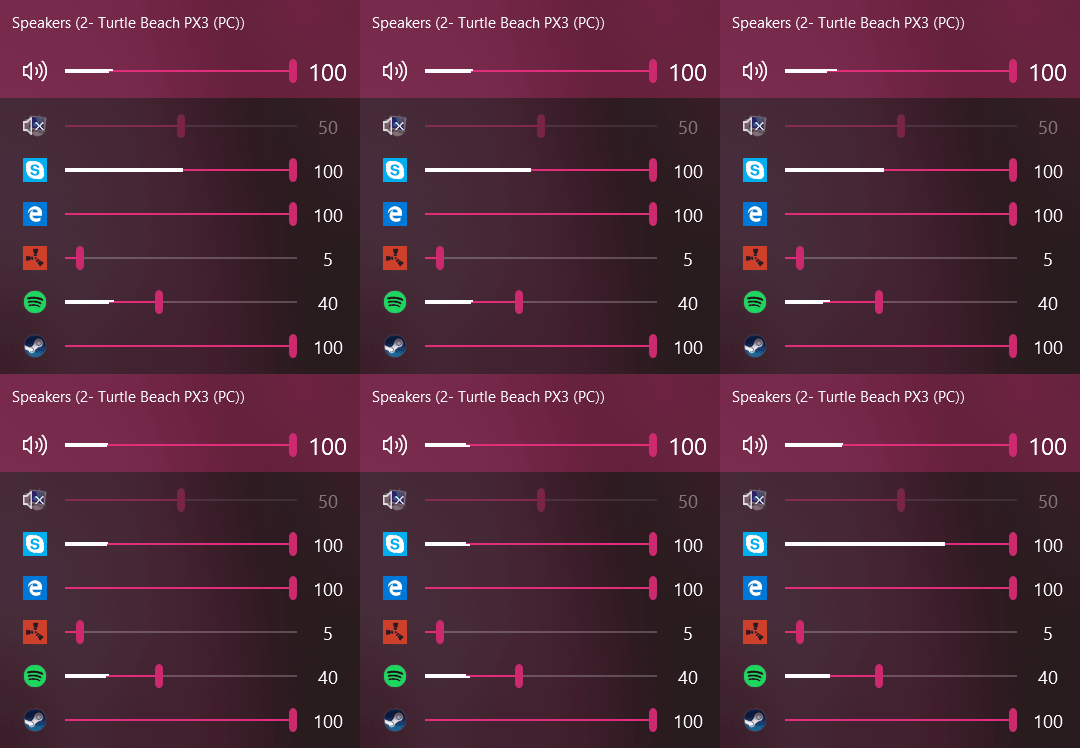
Official interface preview
What it is
Windows gives you one master volume slider and hides the per-app mixer several clicks deep. EarTrumpet, described on its store listing as "a powerful volume control app for Windows", adds a taskbar icon that opens a clean mixer instantly. It is built by a small team; its official site is eartrumpet.app and the source code is on GitHub.
Is it free?
Yes. The Microsoft Store listing shows a price of 0. The source code on GitHub is under the MIT licence with one unusual addition: three named companies are excluded from using it, which does not affect regular users.
What the pages list
- Per-app volume sliders and quick switching between playback devices, per the project pages.
- Scroll wheel volume control, with settings to turn it on or off, and keyboard shortcuts, per the changelog for the latest version 2.3.0.0.
- Install from the Microsoft Store; experimental dev builds are offered on eartrumpet.app for those who want upcoming features early.
Privacy and data
- The project's privacy statement says the only information transmitted is at crash time, sent through the Bugsnag error-reporting service.
- A crash report can include the app version, how long it ran before crashing, your Windows build, language and region, and in rare cases paths to applications on your PC, per the statement.
- No routine usage tracking is described on the pages we read.
Our advice
- After installing, drag the EarTrumpet icon from the hidden icons tray next to the clock so it is always one click away. This is our advice, not the project's.
- Install from the Microsoft Store listing linked from eartrumpet.app, or the project's GitHub page.
India
- No region limit appears on the pages we read. We did not test it from India.
Frequently asked questions
Is EarTrumpet free?
Yes. The Microsoft Store version shows a price of 0 and the source code is public on GitHub.
Does it collect my data?
Its privacy statement says data is transmitted only when the app crashes, through Bugsnag, and lists exactly what a crash report can contain.
Does it work on Windows 11?
Yes. It supports Windows 10 (version 14342 and up) and Windows 11, per the store listing.
Sources: eartrumpet.app, GitHub, Microsoft Store. Checked 21 October 2026.
Official interface media and linked project source checked 22 October 2026. Original publication and other source-check dates are unchanged.