
Diffchecker: catch changed numbers before you send
Two versions of a notice can look almost the same while the time, price or instructions have changed. Diffchecker's browser text tool puts them side by side and highlights the differences. Before sending a revised notice, application draft or public page, this is a direct way to check what changed instead of relying only on a summary.
Quick facts
- Tested: two five-line fictional workshop notices, loaded as plain-text files, using Split view and Smart precision on 28 October 2026.
- Free scope: the Basic plan includes side-by-side text comparison. Other features have trial quotas or paid access. No account, card or payment was requested for this comparison.
- Account boundary: the homepage says comparing needs no sign-up; saving, sharing or upgrading needs an account. We did not use Save, Share or Explain.
- Privacy boundary: the homepage says the text comparison runs in your browser. Its privacy policy also describes analytics, advertising and session replay, including keystrokes in non-excluded fields. Do not treat this as a confidential-document vault.
- India: no India-specific availability claim established. The test was not an India-network check.
Why use this beside a chatbot?
A chatbot can explain a revision, but a summary can be the wrong tool when you need to inspect exact digits and deleted wording. A side-by-side diff keeps both versions visible, with changes marked where they occur. It does not tell you whether the new time, fee or clause is correct. You still need to check the source and decide which version to send.
Our five-line test
These are invented notices, not a real event or a price offer. We loaded each as a plain-text file through Open file, then used Find difference. The final inputs were checked against the originals before reviewing the result.
Original
Workshop notice
Start: 10:00 AM
Fee: Rs 500
Bring a laptop.
Registration closes Friday.
Changed
Workshop notice
Start: 11:00 AM
Fee: Rs 750
Bring a laptop and charger.
Lunch included.
The result showed four removals and four additions across five lines per version. The title stayed unchanged. The comparison marked 10 to 11 in the start time, 500 to 750 in the fee, the added charger instruction, and replacement of the registration line with Lunch included. A removal plus an addition can represent a replacement, not two separate decisions.
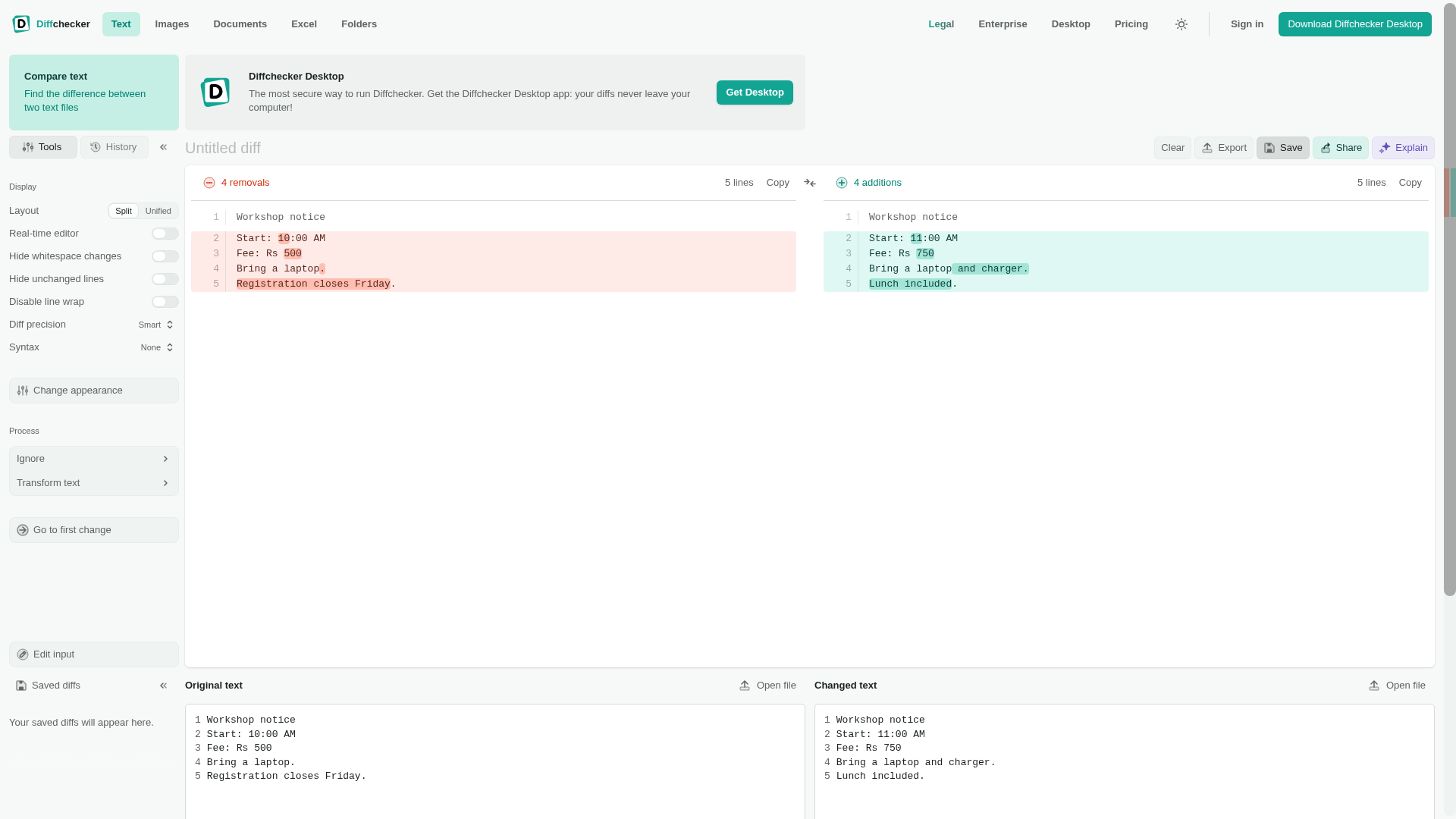
Use the same check for your draft
- Open Diffchecker Text. Put the old version under Original text and the revision under Changed text. You can paste text or use Open file. Our successful test used plain-text files.
- Check both inputs before comparing. Our first rich-text typing attempt was incomplete, so we switched to file inputs and verified all five lines on both sides.
- Click Find difference. Start with Split and Smart, the settings we tested.
- Read the changed numbers, dates, names and deleted conditions in context. Do not treat the count alone as a review.
- Return to your source document to make the intended changes. Saving a comparison, sharing its link, AI explanation and PDF export are separate features, not steps we tested.
Free does not mean every feature is unlimited
The checked pricing table includes Basic side-by-side view, while features such as Unified view, character precision, ignoring whitespace, merging and PDF export have stated trial limits. AI summaries also have separate monthly limits. The homepage and pricing table differ in how they describe some precision options, so this guide promises only the free Split/Smart route we used. Check the current pricing table and any on-screen quota before relying on another mode. Desktop is a separate paid offering; we did not test or start its trial.
Keep private material out of the demo
Use public, fictional or properly redacted text to learn the workflow. Browser-side comparison is a provider claim, not a guarantee that every site feature has the same data flow. The privacy policy describes analytics and advertising services and says session replay may record activity and form fills in non-excluded fields. We did not audit that configuration or network traffic. Follow your workplace's rules for client information, passwords, health records and confidential contracts.
We did not test PDFs, Word files, images, Excel, Malayalam, long documents, whitespace-only changes, AI summaries, merge controls, saving, sharing or export. A text diff is not legal advice or a guarantee that a revision preserves meaning.