
Clonezilla: free disk imaging and cloning, and its limits
Clonezilla copies whole drives or partitions into images and back. Its About page lists GPL v2, a USB boot and clear limits.
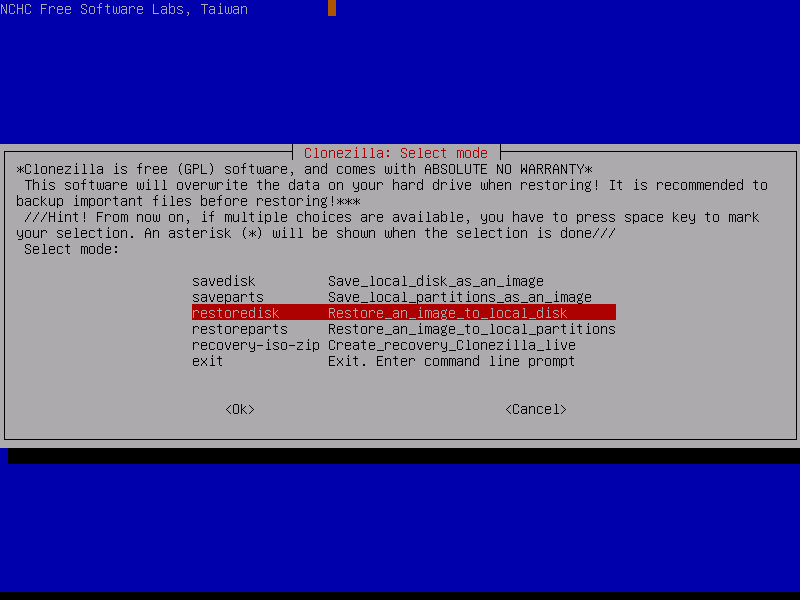
Official app screenshot
What it is
Clonezilla is a disk and partition imaging and cloning program. Its About page says it is "similar to True Image or Norton Ghost" and "helps you to do system deployment, bare metal backup and recovery". In plain words: it can copy a whole drive or partition into an image file and put it back later, or copy one drive to another. It is not an AI tool, and it is not a simple app. It boots from a USB stick or disc, outside Windows.
Is it free?
It is free software. Clonezilla's About page says it is licensed under the GNU General Public License (GPL) version 2, and describes the parts it runs on as "free and open source software". We found no price on the About or Downloads pages, and no page we read says "free of charge" in those words.
Which version, per Clonezilla
- Clonezilla live is for backing up and restoring a single machine, per the About page. You boot it from a CD, DVD or USB flash drive.
- Clonezilla lite server and SE are for cloning many machines at once. The page says "40 plus". Most home users will not need these.
- The Downloads page listed a stable release 3.3.3-37 (Debian-based) and an alternative stable 20260913-resolute (Ubuntu-based) on 19 October 2026. It also lists testing versions. Our advice: pick a stable one.
What it needs, per Clonezilla
- An x86 or x86-64 processor, 196 MB of RAM, and a boot device such as a CD/DVD drive, a USB port, PXE or a hard drive.
- Clonezilla live can boot on legacy BIOS or UEFI machines. If UEFI secure boot is on, the Downloads page says to use the AMD64 version.
- Many file systems are supported, including NTFS, FAT, exFAT, ext4 and Apple HFS+ and APFS.
- Images can be encrypted (the page says AES-256).
- The image can be saved on a local disk or on an ssh, samba, NFS or WebDAV server.
Limits Clonezilla lists itself
- The destination partition must be equal to or larger than the source.
- Differential or incremental backup is not implemented yet.
- Online imaging is not implemented. The partition must be unmounted, so you cannot image the Windows drive while you are using it.
- You cannot browse an image or recover a single file from it. You restore the whole partition or disk.
Checking the download
The Downloads page says the checksum files are GPG-signed by the DRBL project, and gives a key fingerprint. It links a document that explains how to verify.
What to watch out for (our advice)
- Restoring or cloning writes over the target drive. Pick the target slowly and check it twice, and keep a copy of anything important somewhere else first.
- It is a text-menu tool. It is better for people who are comfortable with partitions than for first-time users.
- Test that your backup restores before you depend on it.
Privacy and data
- We saw no privacy or data statement on the pages we read, so we make no claim. It runs offline from a boot device unless you choose a network location for images. We did not run it.
India
- No region limit appears on the pages we read. No price applies.
Frequently asked questions
Is Clonezilla free?
It is GPL v2 free software. We saw no price.
Can it back up Windows?
The page says it supports the NTFS and FAT file systems of Windows, and that you can clone MS Windows. It must be booted from USB or disc.
Can I get one file back from an image?
No, per the page. You restore the whole image.
Sources: clonezilla.org About, Downloads. Checked 19 October 2026.
Independent guide, not affiliated.
Scoped recheck 23 October 2026: About page, downloads page and screenshots page re-read. The stable release is still 3.3.3-37 (Debian-based) and the alternative stable is still 20260913-resolute (Ubuntu-based); 3.3.4-12 is the testing branch, not stable. The GPL v2 licence, the 'similar to True Image or Norton Ghost' description, the 196 MB RAM minimum and the '40 plus' machine cloning line are unchanged. The screenshots gallery's boot-menu capture shows a 2010-era 1.2.x version stamp, so this figure uses an undated mode-selection screen instead. Links checked.