
Bulk Crap Uninstaller: free tool to remove many Windows programs at once
Official publisher logo hosted by its publisher. Official source. Independent guide, not affiliated or sponsored. Artwork and trademarks belong to their owners.
Bulk Crap Uninstaller calls itself a free, open source program uninstaller that removes many applications in one go and cleans up leftovers.
Official app screenshot
What it is
Bulk Crap Uninstaller, short name BCUninstaller or BCU, is a Windows program for removing software. Its site calls it "a free (as in speech and beer) bulk program uninstaller with advanced automation" that "excels at removing large amounts of applications with minimal to no user input, while requiring next to no technical knowledge". It is a desktop program, not an AI tool and not a phone app.
Is it free?
Yes, per BCU. The site says it is free "as in speech and beer". It says the licence is Apache 2.0 and that it "can be used in both private and commercial settings for free and with no obligations", as long as the licence conditions are kept. GitHub also lists Apache-2.0. We saw no price and no sign-in step on the pages we read.
What the site lists
- It detects normal and hidden registered applications, portable applications, Steam games, Windows Store apps, Windows Features and Windows Updates, and applications with damaged or missing uninstallers.
- You can uninstall any number of applications in one batch. The site says it tries to use each application's original uninstaller.
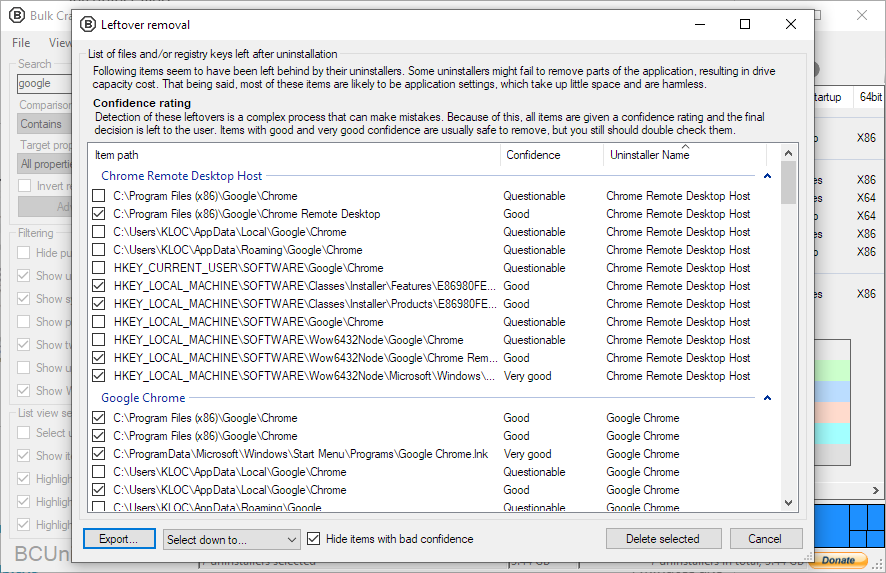
- It can find and remove leftovers after an uninstall, and "force uninstall" an application, bypassing its uninstaller.
- It has a startup manager and is "fully portable", with settings saved to a single file.
- The interface is translated to English and a list of languages that does not include Hindi or Malayalam.
Good to know, per BCU
- Downloads are offered on dAppCDN, SourceForge and GitHub. GitHub lists v6.3, published 7 September 2026, as the latest release when we checked.
- Requirements per the site: Windows Vista or newer is recommended, around 300 MB of free RAM, 50 MB of free space, and .NET 4.0 or newer. Those minimums apply to older releases; the v6.0 release notes say version 6.0 and newer need Windows 10 or later and .NET 8.0, and suggest v5.9 for older systems.
Our advice
- Make a Windows restore point before you remove anything. Force uninstall and leftover cleaning can break software you still need, and we did not test either.
- Do not tick everything. Read each item before you remove it, especially drivers and Microsoft components.
- Download it only through the links on bcuninstaller.com, and prefer the GitHub release.
Privacy and data
- We read no privacy statement for the program and make no claim on what data it collects. The site lists an "Application ratings" feature, and we did not check whether that looks anything up online.
India
- No region limit appears on the pages we read. We did not test it from India. There is no price to convert.
Source code
The GitHub project BCUninstaller/Bulk-Crap-Uninstaller is under Apache-2.0 and has about 22,000 stars, per its GitHub page. The older address Klocman/Bulk-Crap-Uninstaller redirects there.
Frequently asked questions
Is Bulk Crap Uninstaller free?
Yes. Its site says it is free as in speech and beer, under the Apache 2.0 licence.
Does it work on Mac?
No. It is a Windows program, per the site.
Is it safe to force uninstall?
We did not test it. Make a restore point first.
Sources: bcuninstaller.com, GitHub. Checked 20 October 2026.
Independent guide, not affiliated.
Scoped recheck 23 October 2026: official site and GitHub releases re-read. v6.3 (published 7 September 2026) is still the latest release. Correction in the requirements paragraph: v6.0 and newer need Windows 10 or later and .NET 8.0 per the v6.0 release notes, even though the site's requirements section still lists older minimums. Links checked.